Types of Pending Orders in Forex Trading: Limit, Stop and Stop Limit
A pending order is an instruction to buy or sell later, once price reaches a level you set in advance. There are four basic types. A Buy Limit or Sell Limit trades when price pulls back to a better level. A Buy Stop or Sell Stop trades when price breaks through a level. Many platforms also offer two hybrids, the Buy Stop Limit and the Sell Stop Limit.
Choose the wrong type and you buy after the rise instead of the dip, or watch the move you planned leave without you. Both mistakes start with not knowing how a pending order differs from a market order.
A market order trades right away at the current price. Buys fill at the Ask price, the higher of the two quotes. Sells fill at the Bid price, the lower one. The gap between them is the bid-ask spread.
A pending order trades later. You choose a price, the platform holds the order, and it only becomes a real trade when the market reaches your level. Until then you have no position and no floating profit or loss. The only thing to manage is the order itself.
The four basic pending orders and where each one goes
Every pending order answers two questions. Are you buying or selling? And do you want a better price than now (a limit) or proof that the move has started (a stop)?
| Order | Placed where | Fills at | What you expect |
|---|---|---|---|
| Buy Limit | Below current price | Your price or lower | A dip, then a rise |
| Sell Limit | Above current price | Your price or higher | A rise, then a fall |
| Buy Stop | Above current price | Your price or higher | The rise keeps going |
| Sell Stop | Below current price | Your price or lower | The fall keeps going |
The allowed side of the price follows from that. Above the current price you can place a Sell Limit or a Buy Stop. Below it you can place a Buy Limit or a Sell Stop. Say EUR/USD trades at 1.1000. The chart below shows one example level for each order.
A rule you can copy:
- If you want to buy cheaper than now, use a Buy Limit. If you want to buy only after price climbs through a level, use a Buy Stop.
- If you want to sell higher than now, use a Sell Limit. If you want to sell only after price drops through a level, use a Sell Stop.
A limit order bets on a pullback to your level. A stop order bets on a breakout through it. If you can't say which one you expect, you're not ready to place the order. Here is a Buy Stop placed for a breakout on a real gold chart.
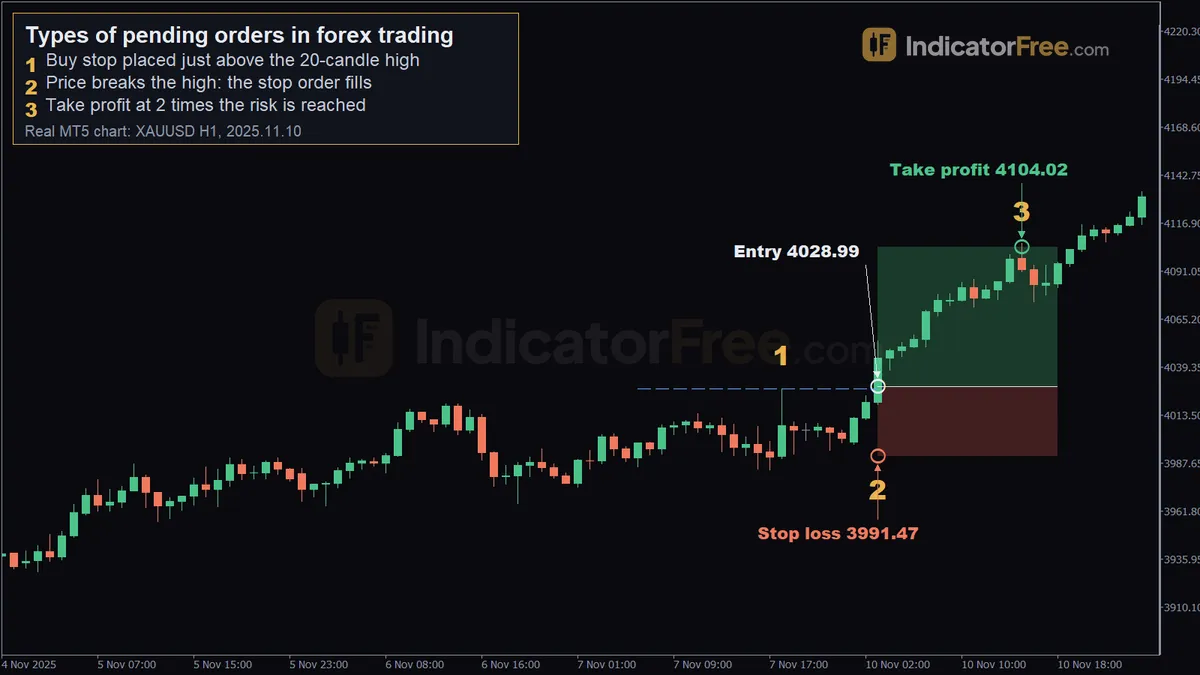 Real XAUUSD H1 chart from MetaTrader 5, a past example, not a forecast. 1 - buy stop placed just above the 20-candle high; 2 - price breaks the high: the stop order fills; 3 - take profit at 2 times the risk is reached.
The chart above is a past example of gold (XAUUSD) on the 1-hour chart, not a prediction. At marker 1 (2025.11.07 18:00, 4027.51), a Buy Stop was placed just above the high of the previous 20 candles. Until price got there, there was no position. At marker 2, on 2025.11.10 03:00, price broke that high and the stop order filled at 4028.99. The stop loss sat at 3991.47, about 37.5 below the entry, and the take profit at 4104.02, about 75 above it, twice the risk. At marker 3, on 2025.11.10 15:00, price reached the take profit. The marker is drawn at 4105.99, but the take-profit level itself was 4104.02.
Your broker also sets a minimum distance between the current price and your order price. The name of this setting varies by platform. If you place an order closer than that, the platform rejects it.
Limit vs stop: which part is guaranteed
Picking the right side of the price is half the decision. The other half is knowing what each type guarantees, and what it doesn't.
A limit order fills at your price or better, so it has no slippage. The catch is that a fill isn't guaranteed. Price can turn a fraction short of your level and leave you with nothing.
A stop order works the other way. When price reaches your level, it sends a market order. The fill is almost certain once triggered, but the price is not. The order fills at the next price available, and in a fast or thin market you can still get a requote or a rejection. In a fast market, around news, or after a gap (price jumping from one level to another with no trades in between), you can be filled at a worse price. That difference is slippage.
Here is the trade-off in one line: use a limit when the price matters more than getting in, and a stop when getting in matters more than the exact price.
Stop Limit orders: two prices, two steps
If neither trade-off suits you, a stop limit order joins the two types. You enter a stop price and a separate limit price. When the market reaches the stop price, the platform places a limit order at your limit price.
Take a Buy Stop Limit on the same EUR/USD example, with a stop price of 1.1050 and a limit price of 1.1040. Nothing happens until price touches 1.1050. At that point a Buy Limit at 1.1040 starts waiting. You get the breakout confirmation first and a pullback entry second.
Where the limit price goes depends on your platform. Some platforms work like this example, with the Buy Stop Limit's limit price below the stop price for a pullback entry. On many other platforms, and in other markets, the limit price usually sits above the stop price. Once the breakout triggers the order, you buy at any price up to that limit, so the limit caps how much slippage you accept. Check which version your platform uses before you enter the two prices, or the order will do the opposite of what you planned.
In both versions you never pay more than your limit price. In the pullback version, if price breaks out and never comes back to 1.1040, you don't get in at all. In the slippage-cap version, if price jumps straight past your limit, you don't get in either. A Sell Stop Limit works the same way, mirrored below the price.
Worked example: a Buy Stop from trigger to take profit
The gold chart showed a Buy Stop working. This example follows one through the money side, including slippage. The figures here are illustrative. EUR/USD is at 1.1000, the same example price as above. Price keeps stalling just under 1.1050, and you expect a breakout that keeps going. You place a Buy Stop at 1.1050 with a stop loss at 1.1020 and a take profit at 1.1110. Your size makes each pip worth $1.
Look at the left side of the chart. Before the order triggered, price dipped below 1.1020 several times and nothing happened. That's because a stop loss on a pending order does nothing until a position is open. Once the Buy Stop filled, the new position took on the order's stop loss and take profit.
Now add slippage. Suppose the breakout candle moved fast and your Buy Stop filled at 1.1053 instead of 1.1050. Your stop loss and take profit stay where you put them, so the gap between entry and each level changes:
Three pips of slippage raised your risk from $30 to $33 and cut your reward from 60 pips to 57. Your 2-to-1 plan became about 1.7 to 1. Before you place a stop order near news, decide how much slippage you can accept.
Now suppose you had expected a dip first and placed a Buy Limit at 1.0950, the same example level as before. It would never have filled on this chart, because price never fell that far. The order wouldn't have lost you money, but it would have missed the whole move.
Why a pending order did not fill, filled early, or disappeared
Even with the right type on the right side of the price, an order can still surprise you. These are the usual reasons.
The spread moved the trigger. On most platforms, buy orders trigger on the Ask and sell orders trigger on the Bid, but the chart usually draws only the Bid. A Buy Limit can look as if price touched it while the Ask never got there. The picture below shows this.
The opposite can also happen. A Buy Stop triggers on the Ask, so it can fire while the chart line is still just under your level. If a buy order really needs to fill at a chart level, place it about one spread above that level.
It expired. Common expiry choices are Good Till Canceled (the order stays until you delete it), Today (current trading day only) and a specified date. When an order expires, the platform deletes it automatically.
It was rejected. The price was too close to the market (inside your broker's minimum distance), or on the wrong side for that type. For example, you can't place a Buy Limit above the current price.
It filled, but you don't see a new trade. Depending on your account type, an order that triggers on a pair where you already have a position may add to it or shrink it instead of opening a separate position.
Pending order mistakes that cost beginners money
The problems above come from how platforms handle orders. The mistakes below come from the trader, which makes them easier to fix.
Mixing up limit and stop. If you place a Buy Stop when you meant a Buy Limit, you buy after price has risen, not after it has dropped. Fix: before you click, say it out loud: buy cheaper is a limit, buy higher is a stop.
Leaving the stop loss blank. The new position takes whatever stop loss and take profit the order had. If those fields are empty, the trade opens with no protection, possibly while you're asleep. Fix: fill in both fields when you create the order, not after it triggers.
Forgetting a Good Till Canceled order. An order you placed for a reason last week can fill today, after that reason is gone. Fix: set the expiry to match how long your idea holds, and review your open orders every day.
Placing stop orders right before big news. In Forex, prices can jump during major releases, and a stop order fills at whatever price is available. Fix: trade smaller, accept wider slippage in your plan, or wait until the release is over.
Letting both sides of a breakout setup fill. Some traders place a Buy Stop above a range and a Sell Stop below it. If price spikes one way and then reverses, both can trigger and both can lose. Fix: delete the other order as soon as one fills, or size each order as if both will fill.
Before you place any pending order, check these:
- Do I expect a pullback (limit) or a breakout (stop)?
- Is the order on the correct side of the current price?
- Are the stop loss and take profit filled in?
- Does the expiry match how long my idea is valid?
- Have I allowed for the spread and possible slippage?
FAQ
Do pending orders still work if I close my trading app?
On most platforms the order is stored on your broker's server, not on your device. It can trigger while your app or computer is off. That's also why a forgotten order is risky.
Can I change or cancel a pending order after placing it?
Yes. Until the order triggers, you can usually change its price, stop loss, take profit or expiry, or delete it. Once it triggers it becomes a position, and from then on you manage the position.
What happens if the market gaps past my pending order?
A stop order fills at the first price available after the gap, which can be well past your level. A limit order that gets jumped in your favour fills at the first available price, which is at your limit price or better, never worse.
How Long Is a Short Position? Time Limits for Stocks, Forex and FuturesNext lesson →
Quote currency
Part of Forex basics: more guides, terms and free tools on this subject.