Fixed Range Profile
Free Fixed Range Profile for MT5: volume histogram, POC, value area and HVN/LVN for any range you drag. Lab-tested on MT5 build 6230.
- Repainted
- Not tested
- Signals / week
- —
- Tested on
- —
- Tested
- 2026-10-09
Overview
Fixed Range Profile is a free MT5 indicator. It is for day traders marking a session or swing traders measuring a base, and it draws a volume profile on your main chart for any stretch of bars you mark with two vertical lines. You get a histogram of 10-100 price rows, the Point of Control, the value area and up to 5 high and 5 low volume nodes. The Lab tested version 1.00 on MT5 build 6230 on 2026-10-09: when you drag the lines, every row is deleted and redrawn cleanly.
It helps you when you want to know where most of the trading happened inside one move, session or consolidation. It can also alert you when a bar closes back at that price.
What it draws on your chart
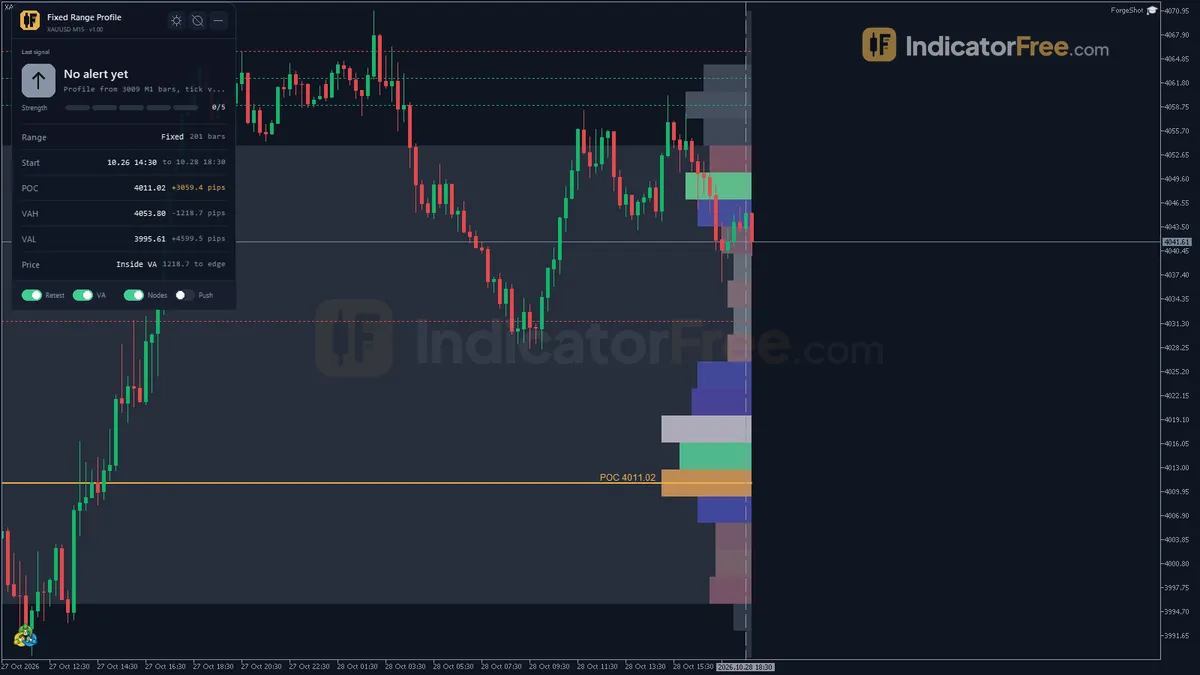
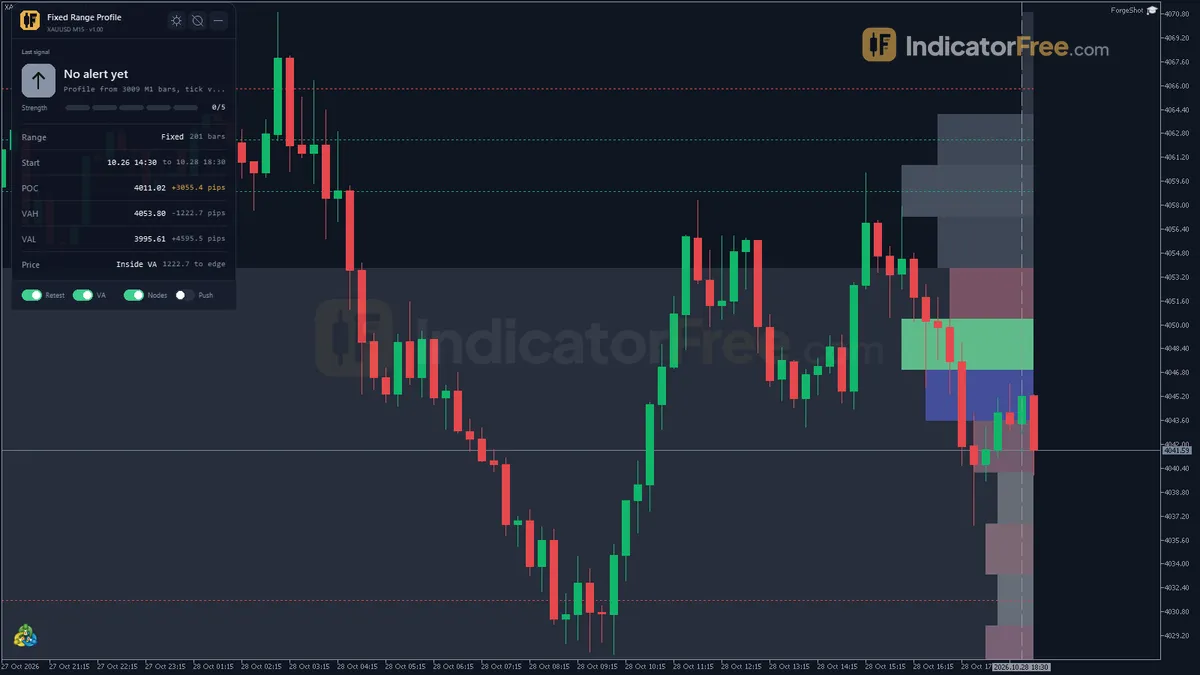
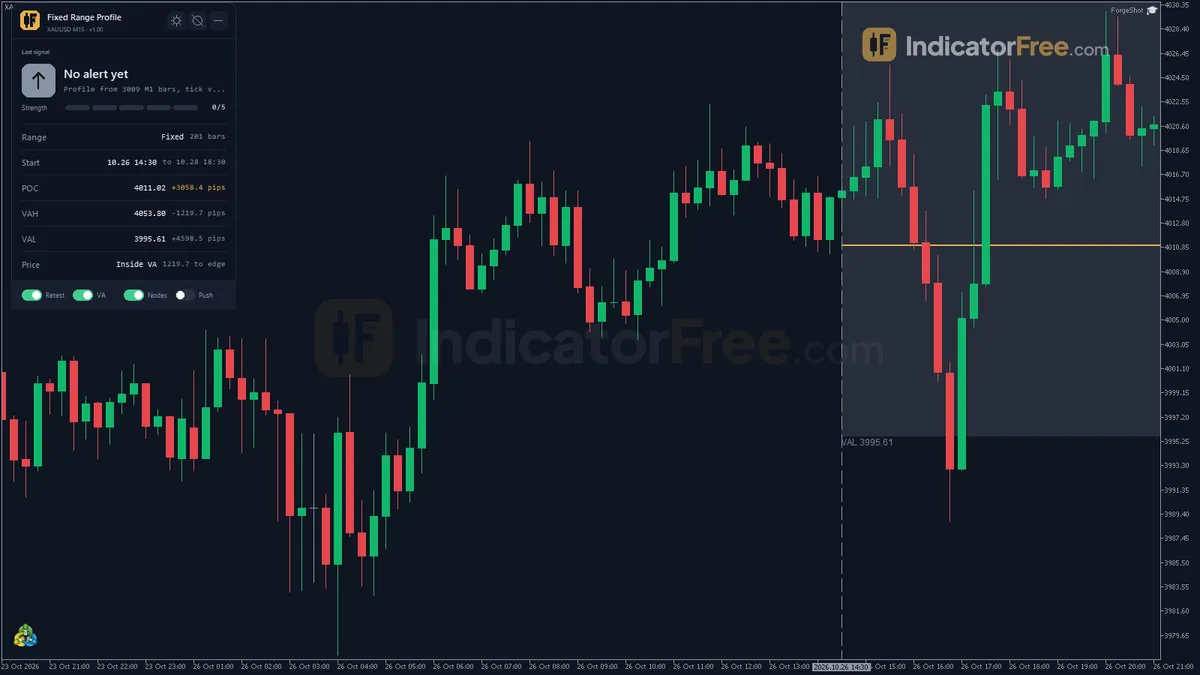
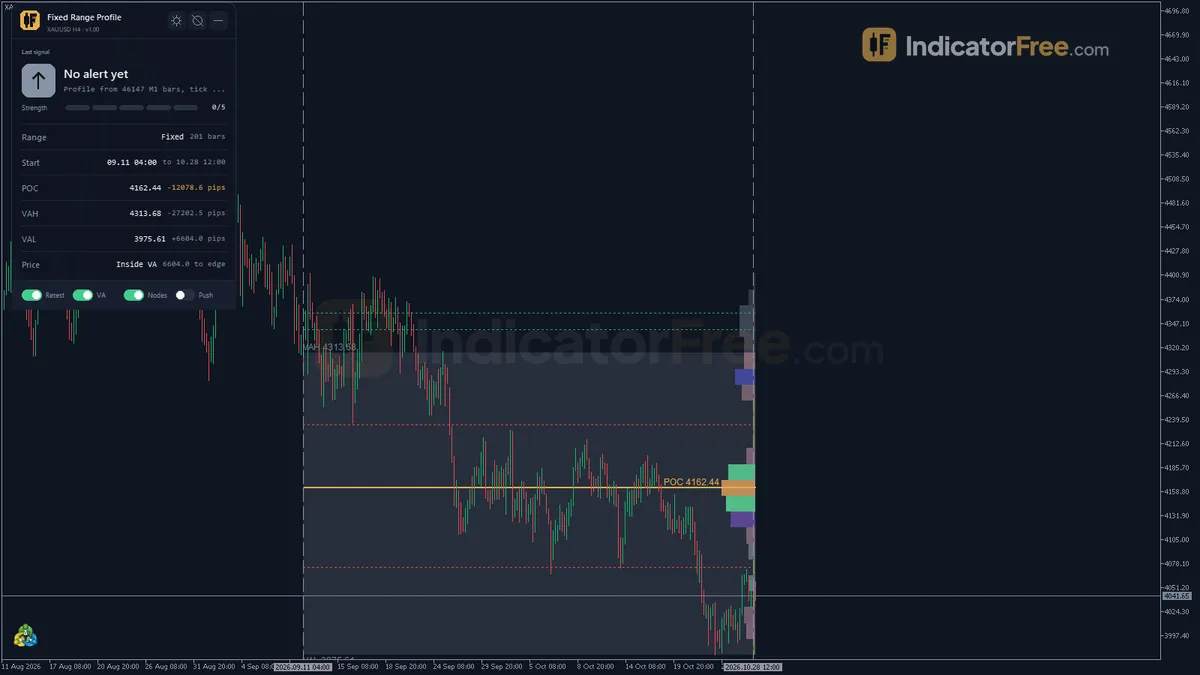
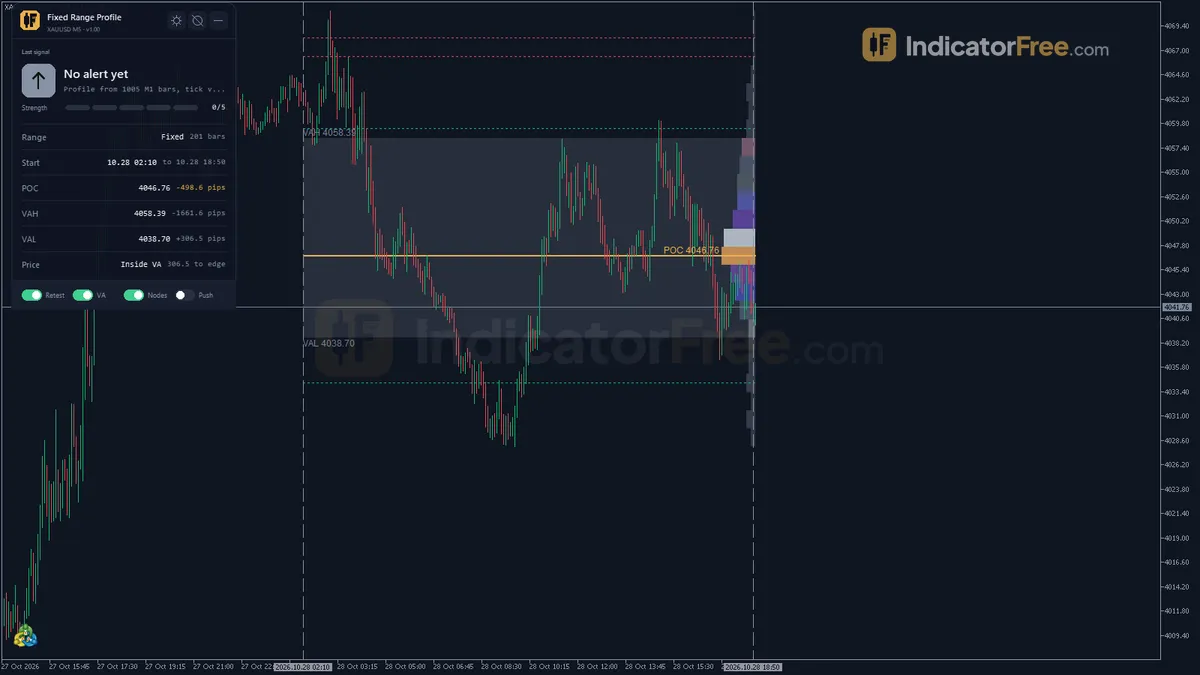
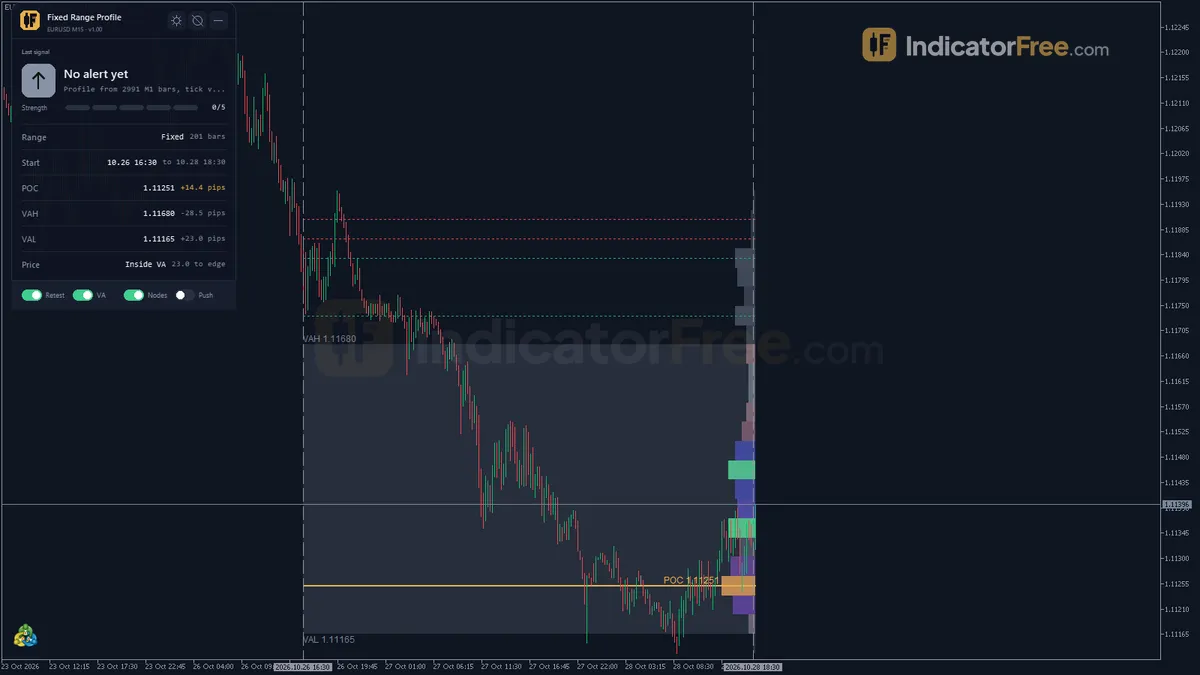
A volume profile shows how much volume traded at each price, stacked sideways instead of under the bars. The busiest row is the Point of Control (POC). The band that holds most of the volume is the value area, with VAH at its top and VAL at its bottom.
- Volume Histogram: one rectangle per row. The rows grow from the side set in
HistogramSide(right of the range by default). The longest bar is the POC row,HistogramMaxWidthBarschart bars long. Rows inside the value area useColorHistogram. Rows outside the value area and low-volume rows are blended toward the chart background. - Value Area box:
ColorValueAreamixed 80% into the background, so your candles stay readable. - POC and Volume Nodes: the POC line and its price label in gold (
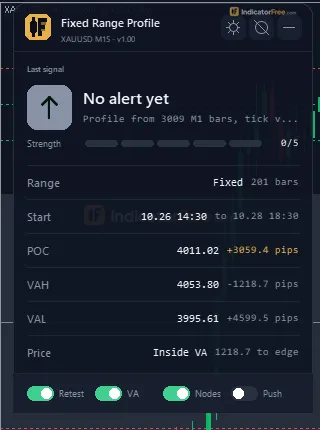
ColorPOC). Green lines (ColorHVN) mark secondary high volume nodes outside the value area. Red lines (ColorLVN) mark low volume nodes, leaving out the two edge rows. - Fixed Range panel: shows the range status and bar count, the start and end time, and POC, VAH and VAL with their distance from price in pips. It also shows where price sits against the value area and the last retest, enter or leave alert.
How the profile is built
The indicator runs the same steps every time it recalculates, from your two lines to the alert check:
- 1Mark the rangeDrag the two vertical lines, or set RangeStartTime and RangeEndTime
- 2Read the source barsProfileSourceTF bars (M1 by default), real volume if at least half the bars have it, else tick volume
- 3Split into rowsNumRows equal price rows between the range low and high
- 4Find POC and value areaBusiest row = POC; ValueAreaPercent of the volume = value area (CBOT method)
- 5Mark the nodesHVNCount high nodes outside the value area, LVNCount low nodes
- 6Check each closed barClose back at the POC, or a close into or out of the value area
What the Lab checked
The Lab loaded version 1.00 in MT5 build 6230, dragged the range lines and turned ExtendToLatestBar on and off to confirm every row is deleted and redrawn.
- Build and file: version 1.00 (118 KB) ran on MT5 build 6230 on 2026-10-09. It draws in the main chart window, not in a subwindow.
- Clean redraws: every histogram row, the value area box and the node lines are deleted and redrawn on each recalculation. A recalculation happens when you drag a range line, or when a new source bar closes while
ExtendToLatestBaris on. Removing the indicator deletes the histogram and the value area box. For you, this means dragging the lines around does not leave old rectangles piling up on the chart. - Scope: 30 inputs and three alert channels (popup, push, sound).
What the record does not include: the Lab published no hit rate for the alerts in version 1.00. Use the POC and value area as reference levels that you judge yourself, not as a tested entry signal.
Who it is for
It suits you if you already trade levels and want to measure one specific move or session: day traders marking a session, or swing traders measuring the base before a breakout. It does not suit you if you want arrows that tell you when to buy or sell.
How it works
- 1Picks one time range (manual lines, recent bar count or set times) and loads source timeframe bars inside it.Inputs: AnchorMode, LookbackBarsDefault, RangeStartTime, RangeEndTime, MinRangeBars, ProfileSourceTF
- 2Splits the range into equal price rows and spreads each bar's volume over the rows its high-low span covers.
Row volume += bar volume x overlap with row / bar spanInputs: NumRows, UseRealVolumeIfAvailable - 3Finds the point of control, the busiest row, then expands the value area around it to the set share.
Value area volume >= total volume x ValueAreaPercent / 100Inputs: ValueAreaPercent - 4Marks the busiest rows outside the value area as high volume nodes and the thinnest as low volume nodes.Inputs: HVNCount, LVNCount, HistogramSide, HistogramMaxWidthBars
- 5Alerts when a close lands within the buffer of the point of control, or enters or leaves the value area.
Retest: abs(Close - POC) <= RetestBufferPoints x pointInputs: RetestBufferPoints, EnableRetestAlert, EnableVAEnterExitAlert
Specifications
- Platform
- MetaTrader 5
- Version
- 1.00
- Type
- Indicator
- Window
- Main chart
- Draws
- 3 zones, 1 panel
- Alerts
- popup, push, sound
- Repaints
- not tested
- Inputs
- 30
- Tested on
- MT5 build 6230 · 2026-10-09
Repaint test
Repaint: not tested. This indicator draws zone, panel, which the IndicatorFree harness cannot read through iCustom().
IndicatorFree — tested 2026-10-09 · MT5 build 6230. Results come from historical data, not live trading, and do not guarantee future results.
What it draws
- Rectangles (Volume Histogram) drawn as chart objects, not buffers — they are not readable by iCustom() in an EA.
- Rectangles (Value Area) drawn as chart objects, not buffers — they are not readable by iCustom() in an EA.
- Rectangles (POC and Volume Nodes) drawn as chart objects, not buffers — they are not readable by iCustom() in an EA.
- An on-chart panel (Fixed Range); values shown in the panel are not exposed as buffers.
Inputs
| Input | Default | What it does |
|---|---|---|
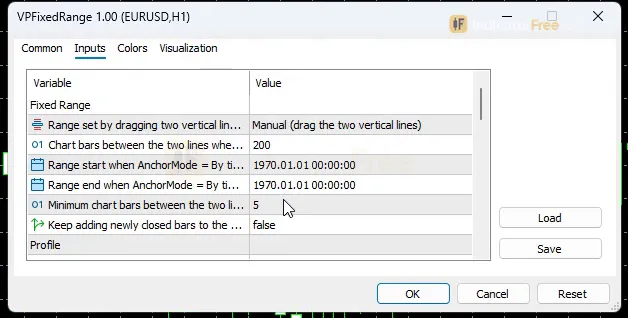
| AnchorMode | Manual (drag the two vertical lines) | Range set by dragging two vertical lines or by fixed input times |
| LookbackBarsDefault | 200 | Chart bars between the two lines when first placed, or when By time is not set (50-2000) |
| RangeStartTime | 0 | Range start when AnchorMode = By time (0 = LookbackBarsDefault bars before the end) |
| RangeEndTime | 0 | Range end when AnchorMode = By time (0 = last closed bar) |
| MinRangeBars | 5 | Minimum chart bars between the two lines to accept a new range (2-50) |
| ExtendToLatestBar | false | Keep adding newly closed bars to the range (developing) instead of a fixed end |
| ProfileSourceTF | M1 | Bars used to build the volume histogram |
| NumRows | 24 | Equal price rows the range [low, high] is split into (10-100) |
| UseRealVolumeIfAvailable | true | Use real volume when at least half of the bars have it, else tick volume |
| ValueAreaPercent | 70 | Share of the range volume inside the value area, in % (50-90) |
| HVNCount | 2 | Secondary high volume nodes marked outside the value area (0-5) |
| LVNCount | 2 | Low volume nodes marked, the two edge rows excluded (0-5) |
| HistogramSide | Right of the range | Side of the range the histogram bars grow from |
| HistogramMaxWidthBars | 15 | Length in chart bars of the longest histogram bar (the POC row) (5-40) |
| EnableRetestAlert | true | Alert when a bar closes back at the POC |
| RetestBufferPoints | 20 | Distance from the POC in points that counts as a retest (5-200) |
| EnableVAEnterExitAlert | true | Alert when a bar closes into or out of the value area |
| AlertPopup | true | Show a popup Alert() window |
| AlertPush | false | Send a push notification to MetaTrader mobile |
| AlertSound | true | Play a sound |
| AlertSoundFile | alert.wav | Sound file from the MT5 Sounds folder |
| ColorHistogram | C'135,146,166' | Histogram rows inside the value area (outside rows and low volume are blended toward the background) |
| ColorPOC | C'232,176,75' | POC row, POC line and its price label |
| ColorValueArea | C'135,146,166' | Value area box (mixed 80% into the chart background) |
| ColorHVN | C'18,183,106' | Secondary high volume node lines |
| ColorLVN | C'229,72,77' | Low volume node lines |
| ColorAnchor | C'150,150,160' | The two range lines |
| Theme | Dark | Chart color theme |
| RestoreTheme | true | Restore the original chart colors when the indicator is removed |
| PanelScale | 1 | Panel size multiplier (0.6-2.0), DPI is applied automatically |
How to read it
Set your range in a minute
To install, copy the file into MQL5\Indicators, refresh the Navigator and drag the indicator onto your chart.
Two vertical lines appear LookbackBarsDefault (200) bars apart. Drag either line and the profile redraws. If the range is shorter than MinRangeBars (5 bars), it is not accepted.
Where to put the lines: start at the bar where the thing you want to measure began, such as the swing low before a rally, a session open or the first bar of a consolidation. End where it finished. Keep one story per profile. A range that mixes two unrelated moves gives you a POC in the middle that neither move defended.
Fixed times instead of dragging: set AnchorMode to By time and fill in RangeStartTime and RangeEndTime. If the start is 0, it uses LookbackBarsDefault bars before the end. If the end is 0, it uses the last closed bar.
Developing profile: turn ExtendToLatestBar on and every newly closed bar joins the range, so the profile grows as the day goes on.
Chart colors: with RestoreTheme on (the default), your original chart colors come back when you remove the indicator.
Read the levels
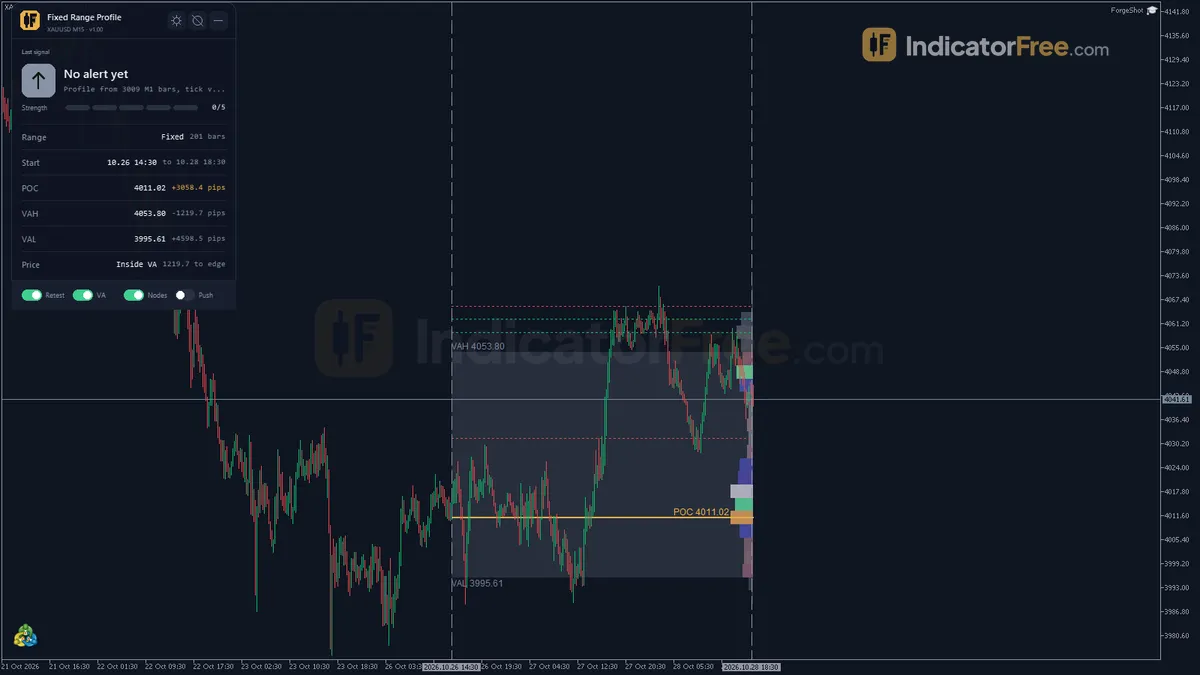
The picture below shows how a finished range sits on the chart and where each alert fires after it.
- POC (gold line): the price where the range traded the most. When price comes back to it after leaving, that is the zone to watch for a reaction.
- VAH / VAL (edges of the box): a close inside means price is back in the range it accepted. A close outside means price is testing new prices.
- Green HVN lines: secondary busy prices outside the value area, which are further support or resistance candidates.
- Red LVN lines: thin rows where little traded. Read them as prices the range never accepted. They are levels to watch, not places to sit and wait.
The alerts and where they appear
- POC retest (
EnableRetestAlert): a bar closes withinRetestBufferPoints(default 20) of the POC. On a 5-digit forex pair, 20 points is 2 pips. On gold or indices, check what a point is on your symbol before you trust the default. - Value area enter / leave (
EnableVAEnterExitAlert): a bar closes into or out of the value area. - Delivery:
AlertPopupopens an alert window in the terminal,AlertSoundplaysAlertSoundFile(alert.wav) from the MT5 Sounds folder, andAlertPushsends a notification to MetaTrader mobile (off by default). The last alert also shows on the panel.
All alerts fire on a closed bar. A wick that touches the POC and closes away from it does not trigger one.
Inputs that change the picture most
| Input | Default | Range | What changing it does |
|---|---|---|---|
NumRows | 24 | 10-100 | More rows give a sharper POC but a noisier histogram; fewer rows give broader zones |
ValueAreaPercent | 70 | 50-90 | A higher value gives a wider value area box |
ProfileSourceTF | M1 | - | The bars whose volume fills the rows |
UseRealVolumeIfAvailable | true | - | Uses real volume when at least half the bars have it. On most forex symbols only tick volume exists, so the profile counts ticks |
HVNCount / LVNCount | 2 / 2 | 0-5 | Number of green and red node lines; 0 hides them |
RetestBufferPoints | 20 | 5-200 | How close a close must be to the POC to count as a retest |
HistogramMaxWidthBars | 15 | 5-40 | Length of the POC bar; shorten it if the histogram covers new candles |
PanelScale | 1 | 0.6-2.0 | Panel size; DPI is applied automatically |
Decision rules for each alert
These are reading rules from how value areas are commonly traded, not results the Lab tested.
- POC retest: act on it only if price left the value area first and then came back. A retest alert while price is still chopping inside the box is noise, so skip it.
- Enter value area after a leave: treat the POC as the halfway mark and the opposite edge as the next reference. Skip it while
ExtendToLatestBaris on, because the edges are still moving. - Leave value area: do not fade the first close outside. Wait for an enter alert back inside before you trade back toward the POC.
A common misread and how to spot it
With ExtendToLatestBar on, the POC can move on each recalculation (see What the Lab checked). An alert from an hour ago may point to a level that is no longer the POC. Check the current POC on the panel before you act on an old alert. Also remember that only the gold line is the POC. Green lines are secondary nodes, not a second POC.
Installation
- 1Download VPFixedRange.ex5 from the button above (Google Drive).
- 2In MetaTrader 5: File → Open Data Folder → MQL5 → Indicators. Copy VPFixedRange.ex5 there.
- 3Restart MT5 or right-click Indicators in Navigator → Refresh.
- 4Drag Fixed Range Profile onto a chart. For push alerts, enable "Allow push notifications" under Tools → Options → Notifications.
- Tested on MT5 build 6230.
Key terms and guides
- Value area
- The value area is the price range where about 70% of a period's volume traded. Its top is the value area high (VAH), its bottom is the value area low (VAL), and the point of control (POC) sits inside it.
- volume profile poc
- The volume profile POC (point of control) is the single price level where the most volume traded over the range you selected. It shows the price the market accepted most, and traders use it as a reference level for reactions and targets.
- Lot size
- Lot size is the volume of a trade, counted in lots. In forex, one standard lot is 100,000 units of the base currency, and the lot size you choose sets how much money each pip of price movement is worth.
- Sideways market
- A sideways market, also called a range-bound market, a trading range or consolidation, is a phase when price moves back and forth between a fairly flat high and a fairly flat low instead of trending.
- Win rate
- Win rate is the share of your closed trades that ended in profit: winning trades divided by total trades, times 100. On its own it does not show whether a strategy makes money, because it ignores how big the wins and losses are.
- Profile
- A profile in trading is a saved set of chart windows on your platform: which symbols are open, their timeframes, indicators and layout. The word also appears in volume profile, market profile and risk profile, which mean different things.
More on this subject: Volume & order flow guide, terms and tools
User reviews
No reviews yet. Members who download the tool can review it here.
Sign in and download the tool to review it.
Build a checklist with it
Fixed Range Profile does one job on the chart: zone / level. Put it on the same chart as the tools below and the IndicatorFree panels merge into one checklist card, ordered trend, zone, signal, risk.
- Trend / contextBreak of StructureAdds the trend side: which way the market leans before you act on Fixed Range Profile.
- Entry signalClimax VolumeAdds the entry signal: the moment to act once Fixed Range Profile has set the scene.
The Lab has not tested these combinations. Each tool is tested on its own; the card only lines up what each one says. Free members get 2 new tools a day. If one has to wait until tomorrow, install BlackBox to raise the limit to 5 a day (20 on a live account).
FAQ
Does Fixed Range Profile repaint?
Repaint: not tested. This indicator draws zone, panel, which the IndicatorFree harness cannot read through iCustom().
Why can’t my EA read the zones?
Zones and the panel are chart objects, not indicator buffers, so iCustom() does not return them.
How do I get alerts on my phone?
Enter your MetaQuotes ID under Tools → Options → Notifications, tick "Enable push notifications", and keep the push alert input on.
Does Fixed Range Profile work on MetaTrader 5 mobile?
No. It runs in the desktop MT5 terminal, because MetaTrader mobile does not load custom indicators. Turn on AlertPush and the desktop copy will send its retest and value area alerts to your phone.
Which chart timeframe should I use it on?
Any chart timeframe works. The histogram is filled from ProfileSourceTF bars (M1 by default) whatever your chart shows, so a range on an H1 chart is still built from M1 detail.
Can I build a profile for one session, like London or New York?
Yes. Set AnchorMode to By time and put the session's open and close in RangeStartTime and RangeEndTime. Change the times for the next session, or turn on ExtendToLatestBar to watch the current session build up.
Does it repaint?
It redraws by design on each recalculation, as described under What the Lab checked. The alerts use closed bars only. The Lab did not publish a repaint count for version 1.00.
Why is my POC different from another platform's volume profile on the same range?
The POC depends on the row count, the source bars, whether real or tick volume is used, and the value area percent. Match NumRows, ProfileSourceTF and ValueAreaPercent before you compare, and keep in mind that brokers' tick volume differs.
Changelog
- 1.00Initial release: fixed-range volume profile with a full per-row histogram (10-100 rows), Point of Control, CBOT-method value area, and secondary High/Low Volume Node markers over a user-anchored time range (manual. · 2026-10-09
Final verdict
Verdict: a clean range profile, not a signal system
In one free file you get:
- a per-row histogram of up to 100 rows
- a CBOT-method value area
- node markers
- closed-bar alerts on three channels
- a panel that tells you how many pips price is from each level
On build 6230 it redraws cleanly (see What the Lab checked).
Its limits are just as clear. On forex, the profile is only as good as your broker's tick volume. It cannot tell you which range matters, because that choice is yours, and a badly chosen range gives you a confident-looking POC that means nothing.
The chart below sums up when it earns its place and when it does not:
- –You can name the move or session you want to measure
- –You trade reactions at levels, not arrows
- –You want a closed-bar alert when price returns to the POC
- –You want pip distances to POC, VAH and VAL at a glance
- –You need a buy/sell signal with a tested hit rate
- –You trade only on MetaTrader mobile
- –You redraw the range after every bar to fit the trade you want
- –Your range mixes two unrelated moves
Settings to start with
- Defaults suit a move or session of about 200 bars. Start there.
- One intraday session on M5 or M15: try
NumRows40. This is a starting point the Lab has not tested, so compare it with the default 24. - Gold or indices: try
RetestBufferPoints100 so a retest is not missed by a few points. This is not tested by the Lab either, so compare it with the default 20. - Away from the screen: turn
AlertPushon and leaveAlertPopupon. - Leave
ValueAreaPercentat 70 until you have a reason to change it.
A tool to try alongside it
Anchored VWAP anchored at the same bar as your range's first line adds a moving average price on top of the profile's fixed levels. Climax Volume can point out the high-volume bar where a range is worth starting. These are ideas to try: the Lab has not tested either pair.