Apex Pinch
Apex Pinch indicator MT5 finds symmetrical triangles and marks breakouts with arrows and targets. Lab test: 0 of 43 signals repainted.
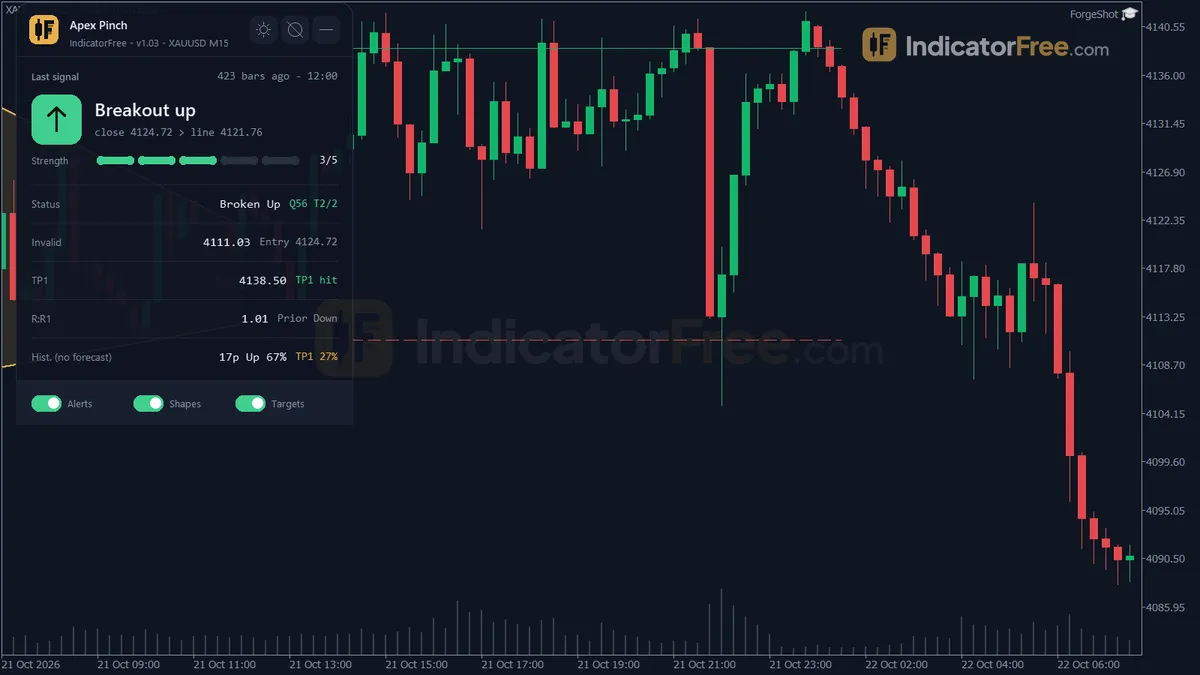
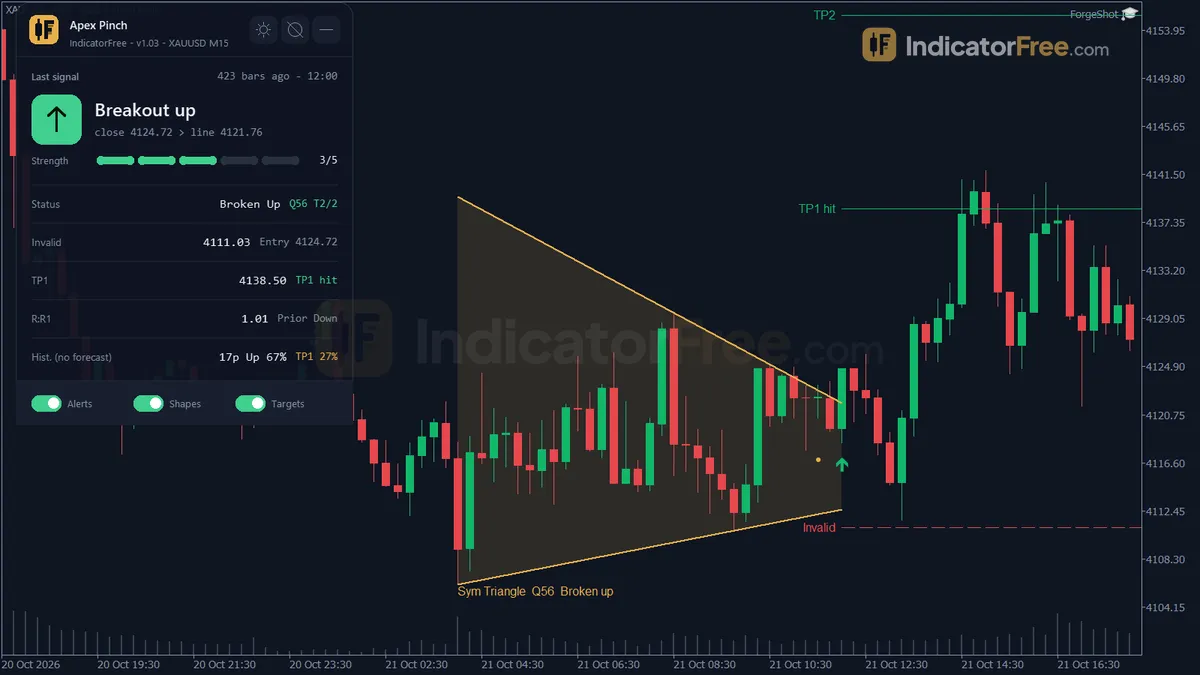
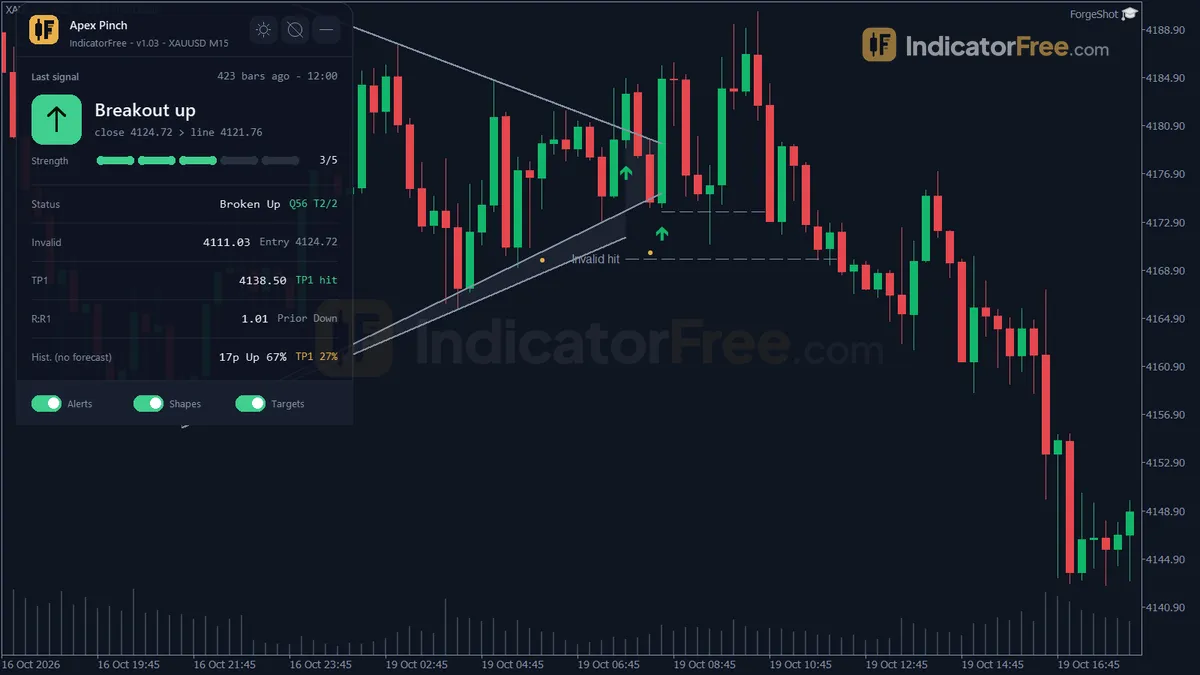
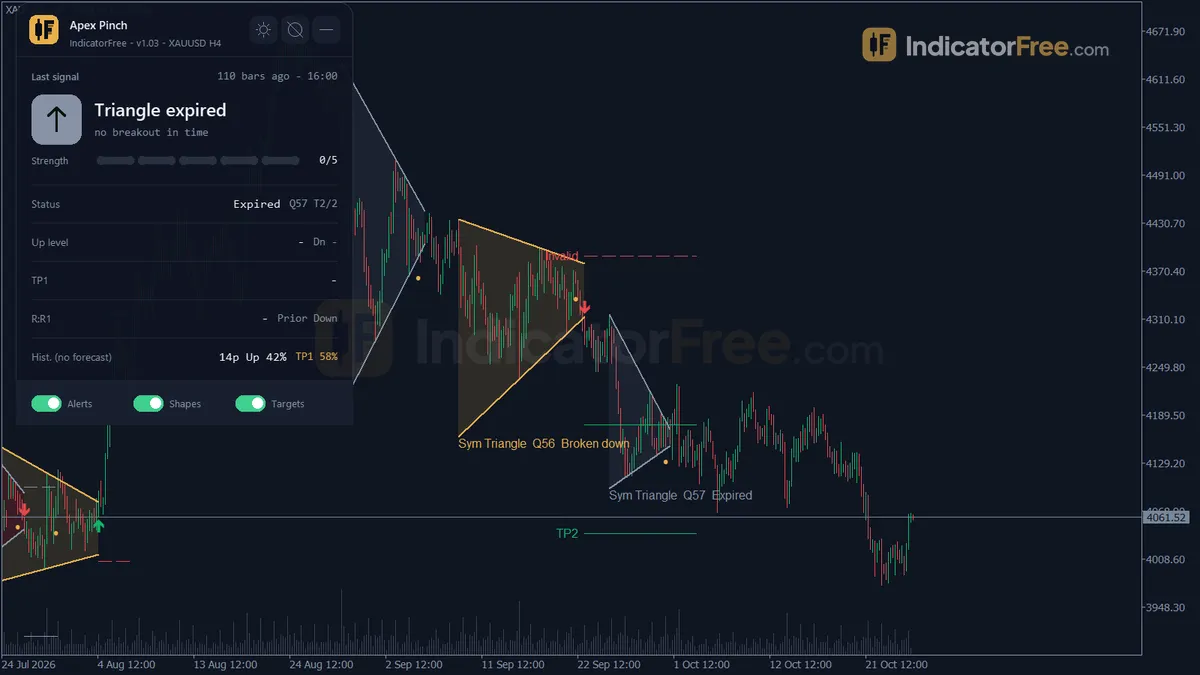
- Repainted
- 0 / 43
- Signals / week
- ≈ 3.4
- Tested on
- EURUSD M15
- Tested
- 2026-10-12
Overview
Apex Pinch is a pattern indicator for MT5 that finds symmetrical triangles on the price chart. It draws their two converging trendlines and marks the formation and the breakout with arrows, plus target and invalidation ticks. In the Lab's repaint test, 0 of 43 signals changed after they appeared.
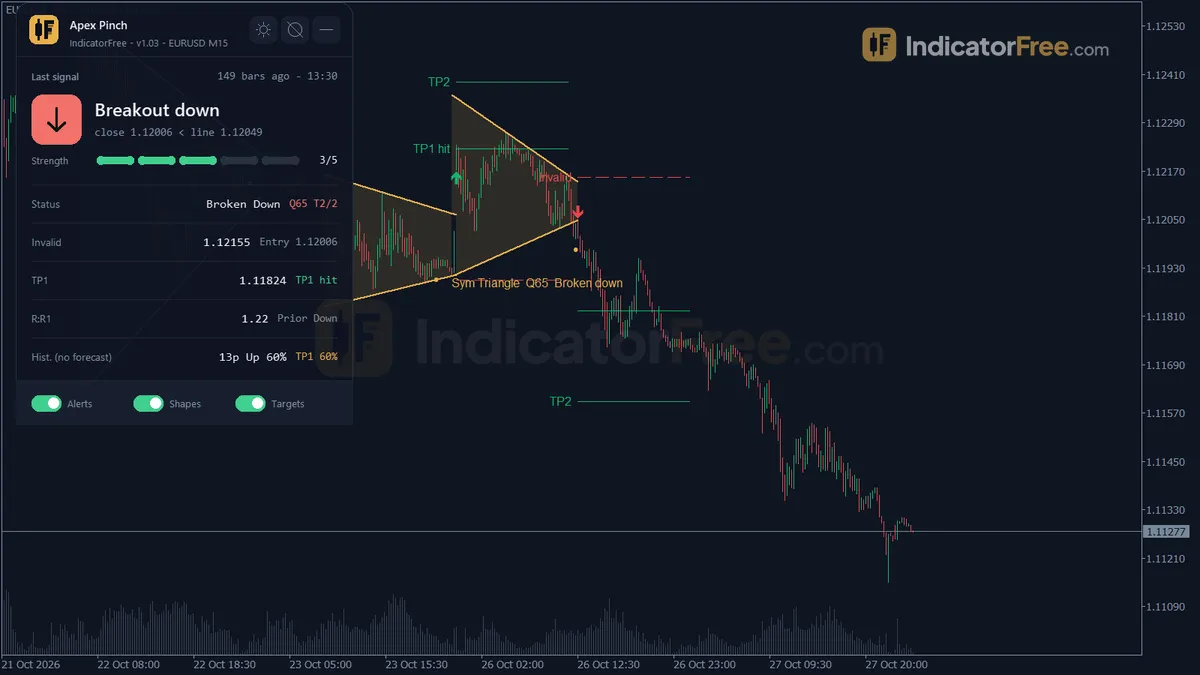
What Apex Pinch draws on your chart
A symmetrical triangle forms when price makes lower highs and higher lows, so a falling resistance line and a rising support line meet at a point called the apex. Apex Pinch looks for this shape and draws everything in the main chart window, not in a subwindow:
- Triangle Lines: the falling resistance and the rising support. They stop extending at the breakout and turn grey when the breakout fails or the triangle expires.
- Triangle Formed arrow: a new triangle passed every quality check.
- Breakout Up / Breakout Down arrows: a closed bar broke out of the triangle.
- Target Levels: TP1, TP2 and an invalidation tick, drawn at the breakout bar.
- Triangle Label: a label on each triangle. It is deleted together with its triangle when more than 20 triangles are on the chart.
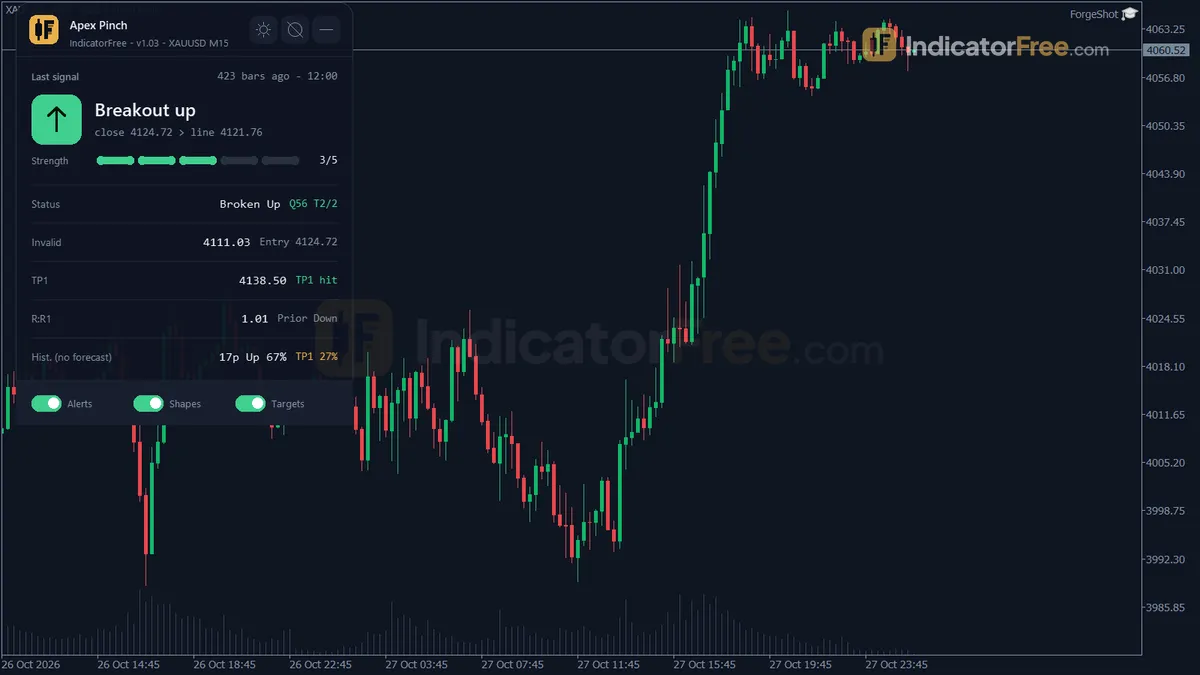
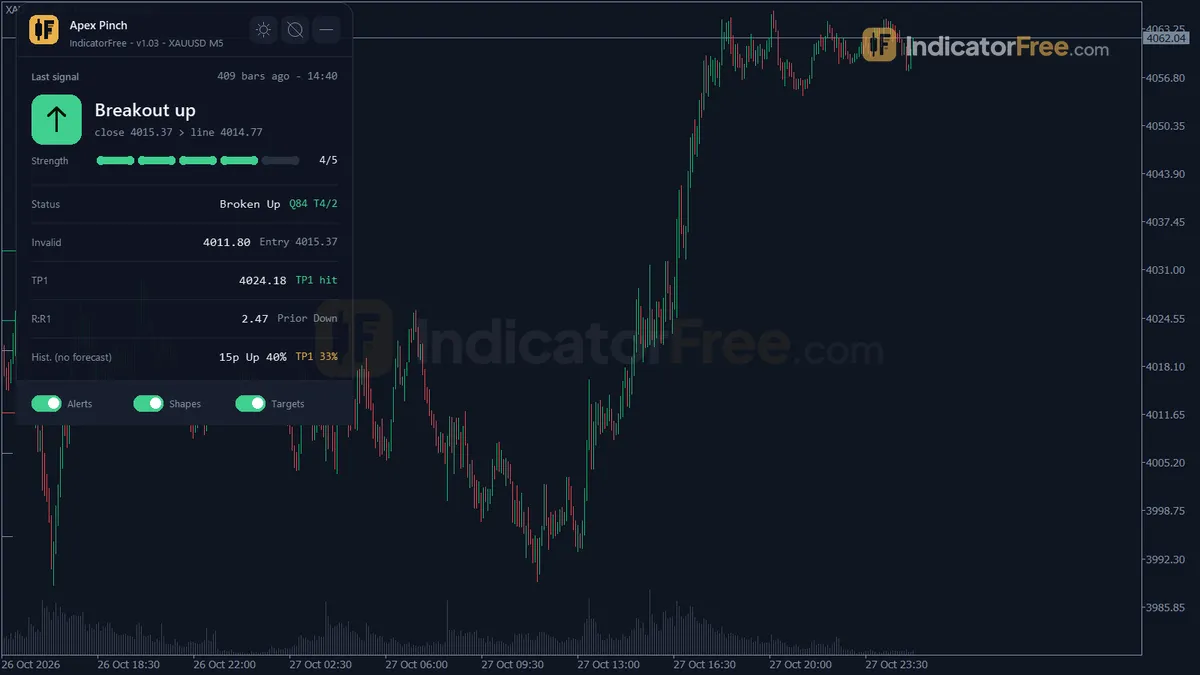
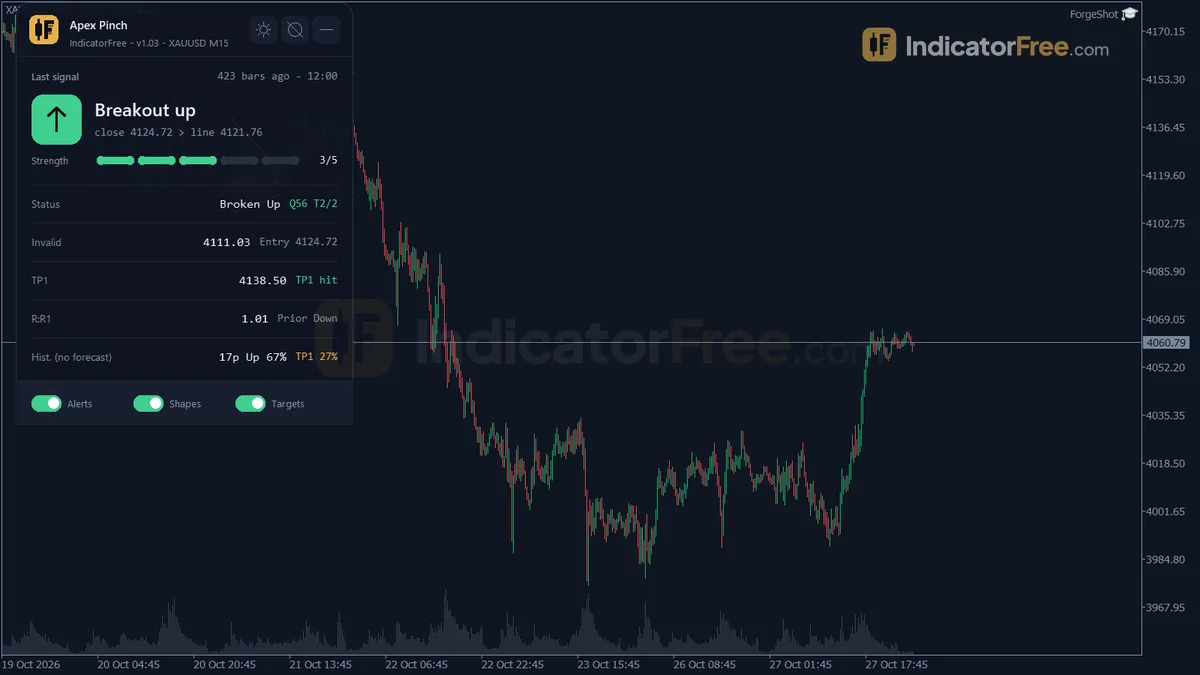
- Triangle Status panel: a summary of the current pattern and its levels, explained in How it works.
How the Lab tested it
The Lab ran version 1.03 (130.2 KB) on MT5 build 6230 on 2026-10-12. The test covered EURUSD M15 from 2026-07-13 to 2026-10-09, using real tick data from Raw Trading Ltd. Each of the 43 signals was logged when it appeared and checked again later. 0 of 43 arrows moved or vanished after they appeared.
0-bar delay: each arrow is drawn on the closed bar that triggered it. The Formed arrow is still PivotLen bars after its pivot by design.
The Lab also ran a 1 ATR test: after each arrow, did price move 1 ATR in the signal's direction before it moved 1 ATR against it? The Lab data does not say how a Formed arrow's direction was scored, so the Formed result is shown for comparison only. Across all 43 signals, 51.1% moved the right way first. That is barely better than a coin flip. The split by arrow type tells you more:
Scale zoomed in to show the difference (bars do not start at zero).
What this means for you: the two breakout arrows did better than the Formed arrow in this sample (57.1% and 53.8% against 47.8%), but 7 and 13 signals are too few to call it an edge. The Triangle Formed arrow did slightly worse than a coin flip, so treat it as a warning to watch the chart, not as an entry.
Who it is for
Apex Pinch fits traders who already trade triangle breakouts and want three jobs done for them: finding the pattern, scoring it, and placing the targets and invalidation level the moment a bar closes outside the triangle. It also fits anyone who wants a closed-bar alert instead of watching charts for a squeeze.
How it works
- 1Finds swing highs and lows: a bar higher or lower than the set number of bars on both sides.Inputs: PivotLen
- 2Measures ATR with Wilder smoothing to size breakouts and invalidation.
ATR = (ATR_prev x (n - 1) + TrueRange) / nInputs: ATRPeriod - 3Fits converging lines through recent pivot highs and lows, and keeps a triangle only if length, touches and score pass.Inputs: MinBars, MaxBars, MinTouches, MinScore
- 4A close beyond a triangle line by a buffer of ATR signals a breakout. Late breakouts get no arrow.
Up: Close > Upper line + BreakBufATR x ATR. Down: Close < Lower line - BreakBufATR x ATRInputs: BreakBufATR, LateBreakFrac - 5Targets sit at half and full triangle height from the broken line. Invalidation sits beyond the opposite line.
TP1 = Line +/- 0.5 x Height, TP2 = Line +/- HeightInputs: InvalidBufATR, TrackBars
Specifications
- Platform
- MetaTrader 5
- Version
- 1.03
- Type
- Indicator
- Window
- Main chart
- Draws
- 3 arrows, 3 zones, 1 panel
- Alerts
- popup, push, sound, email
- Repaints
- No (0 of 43 signals changed)
- Inputs
- 31
- Tested on
- MT5 build 6230 · 2026-10-12
Repaint test
No repaint detected. In a 13 Jul 2026 – 9 Oct 2026 test on EURUSD M15 (Raw Trading Ltd real ticks), 43 signals were logged at bar close and re-read at the end of the test: 0 changed. Arrows print on the bar that closes the signal, with no delay.
IndicatorFree — tested 2026-10-12 · MT5 build 6230 · Raw Trading Ltd real ticks. Results come from historical data, not live trading, and do not guarantee future results.
Signal statistics
Over 13 Jul 2026 – 9 Oct 2026 on EURUSD M15, the indicator printed 43 arrows. After 51.1% of them, price moved 1×ATR(14) in the arrow's direction before moving 1×ATR against it (median 3 bars). 0% reached neither level within 20 bars.
This measures price movement after the arrow, not a trading result. It includes no spread, commission, stop loss or position sizing.
What it draws
- Arrows (Breakout Up) from buffer 0, drawn on the closed bar.
- Arrows (Breakout Down) from buffer 1, drawn on the closed bar.
- Arrows (Triangle Formed) from buffer 2, drawn on the closed bar.
- Rectangles (Triangle Lines) drawn as chart objects, not buffers — they are not readable by iCustom() in an EA.
- Rectangles (Target Levels) drawn as chart objects, not buffers — they are not readable by iCustom() in an EA.
- Rectangles (Triangle Label) drawn as chart objects, not buffers — they are not readable by iCustom() in an EA.
- An on-chart panel (Triangle Status); values shown in the panel are not exposed as buffers.
Inputs
| Input | Default | What it does |
|---|---|---|
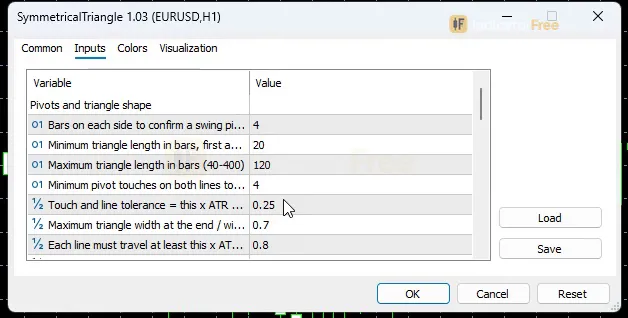
| PivotLen | 4 | Bars on each side to confirm a swing pivot (2-12); also the detection delay in bars |
| MinBars | 20 | Minimum triangle length in bars, first anchor to last anchor (10-100) |
| MaxBars | 120 | Maximum triangle length in bars (40-400) |
| MinTouches | 4 | Minimum pivot touches on both lines together (4-8); each line needs at least 2 |
| TouchTolATR | 0.25 | Touch and line tolerance = this x ATR (0.05-0.8) |
| ConvergeMax | 0.7 | Maximum triangle width at the end / width at the start (0.3-0.95) |
| MinSlopeATR | 0.8 | Each line must travel at least this x ATR over the triangle (0.2-4) |
| MinSlopeRatio | 0.35 | Minimum ratio of the flatter slope to the steeper slope (0.1-0.9) |
| MaxProgress | 0.8 | Maximum share of the way to the apex already used when the triangle forms (0.4-0.95) |
| MinScore | 50 | Minimum quality score 0-100 for a triangle to be shown (0-90) |
| ATRPeriod | 14 | ATR period (Wilder) used for every tolerance and buffer (5-50) |
| BreakBufATR | 0.1 | Breakout needs a close beyond the line by more than this x ATR (0-0.5) |
| LateBreakFrac | 0.9 | A breakout after this share of the way to the apex is marked Late, no buffer arrow (0.6-1.0) |
| InvalidBufATR | 0.25 | Invalidation level = opposite line at the breakout bar -/+ this x ATR (0-1) |
| MaxAgeBars | 40 | Bars after the last anchor before an unbroken triangle expires (10-150) |
| TrackBars | 50 | Bars after a breakout during which TP1 / TP2 / invalidation are tracked (10-200) |
| PriorBars | 30 | Bars before the triangle used for the Prior Up / Down / Flat note (10-100) |
| HistoryBars | 3000 | Closed bars scanned for triangles and statistics (500-20000) |
| ShowTargets | true | Draw the TP1, TP2 and invalidation ticks after a breakout |
| ShowStats | true | Show historical statistics on the panel (loaded bars only, not a forecast) |
| AlertOnFormed | true | Alert when a new symmetrical triangle is formed (closed bar) |
| AlertOnBreak | true | Alert when the triangle breaks up or down (closed bar) |
| AlertPopup | true | Send alerts as a popup window |
| AlertPush | false | Send alerts as a push notification to MT5 mobile |
| AlertEmail | false | Send alerts by email (uses the terminal email settings) |
| AlertSound | false | Play a sound with each alert |
| ShowPanel | true | Show the on-chart panel |
| PanelCorner | Right Upper | Chart corner where the panel starts |
| PanelScale | 1 | Panel size multiplier (DPI is applied automatically) |
| Theme | Dark | Chart color theme |
| RestoreTheme | true | Restore the original chart colors when the indicator is removed |
How to read it
Install in one line
Copy the file into the MQL5/Indicators folder (File > Open Data Folder), refresh the Navigator, and drag Apex Pinch onto a chart.
How one triangle becomes a signal
Every arrow is based on closed bars. Here is the order of events, taken from the indicator's own rules:
- 1Swing pivot confirmedPivotLen bars on each side (default 4), so a pivot is confirmed 4 bars after its high or low
- 2Lines checkedFalling resistance and rising support must pass the slope (MinSlopeATR, MinSlopeRatio), convergence (ConvergeMax), length (MinBars to MaxBar
- 3Triangle Formed arrowThe score must reach at least MinScore and the closed bar must still be inside the triangle
- 4Breakout arrowA close beyond a line by more than BreakBufATR x ATR, before LateBreakFrac of the way to the apex
- 5Targets trackedTP1, TP2 and invalidation are followed for TrackBars bars. An unbroken triangle expires MaxAgeBars bars after its last anchor
Reading the Triangle Formed arrow
This arrow means a triangle passed every check. It does not tell you which way price will break. The arrow always comes PivotLen bars after the last pivot, because a pivot can only be confirmed once that many bars have closed after it. Expect it to look "late" next to the high or low it is based on. That delay is part of the design, not repainting.
Reading the Breakout Up and Breakout Down arrows
A breakout arrow appears when a closed bar finishes beyond the line by more than BreakBufATR × ATR. Breakout Up needs a close above the falling resistance, and Breakout Down needs a close below the rising support. A wick through the line does not count.
If the breakout happens after LateBreakFrac (default 0.9) of the way to the apex, it is marked Late and no arrow is drawn. Near the apex the two lines are so close together that a "break" means little.
At the breakout bar, the indicator draws TP1, TP2 and an invalidation tick (when ShowTargets is on). The invalidation level is the opposite line at the breakout bar, plus or minus InvalidBufATR × ATR.
Reading the lines and the panel
- Coloured lines that keep extending: the triangle is still active.
- Lines that stop at a bar: that bar was the breakout.
- Grey lines: the breakout failed, or the triangle expired
MaxAgeBarsbars after its last anchor without breaking.
A common misread is treating a grey triangle as a live setup. It is history.
The Triangle Status panel shows:
- the last Formed or breakout event
- the pattern status, with its score and number of touches
- the up and down confirm levels
- the invalidation level, TP1 and TP2
- the reward to risk to TP1
- the prior move
- the bars left to the apex
- historical statistics: pattern count, up-break share and TP1 hit rate
Those statistics only cover the bars loaded on your chart (HistoryBars, default 3000). They describe the past, not the next trade.
Inputs to change first
- MinScore (default 50, range 0-90): the main filter. Raise it for fewer, cleaner triangles. Lower it to see more shapes.
- PivotLen (default 4, range 2-12): how far a swing must stand out from nearby bars. It is also the detection delay in bars. A higher value means bigger swings and later Formed arrows.
- BreakBufATR (default 0.1, range 0-0.5): how far past the line a close must be. Raise it if you see too many breakouts that fail straight away.
- LateBreakFrac (default 0.9, range 0.6-1.0): lower it to ignore breakouts that happen closer to the apex.
- MaxAgeBars (default 40) and TrackBars (default 50): how long an unbroken triangle stays valid, and how long targets are tracked after a breakout.
- Theme (default Dark): changes the chart's colours. Set it to None to keep your own.
RestoreThemeputs the original colours back when you remove the indicator.
Alerts
AlertOnFormed and AlertOnBreak are both on by default, and both fire on closed bars only. A popup is the default. You can also turn on AlertPush (MT5 mobile app), AlertEmail (uses your terminal's email settings) and AlertSound.
A decision rule for each arrow
- Triangle Formed: never enter on it. Mark the triangle, check the score on the panel, and wait.
- Breakout Up / Down: take it only if three things are true. There is an arrow, so the breakout was not Late. The reward to risk to TP1 on the panel meets your minimum. And you can place your stop beyond the invalidation tick without breaking your risk limit.
- Skip a breakout when price closes back inside the triangle on the next bars, or when the invalidation tick is so far away that TP1 is not worth the risk.
Installation
- 1Download SymmetricalTriangle.ex5 from the button above (Google Drive).
- 2In MetaTrader 5: File → Open Data Folder → MQL5 → Indicators. Copy SymmetricalTriangle.ex5 there.
- 3Restart MT5 or right-click Indicators in Navigator → Refresh.
- 4Drag Apex Pinch onto a chart. For push alerts, enable "Allow push notifications" under Tools → Options → Notifications.
- Tested on MT5 build 6230.
Key terms and guides
- Trade setup
- A trade setup is the full set of conditions that must be in place before you enter a trade: the market context, a price area, an entry trigger, a stop-loss level and a target, all decided in advance.
- Wick
- A wick is the thin line above or below a candlestick's body. It marks the highest and lowest prices traded in that period that price could not hold until the candle closed.
- Win rate
- Win rate is the share of your closed trades that ended in profit: winning trades divided by total trades, times 100. On its own it does not show whether a strategy makes money, because it ignores how big the wins and losses are.
- Trend
- A trend is the main direction price keeps moving in over a period. In an uptrend price makes higher highs and higher lows. In a downtrend it makes lower highs and lower lows.
- Market Noise
- Market noise is the small, random back-and-forth price movement that has no lasting direction. It comes from routine buying and selling, not from a real change in what traders think an asset is worth.
- Price Swing
- A price swing is one move in a single direction, from a turning low to a turning high or the reverse. You measure it in pips from one swing point to the next.
- Guide: What Is a Fair Value Gap in Forex? How to Spot and Trade One
- Guide: How to Read Candlestick Charts: Bodies, Wicks and Shapes Explained
More on this subject: Price action & SMC guide, terms and tools
User reviews
No reviews yet. Members who download the tool can review it here.
Sign in and download the tool to review it.
Build a checklist with it
Apex Pinch does one job on the chart: entry signal. Put it on the same chart as the tools below and the IndicatorFree panels merge into one checklist card, ordered trend, zone, signal, risk.
- Trend / contextDowntrendApex Pinch tells you when; this tells you which way the market leans, so you can skip signals against it.
- Zone / levelLiquidity SweepShows the zones and levels, so you can see whether a signal from Apex Pinch fires at a level worth trading.
The Lab has not tested these combinations. Each tool is tested on its own; the card only lines up what each one says. Free members get 2 new tools a day. If one has to wait until tomorrow, install BlackBox to raise the limit to 5 a day (20 on a live account).
FAQ
Does Apex Pinch repaint?
No repaint detected. In a 13 Jul 2026 – 9 Oct 2026 test on EURUSD M15 (Raw Trading Ltd real ticks), 43 signals were logged at bar close and re-read at the end of the test: 0 changed. Arrows print on the bar that closes the signal, with no delay.
Can I use Apex Pinch in an EA?
Yes. Read buffer 0 (Breakout Up) with iCustom() on bar 1 — the last closed bar.
Why can’t my EA read the zones?
Zones and the panel are chart objects, not indicator buffers, so iCustom() does not return them.
How do I get alerts on my phone?
Enter your MetaQuotes ID under Tools → Options → Notifications, tick "Enable push notifications", and keep the push alert input on.
Does it work on other pairs?
Tested on EURUSD only; other symbols not tested.
Which timeframes and pairs can I use it on?
It isn't limited to one symbol. The screenshots show it on H4 and M5, but the Lab only measured EURUSD M15. On other markets, compare the panel's historical statistics for your loaded bars before you rely on it.
What happens to old triangles on my chart?
When more than 20 triangles are on the chart, the oldest is deleted together with its target levels and label. All of them are also cleared when you remove the indicator or the history is recalculated.
How do I get the alerts on my phone?
Set `AlertPush` to true and make sure push notifications are set up in your MT5 terminal for the mobile app. Formed and breakout alerts are sent once the bar closes.
What does turning off ShowStats change?
The panel stops showing the historical statistics for your loaded bars: pattern count, up-break share and TP1 hit rate. Those numbers describe the past and are not a forecast, so turning them off hides that summary but does not remove a signal.
Changelog
- 1.03Rebuilt from scratch: new IndicatorFree panel (signal card, strength bar, status rows, Alerts / Shapes / Targets switches), chart theme (None / Dark / Midnight / Light with restore on removal), symmetrical triangle. · 2026-10-12
Final verdict
Where Apex Pinch earns its place
The repaint result is the main strength. You can trust that an arrow you see now is the arrow you would have seen live in the Lab's EURUSD M15 test (0 of 43 changed).
Signals also resolve quickly. On EURUSD M15, the median signal reached ±1 ATR within 3 bars, about 45 minutes. None of the signals went 20 bars without reaching one side, so you rarely sit in a stalled pattern.
The breakout arrows outperformed the Formed arrow in the Lab, and the indicator places the invalidation and targets for you at the breakout bar. That saves the most error-prone part of trading triangles by hand.
Limits you should know
- One market, one timeframe, about three months. All Lab numbers come from EURUSD M15. The breakout samples are small, so treat the hit rates as early evidence, not proof.
- Not a stand-alone edge. The overall hit rate is close to a coin flip. Use it with your own filter, such as trend direction or session.
- Not frequent. The Lab counted 3.4 signals per week in total, with only 0.6 Breakout Up and 1 Breakout Down arrow per week. Most weeks give you very few trades per chart.
- Symmetrical triangles only. Each line must slope by at least
MinSlopeATR× ATR, so flat-topped or flat-bottomed shapes are filtered out. - Closed bars only. You will never get an arrow in the middle of a bar.
- It does not manage trades. It draws levels and tracks them. It does not open, size or close positions.
Who should skip it
Skip Apex Pinch if you scalp and need many signals a day, if you want intrabar entries, or if you want a ready-made system you can follow without judgement. It is also a poor fit if you trade other pattern types, because it shows nothing else.
Settings to start with
Start with the defaults on M15. That is the only setup the Lab measured.
The ideas below are untested starting points, not Lab results. Compare each one with the default on your own chart before relying on it:
- Fewer, cleaner triangles: try
MinScore65. - Lower timeframes such as M5: try
BreakBufATR0.2 to cut down on breakouts that only just clear the line. - Earlier Formed arrows: try
PivotLen3. Expect more noise in return.