Climax Volume
Free Climax Volume indicator for MT5: arrows and zones at buying and selling climaxes. 0 of 13 signals changed in the Lab's repaint test.
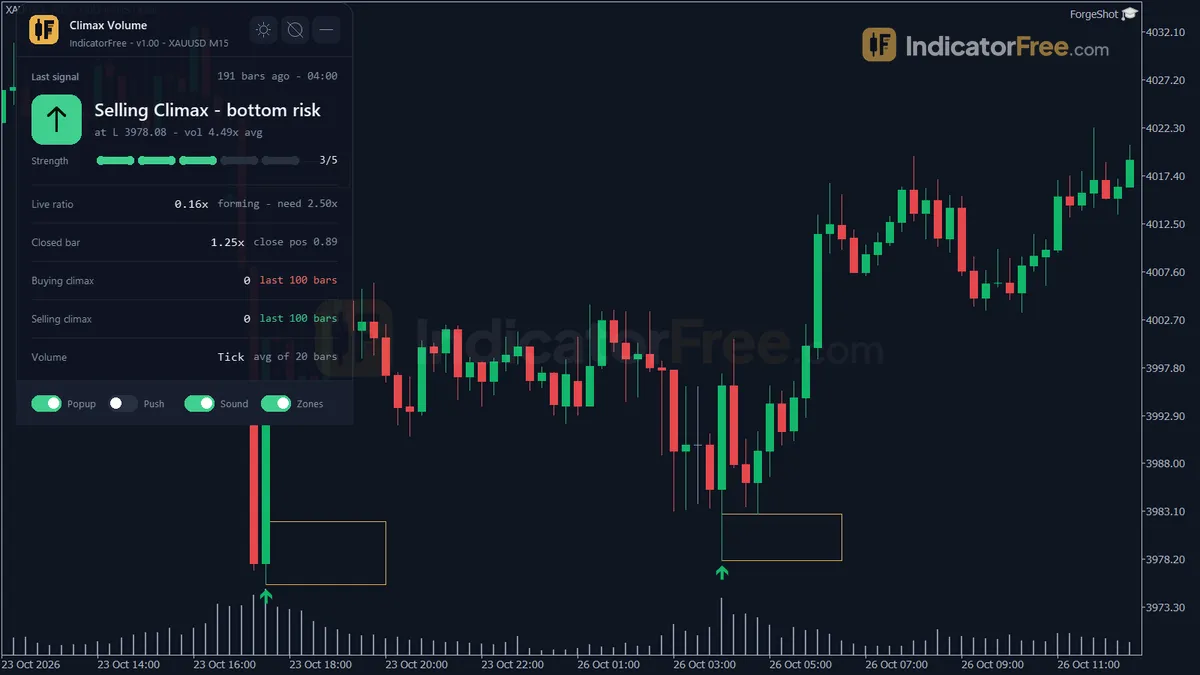
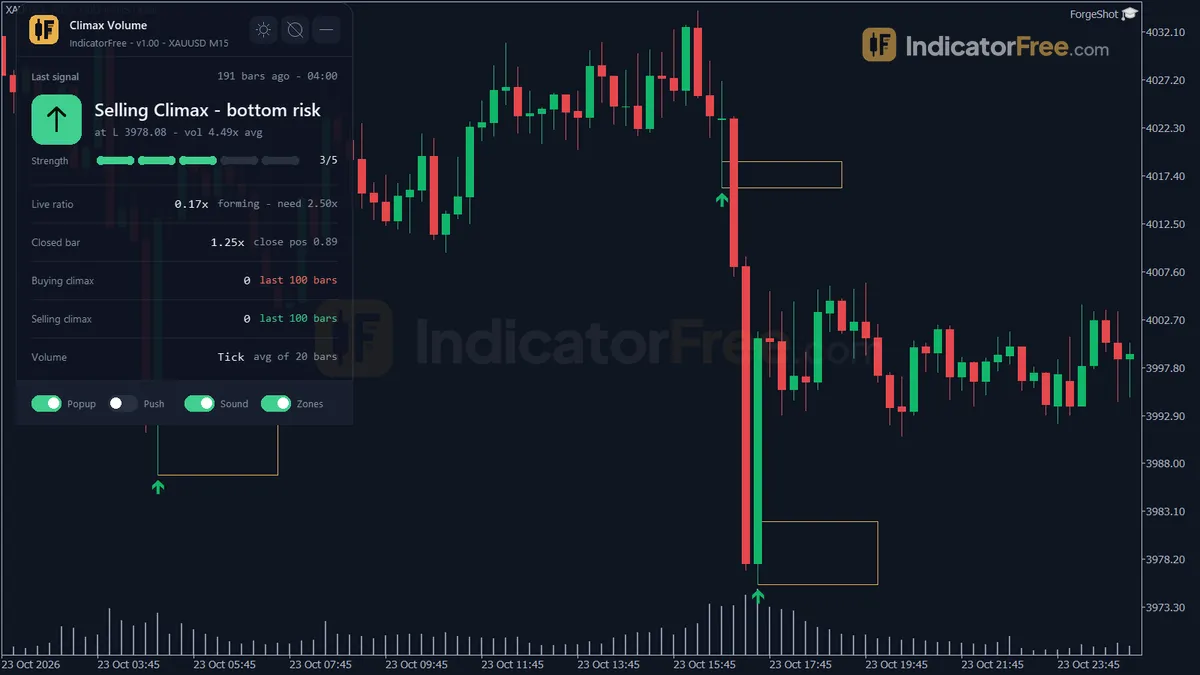
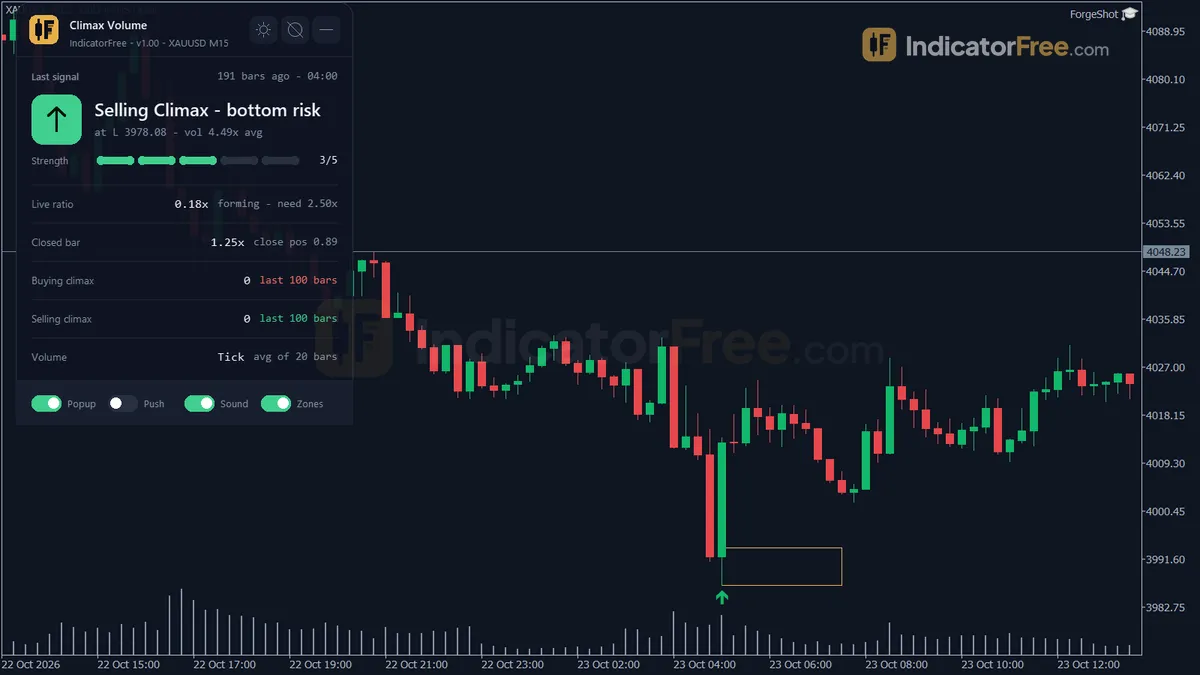
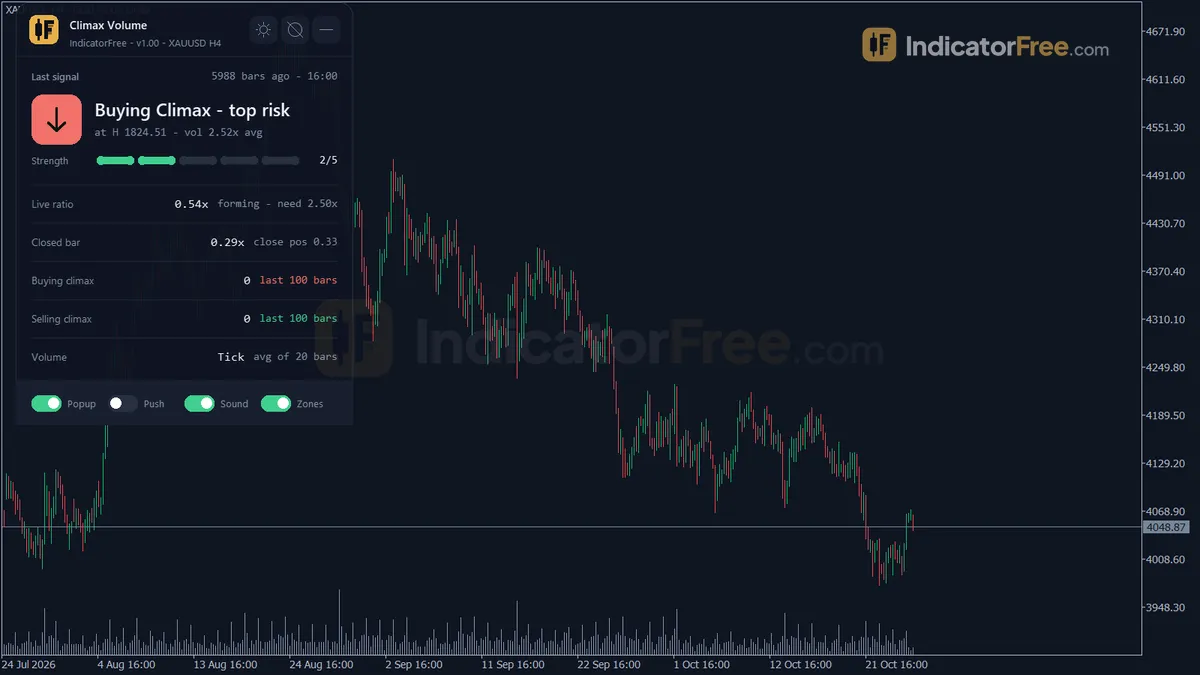
- Repainted
- 0 / 13
- Signals / week
- ≈ 1
- Tested on
- EURUSD M15
- Tested
- 2026-10-05
Overview
Climax Volume is a free MT5 indicator that puts an arrow on your main chart when one closed bar has a volume spike, makes a new price extreme and ends a one-way run. A buying climax forms at a top and a selling climax at a bottom. In the Lab's EURUSD M15 test, 69.3% of its 13 signals moved 1 ATR in the signal's direction before they moved 1 ATR against it.
It helps you if you read reversals with volume and want the chart to flag exhaustion bars, so you don't have to scan every volume spike yourself.
What Climax Volume draws on your chart
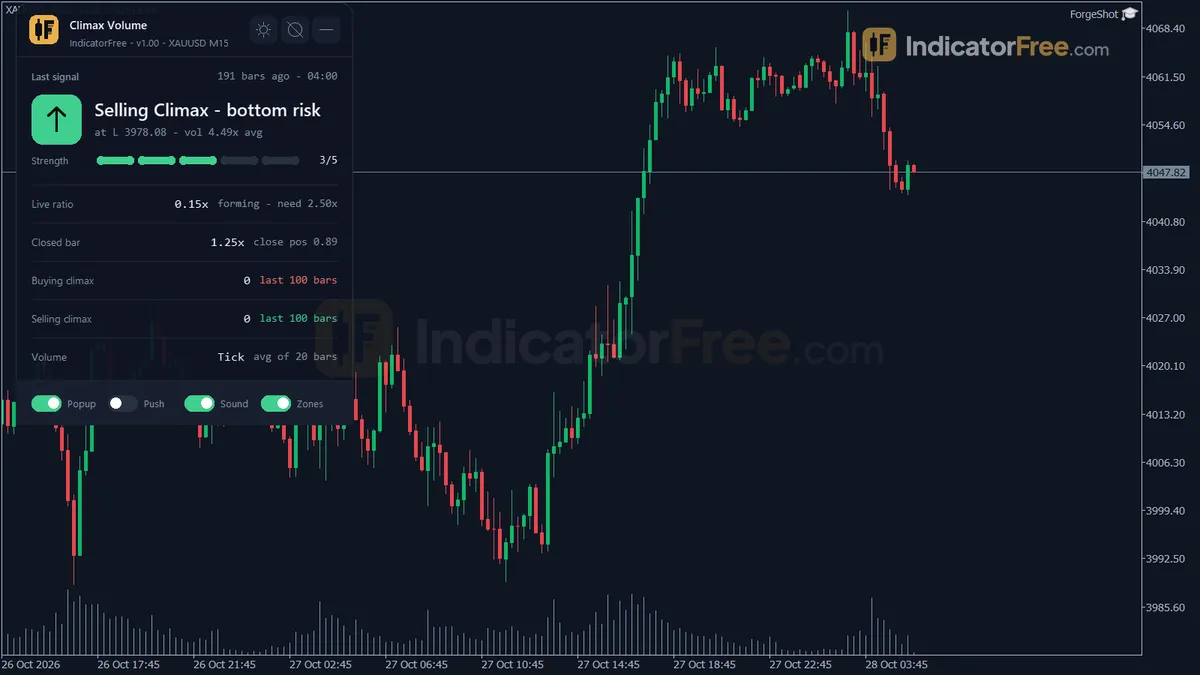
In Volume Spread Analysis and Wyckoff reading, a climax is a bar of very heavy volume at the end of a run. It often marks the moment the last late buyers or sellers rush in. The tool looks for that bar and draws four things on the price chart. It does not open a separate subwindow.
- Buying Climax arrow: a possible top. The signal points down.
- Selling Climax arrow: a possible bottom. The signal points up.
- Climax Zone: a thin rectangle at the extreme of each climax bar. It marks the price where the climax happened.
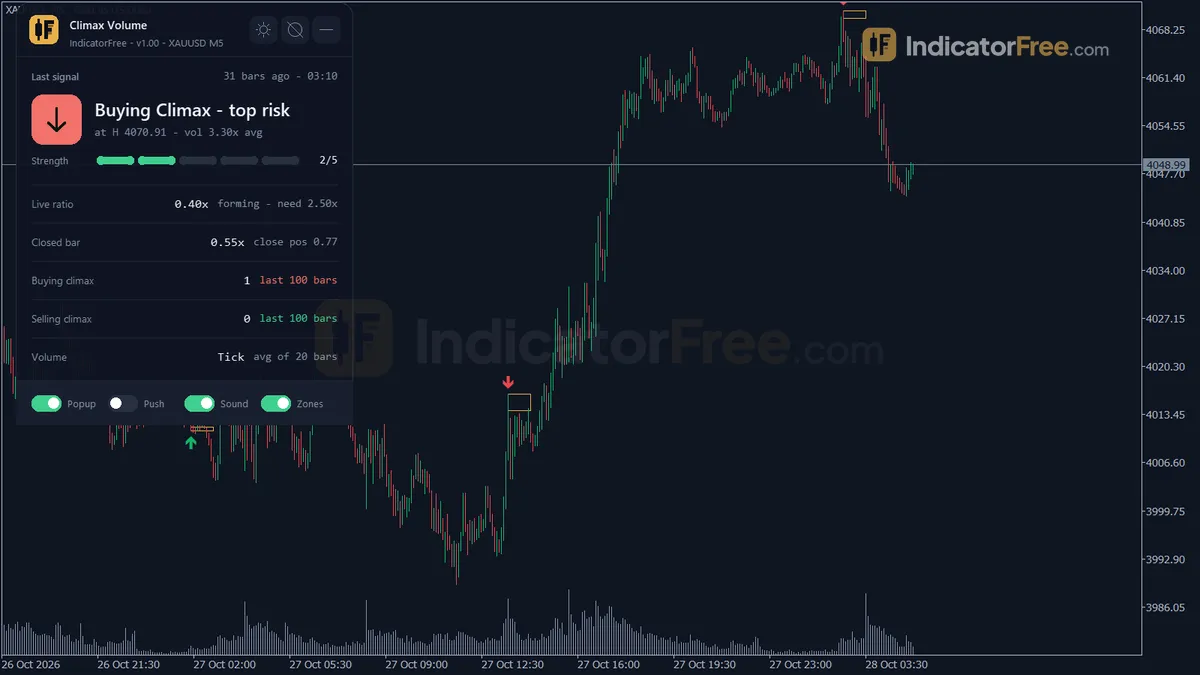
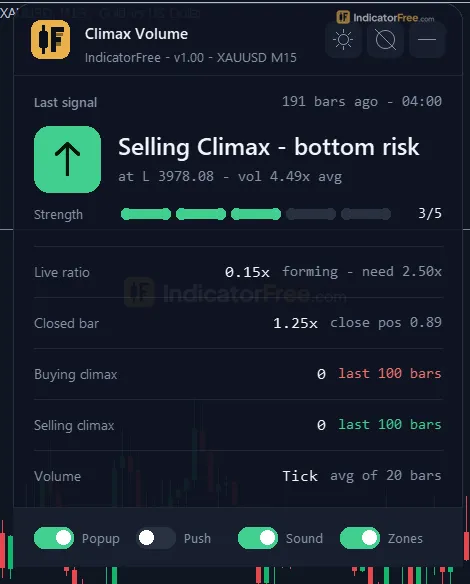
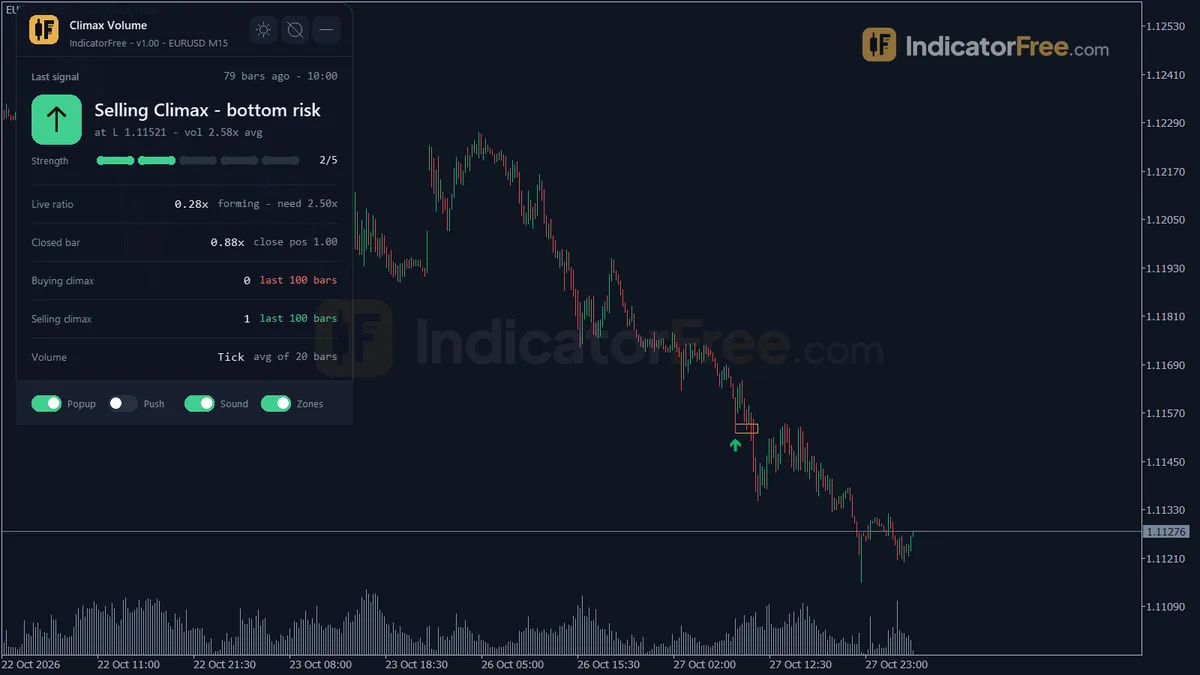
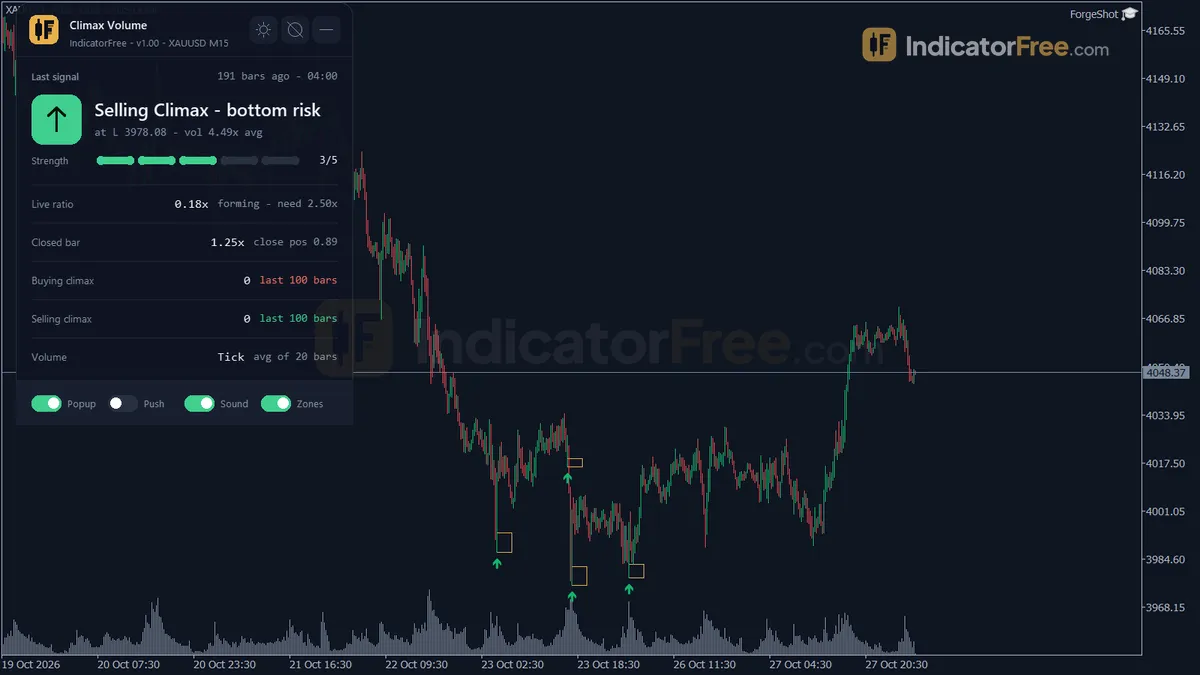
- Climax panel: shows the last climax type, its price and how many bars ago it fired. It also shows the volume ratio of the live bar and of the last closed bar, the buy and sell climax counts over recent bars, the volume source and the optional higher-timeframe confirm.
How the Lab tested it
The Lab tested version 1.00 (98.1 KB) on MT5 build 6230 on 2026-10-05. The test ran on EURUSD M15 from 2026-07-06 to 2026-10-02 using Raw Trading Ltd real ticks.
Repaint check: the Lab logged every arrow as it appeared and then compared the log with the finished chart. 0 of 13 signals changed and the largest arrow delay was 0 bars. An arrow appears once its bar closes, and it stays where it was drawn.
Follow-through check: for each arrow, the Lab recorded whether price first moved 1 ATR in the signal's direction or 1 ATR against it. ATR (Average True Range) is the bar's typical size, so 1 ATR is a move of one normal bar.
What the numbers mean for you
The chart below splits the result by arrow type.
- Overall, 69.3% of 13 signals. That is better than a coin flip, but 13 signals on one pair over about three months is a small sample. Treat it as a first read, not as proof.
- Buying Climax: 55.6% of 9 signals. That is close to a coin flip. A top arrow on its own is a weak reason to sell.
- Selling Climax: 100% of 4 signals. Four signals are too few to trust. One loser would drop the figure to 75%.
- Median 1 bar to the hit. When a climax plays out, it usually does so on the very next bar. If price does nothing for several bars, the signal is going stale.
- 0% left with no hit after 20 bars. Every signal reached 1 ATR one way or the other within 20 bars. Climax bars come before fast moves, though not always in the signal's direction.
- About 1 signal per week (0.7 Buying Climax, 0.3 Selling Climax). This is a rare-event tool, not a constant stream of entries.
Who it is for
It suits swing and intraday traders who already trade reversals and want a strict, rule-based exhaustion flag at the end of a move. Scalpers who want several setups a day, and traders who only follow trends, will get little from it.
How it works
- 1Takes volume per bar, tick or real, and compares it with the average of the previous bars.
Volume ratio = Volume / average Volume of previous VolAvgPeriod barsInputs: VolumeSource, VolAvgPeriod - 2Requires a volume spike: the ratio must reach the climax multiplier.
Spike if Volume ratio >= ClimaxMultiplierInputs: ClimaxMultiplier - 3The bar must be the highest high or lowest low of the window, after mostly rising or falling closes.
Extreme over PriceExtremePeriod bars | at least TrendMinRatio x TrendRunBars closes in trend directionInputs: PriceExtremePeriod, TrendRunBars, TrendMinRatio - 4Optionally needs a reversal candle: a weak close after a rally, or a strong close after a drop.
Close position = (Close - Low) / (High - Low) | sell if <= WeakCloseThreshold, buy if >= 1 - WeakCloseThresholdInputs: RequireReversalCandle, WeakCloseThreshold - 5Marks a sell or buy arrow, draws a zone from the bar's extreme, optionally checking volume on a higher timeframe.
Zone depth = ZoneDepth x bar rangeInputs: ZoneDepth, UseMTFConfirm, ConfirmTimeframe
Specifications
- Platform
- MetaTrader 5
- Version
- 1.00
- Type
- Indicator
- Window
- Main chart
- Draws
- 2 arrows, 1 zone, 1 panel
- Alerts
- popup, push, sound
- Repaints
- No (0 of 13 signals changed)
- Inputs
- 25
- Tested on
- MT5 build 6230 · 2026-10-05
Repaint test
No repaint detected. In a 6 Jul 2026 – 2 Oct 2026 test on EURUSD M15 (Raw Trading Ltd real ticks), 13 signals were logged at bar close and re-read at the end of the test: 0 changed. Arrows print on the bar that closes the signal, with no delay.
IndicatorFree — tested 2026-10-05 · MT5 build 6230 · Raw Trading Ltd real ticks. Results come from historical data, not live trading, and do not guarantee future results.
Signal statistics
Over 6 Jul 2026 – 2 Oct 2026 on EURUSD M15, the indicator printed 13 arrows. After 69.3% of them, price moved 1×ATR(14) in the arrow's direction before moving 1×ATR against it (median 1 bars). 0% reached neither level within 20 bars.
This measures price movement after the arrow, not a trading result. It includes no spread, commission, stop loss or position sizing.
Small sample — not enough to draw a conclusion.
What it draws
- Arrows (Buying Climax) from buffer 0, drawn on the closed bar.
- Arrows (Selling Climax) from buffer 1, drawn on the closed bar.
- Rectangles (Climax Zone) drawn as chart objects, not buffers — they are not readable by iCustom() in an EA.
- An on-chart panel (Climax); values shown in the panel are not exposed as buffers.
Inputs
| Input | Default | What it does |
|---|---|---|
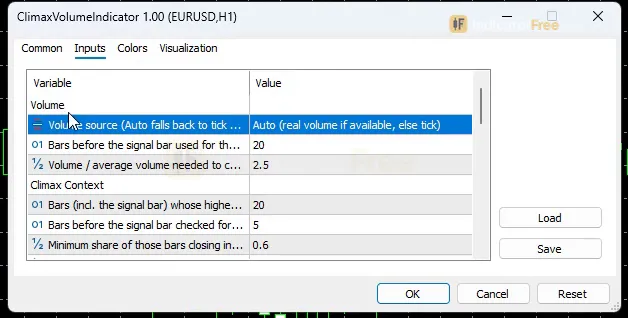
| VolumeSource | Auto (real volume if available, else tick) | Volume source (Auto falls back to tick when real volume is all zero) |
| VolAvgPeriod | 20 | Bars before the signal bar used for the average volume (10-100) |
| ClimaxMultiplier | 2.5 | Volume / average volume needed to count as a climax (1.5-6.0) |
| PriceExtremePeriod | 20 | Bars (incl. the signal bar) whose highest high / lowest low it must be (10-100) |
| TrendRunBars | 5 | Bars before the signal bar checked for a one-way run (3-20) |
| TrendMinRatio | 0.6 | Minimum share of those bars closing in the run direction (0.4-1.0) |
| RequireReversalCandle | true | Require a weak close at a top / strong close at a bottom |
| WeakCloseThreshold | 0.4 | Close position in the bar range that counts as weak (0.2-0.5) |
| UseMTFConfirm | false | Check the volume ratio on a higher timeframe (panel and alert label only) |
| ConfirmTimeframe | H1 | Higher timeframe used for the confirm label |
| ShowZones | true | Draw a thin box at each climax extreme |
| MaxZonesShown | 10 | Maximum climax boxes kept on the chart; the oldest is deleted (3-50) |
| ZoneExtendBars | 10 | Bars each box extends to the right |
| ZoneDepth | 0.25 | Box thickness as a fraction of the climax bar range |
| CountBars | 100 | Closed bars used for the buy / sell climax counts on the panel |
| EnableAlerts | true | Master switch for all alerts |
| AlertPopup | true | Popup alert on a new climax |
| AlertPush | false | Push notification on a new climax |
| AlertSound | true | Play a sound on a new climax |
| AlertSoundFile | alert.wav | Sound file for the sound alert |
| AlertCooldownSec | 30 | Minimum seconds between two alerts for this symbol and timeframe (5-300) |
| ShowPanel | true | Show the on-chart panel |
| PanelScale | 1 | Panel size multiplier (DPI is applied automatically) |
| Theme | Dark | Chart color theme |
| RestoreTheme | true | Restore the original chart colors when removed |
How to read it
How one climax arrow forms
An arrow prints only when all of these conditions agree on the same closed bar. For a Buying Climax:
- Volume spike: the bar's volume is at least ClimaxMultiplier (default 2.5) times the average of the previous VolAvgPeriod (20) bars.
- Price extreme: its high is the highest high of the last PriceExtremePeriod (20) bars, counting the signal bar.
- Run into it: at least TrendMinRatio (0.6) of the prior TrendRunBars (5) bars closed higher than the bar before them, and price rose overall across that run.
- Weak close (when RequireReversalCandle is on): the bar closes in the lower WeakCloseThreshold (0.4) part of its own range.
A Selling Climax is the mirror image: the lowest low, a run of lower closes with an overall fall, and a close in the upper part of the range.
The picture below shows how a typical Buying Climax looks: an up run, one wide bar that sets a new high but closes near its low, the arrow above it and the Climax Zone at the top. You can't see the volume spike on price candles. It is the first condition in the list above.
Reading the arrows, zones and panel
- Buying Climax arrow: heavy volume met a new high, and the bar could not hold its gains. That points to selling pressure at the top. Look for a short, not a buy.
- Selling Climax arrow: heavy volume met a new low, and the bar closed strong. That points to buying pressure at the bottom. Look for a long.
- Climax Zone: the price area of the climax extreme. While price stays on the far side of it, the climax idea is still alive. ShowZones turns the boxes on or off. ZoneExtendBars (10) sets how far each box runs to the right, and ZoneDepth (0.25) sets its thickness as a share of the climax bar's range. Once there are more than MaxZonesShown (10) boxes, the oldest one is deleted.
- Panel: check the live volume ratio here. It tells you whether the bar that is forming is close to the ClimaxMultiplier level before it closes. CountBars (100) sets how many closed bars the buy and sell counts cover.
Inputs to change first
| Input | Default | Range | What changing it does |
|---|---|---|---|
| VolumeSource | Auto | Auto / real / tick | Auto uses real volume and falls back to tick volume (the count of price updates) when real volume is all zero. |
| ClimaxMultiplier | 2.5 | 1.5–6.0 | This is the main filter. A higher value needs a bigger spike, so you get fewer, more extreme arrows. A lower value gives more arrows. |
| PriceExtremePeriod | 20 | 10–100 | A larger value means the bar must top a longer stretch of history, so only major highs and lows qualify. |
| TrendRunBars / TrendMinRatio | 5 / 0.6 | 3–20 / 0.4–1.0 | Sets how clean the run into the climax must be. Raising TrendMinRatio to 1.0 requires every bar in the run to close in the run's direction. |
| RequireReversalCandle / WeakCloseThreshold | on / 0.4 | on/off, 0.2–0.5 | Turning the filter off allows climaxes without a rejection close. A lower threshold demands a weaker close at a top. |
| VolAvgPeriod | 20 | 10–100 | Sets the baseline that the spike is measured against. A longer period gives a steadier average. |
| UseMTFConfirm / ConfirmTimeframe | off / H1 | any timeframe | Adds the higher-timeframe volume ratio to the panel and the alert text. |
Where alerts appear
EnableAlerts is the master switch. On a new climax you can get a popup in the terminal (AlertPopup, on), a sound (AlertSound, on, file set by AlertSoundFile) and a push message to the MetaTrader mobile app linked to your terminal (AlertPush, off by default).
Decision rule for each arrow
This rule is a suggestion, not a Lab result.
- Buying Climax: consider a short at the next bar's open only if that bar has not traded back above the Climax Zone. Put your invalidation above the zone. Skip the arrow if a later bar closes above the climax high.
- Selling Climax: consider a long at the next bar's open only if price is still above the zone. Put your invalidation below it. Skip the arrow if a later bar closes below the climax low.
- Both: the Lab saw a median of 1 bar to the hit, so a climax that has not moved price within a few bars has lost its edge. Don't keep holding and hoping.
Common misreads and how to spot them
- "A huge volume bar with no arrow is a bug." No. The spike must line up with a new 20-bar extreme, a qualifying run and, by default, a rejection close. A spike in the middle of a range, or a strong close at a top, is filtered out on purpose.
- "The higher-timeframe confirm filters the arrows." It does not. UseMTFConfirm only adds a label to the panel and the alerts. Arrows still print without it, so read the label yourself before you act.
- "A high live ratio on the panel means an arrow is coming." Only the closed bar counts. A bar can spike halfway through and finish below the multiplier.
Installation
- 1Download ClimaxVolumeIndicator.ex5 from the button above (Google Drive).
- 2In MetaTrader 5: File → Open Data Folder → MQL5 → Indicators. Copy ClimaxVolumeIndicator.ex5 there.
- 3Restart MT5 or right-click Indicators in Navigator → Refresh.
- 4Drag Climax Volume onto a chart. For push alerts, enable "Allow push notifications" under Tools → Options → Notifications.
- Tested on MT5 build 6230.
Key terms and guides
- Tick volume
- Tick volume is the number of price changes (ticks) a price feed records during one candle. In forex, where no central exchange reports how much was traded, it is the usual way to judge how active the market was.
- Volume spike
- A volume spike is a candle whose traded volume is far above its recent average, often two to three times or more. It shows that activity suddenly jumped at that price, which can confirm a breakout or mark the end of a move.
- Lot size
- Lot size is the volume of a trade, counted in lots. In forex, one standard lot is 100,000 units of the base currency, and the lot size you choose sets how much money each pip of price movement is worth.
- Price Swing
- A price swing is one move in a single direction, from a turning low to a turning high or the reverse. You measure it in pips from one swing point to the next.
More on this subject: Volume & order flow guide, terms and tools
User reviews
No reviews yet. Members who download the tool can review it here.
Sign in and download the tool to review it.
Build a checklist with it
Climax Volume does one job on the chart: entry signal. Put it on the same chart as the tools below and the IndicatorFree panels merge into one checklist card, ordered trend, zone, signal, risk.
- Trend / contextEMA Lead GaugeClimax Volume tells you when; this tells you which way the market leans, so you can skip signals against it.
- Zone / levelLiquidity SweepShows the zones and levels, so you can see whether a signal from Climax Volume fires at a level worth trading.
The Lab has not tested these combinations. Each tool is tested on its own; the card only lines up what each one says. Free members get 2 new tools a day. If one has to wait until tomorrow, install BlackBox to raise the limit to 5 a day (20 on a live account).
FAQ
Does Climax Volume repaint?
No repaint detected. In a 6 Jul 2026 – 2 Oct 2026 test on EURUSD M15 (Raw Trading Ltd real ticks), 13 signals were logged at bar close and re-read at the end of the test: 0 changed. Arrows print on the bar that closes the signal, with no delay.
Can I use Climax Volume in an EA?
Yes. Read buffer 0 (Buying Climax) with iCustom() on bar 1 — the last closed bar.
Why can’t my EA read the zones?
Zones and the panel are chart objects, not indicator buffers, so iCustom() does not return them.
How do I get alerts on my phone?
Enter your MetaQuotes ID under Tools → Options → Notifications, tick "Enable push notifications", and keep the push alert input on.
Does it work on other pairs?
Tested on EURUSD only; other symbols not tested.
Can I use Climax Volume on gold, indices or stocks?
Yes, it runs on any MT5 symbol. With VolumeSource on Auto, it uses real volume where your broker provides it and tick volume where it doesn't. The Lab results cover only EURUSD M15, so check a few months of history on your own symbol before you rely on it.
Why do I get only one alert when several charts fire close together?
AlertCooldownSec (default 30, range 5–300) sets the minimum gap between two alerts for the same symbol and timeframe. Charts with a different symbol or timeframe alert separately. Lower the value if you are missing alerts you expected.
Can an Expert Advisor read the climax arrows?
Yes. Buying Climax arrows are in buffer 0 and Selling Climax arrows are in buffer 1. An arrow prints only on a closed bar and stayed fixed in the Lab's repaint test, so an EA should read the last closed bar, not the live one.
Why did my chart colors change, and will they come back?
The Theme input (default Dark) restyles the chart so the arrows, zones and panel stay readable. With RestoreTheme on (the default), your original colors come back when you remove the indicator. Use PanelScale if the panel looks too small or too large on your screen.
Changelog
- 1.00Initial release: VSA/Wyckoff-style climax detection requiring a volume spike, an N-bar price extreme, and a qualifying prior trend run to agree on the same closed bar, with an optional weak/strong-close reversal filter,. · 2026-10-09
Final verdict
Lab verdict on Climax Volume
This is a strict tool that seldom fires, and its arrows held up cleanly in the repaint test. You can trust that what you see on history is what you would have seen live. Its signals are also followed by a fast move, usually on the next bar. That makes the Climax Zone a useful place to set invalidation tightly.
The weak spot is the Buying Climax. On EURUSD M15 it was barely better than chance. The perfect Selling Climax score comes from too few signals to mean much. The whole test covers one pair and one timeframe. Until more data exists, treat every arrow as a prompt to look closer, not as an entry.
What it cannot do
- It cannot tell you how far a reversal will run. The Lab measured only whether price moved 1 ATR in the signal's direction or against it first.
- It cannot read true exchange volume when your feed has none. In that case it works on tick volume, which counts price updates, not traded size.
- It does not trade for you, and it gives no stop or target.
The comparison below shows when the tool fits your trading and when it doesn't.
- –You trade reversals at the end of stretched moves
- –You can wait days for a setup
- –You confirm the arrow with your own read of the next bar
- –You want an exact level (the Climax Zone) for invalidation
- –You want several entries a day
- –You only trade with the trend
- –You plan to take every top arrow without a filter
- –You expect the higher-timeframe confirm to block arrows
Settings to start with
Start with the defaults so your chart behaves like the tested build. Change one input at a time.
- Too many arrows on a fast chart: on M5, try ClimaxMultiplier 3.0. This was not tested by the Lab, so compare it with the default 2.5 on the same history.
- You want only major tops and bottoms: on H1, try PriceExtremePeriod 50. This was not tested by the Lab, so compare it with the default 20.
- Keep RequireReversalCandle on while you learn the tool. It removes the spikes where price kept pushing through the high or low.
A tool to try alongside it
To add a level that shows who controls price after the climax, try Anchored VWAP anchored at the climax bar. Price staying on the signal's side of that VWAP adds weight to the reversal. This is an idea to try: the Lab has not tested the pair.