









Pending order
Also called Entry order, Working order
A pending order is an instruction to buy or sell automatically when price reaches a level you choose, not at the current price. The four types are buy limit, sell limit, buy stop and sell stop.
With a pending order you plan the entry, stop loss and target while you are calm, and then you can step away. If price never reaches your level, nothing happens and none of your money is at risk. If you pick the wrong type, though, the order can fill straight away or at a price you never wanted.
Buy limit, sell limit, buy stop, sell stop: where each one sits
Every trade starts with an order, which is an instruction to buy or sell. A market order fills now at the current price. A pending order waits for a price you set.
Two questions decide which type you need. Is your level above or below the current price? Do you expect price to break through that level or turn back from it?
A limit order buys lower than now or sells higher than now. You use it when you expect price to reach the level and turn. A stop order buys higher than now or sells lower than now. You use it when you expect price to break through and keep going. The picture below shows all four around the current price.
Checklist: picking the right pending order
- Mark the price where you want to get in. If that is the current price, use a market order instead.
- Check whether the level is above or below the current price.
- Decide what you expect there: a break that keeps going (stop order) or a turn (limit order).
- Combine the two answers. Above and a break means a buy stop. Above and a turn means a sell limit. Below and a turn means a buy limit. Below and a break means a sell stop.
- Attach a stop loss and a take profit before you send the order. Then choose how long it stays live: until you cancel it, or until a set expiry time.
- Work out the lot size from the stop distance.
- Check that no major news is due before the expiry.
Real example: a buy stop above a 20-candle high on EURUSD
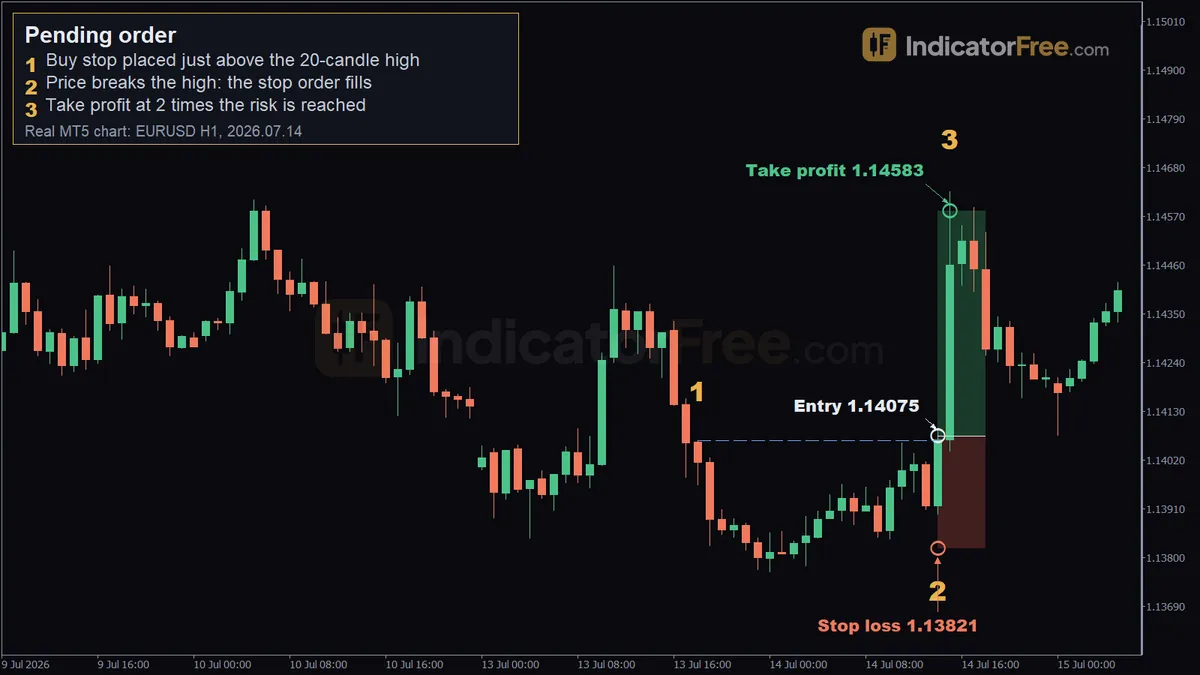
The chart at the top of the page shows a past EURUSD trade on the 1-hour chart. It shows how a pending order behaves. It is not a prediction.
Marker 1: the trigger level. The highest high of the last 20 candles was 1.14065 (13 July 2026, 18:00). The buy stop was placed at 1.14075, one pip above it. That way a simple touch of the high does not fill the order. Price has to trade through it.
Marker 2: the fill. On 14 July 2026 at 14:00, price broke the high and the order filled at 1.14075. The stop loss at 1.13821 and the take profit at 1.14583 were already attached to the order.
Marker 3: the target. By 15:00 the same day, price had traded up to 1.14626. That is past the target, so the take profit closed the trade.
Here is how the distances work out. Risk: 1.14075 − 1.13821 = 0.00254, about 25 pips. Reward: 1.14583 − 1.14075 = 0.00508, about 51 pips. That is roughly 2 to 1.
Three pending order setups with entry, stop and target
Buy stop above a range high
Using the trade above, work out the order size from the stop distance, not from a feeling. The illustrative example below assumes a $10,000 account that risks 1% per trade on a USD-quoted pair like EURUSD. On such a pair, one standard lot (100,000 units) is worth $10 per pip.
At 0.40 lots, getting stopped out costs about $100 and reaching the target pays about $204. Redo this sum every time the stop distance changes.
Sell stop below a range low
This is the mirror image. Entry: a sell stop a pip or two below the lowest low of the range. Stop loss: above the middle of the range, or above the last swing high inside it. Target: twice the stop distance below the entry.
To place it, measure the pips from your entry up to your stop loss. Then count twice that many pips down from the entry and set the take profit there.
Buy limit at a level you expect to hold
Entry: a buy limit at support below the current price, for example the top of a range that price has just broken out of. Many traders also use order blocks as limit levels; that concept has its own entry. Stop loss: the spread plus a pip or two below that level, so a clean break proves the idea wrong. Target: the recent high, or twice the risk. Cancel the order if price closes back inside the old range before it fills. A sell limit is the same setup flipped, placed at resistance above the price.
What makes a pending order valid, weak or broken
A valid pending order sits at a level you can explain. It carries a stop loss and a target. Its expiry matches the setup.
It is weak when the level is arbitrary, when it sits exactly on an obvious high or low with no buffer, or when it is so close to price that ordinary spread movement sets it off.
It is broken when the type does not match where the level is. A buy limit above the current price, or a buy stop below it, cannot wait. The platform either rejects it or fills it at once.
A common misread: most charts draw the bid price, but buy orders fill at the ask, which sits above the bid by the spread. So your buy order can fill, or miss, even though the candle on screen never seems to touch your line. The stop loss on a short position is a buy order too, so the ask triggers it, not the candle. Sell orders use the bid, so they trigger where the chart shows. The levels below reuse two prices from the example above, purely as an illustration of a buy stop set off this way.
Once a stop order triggers, it becomes a market order. In a fast move or a weekend gap it can fill past your price. A limit order never fills at a worse price than yours, but it may not fill at all.
When pending orders work well, and when to skip them
Pending orders work well at clear levels, such as range highs and lows or support that has already held. They also suit times when you cannot watch the screen and want the plan carried out exactly.
Skip them just before high-impact news, when both sides of a range can trigger. Skip them in choppy ranges with no clean edges, too. If you would not take the trade at market once price reached your level, don't place the order.
| Pros | Cons |
|---|---|
| You get in at your planned price, without chasing | The order may never fill, and you miss the move |
| Stop loss and target are set in advance, so you need not sit at the screen | A forgotten order can fill after your view has changed |
| Limit orders fill at your price or better | Breakout stops also fill on false breaks |
Practical tips for pending orders
- Leave a pip or two beyond the level, plus the spread on buy orders (see the misread above).
- Set an expiry. If the setup is built on today's candles, let the order expire at the end of the day.
- If you bracket a range with a buy stop above and a sell stop below, delete the other order as soon as one fills. Otherwise a reversal can open a second, opposite trade.
- Review your pending orders every session and delete any whose reason has gone.
FAQ
Does a pending order use margin before it fills?
On most forex accounts, no. Margin is set aside only when the order fills and becomes an open position. Check your account terms to be sure.
How do I cancel a pending order?
Delete it from the list of working orders before it fills. Cancelling costs nothing. Once it has filled, it is an open position, so you close the trade instead.
Can I edit a pending order after placing it?
Yes, as long as it has not filled. You can move the entry price, the stop loss, the take profit or the expiry. Once it fills, it is an open position, and only its stop loss and take profit can be changed.
Do pending orders work the same way in the stock market?
The logic is the same: limit orders and stop orders. They normally trigger only during the hours your broker trades that stock, and gaps at the open are more common than in forex, so stop orders on shares slip more often.