Average Daily Range
Free MT5 Average Daily Range indicator: ADR bands, Day Open line, touch arrows and a gauge panel. Lab repaint test: 0 of 31 arrows changed.
- Repainted
- 0 / 31
- Signals / week
- ≈ 2.3
- Tested on
- EURUSD M15
- Tested
- 2026-10-10
Overview
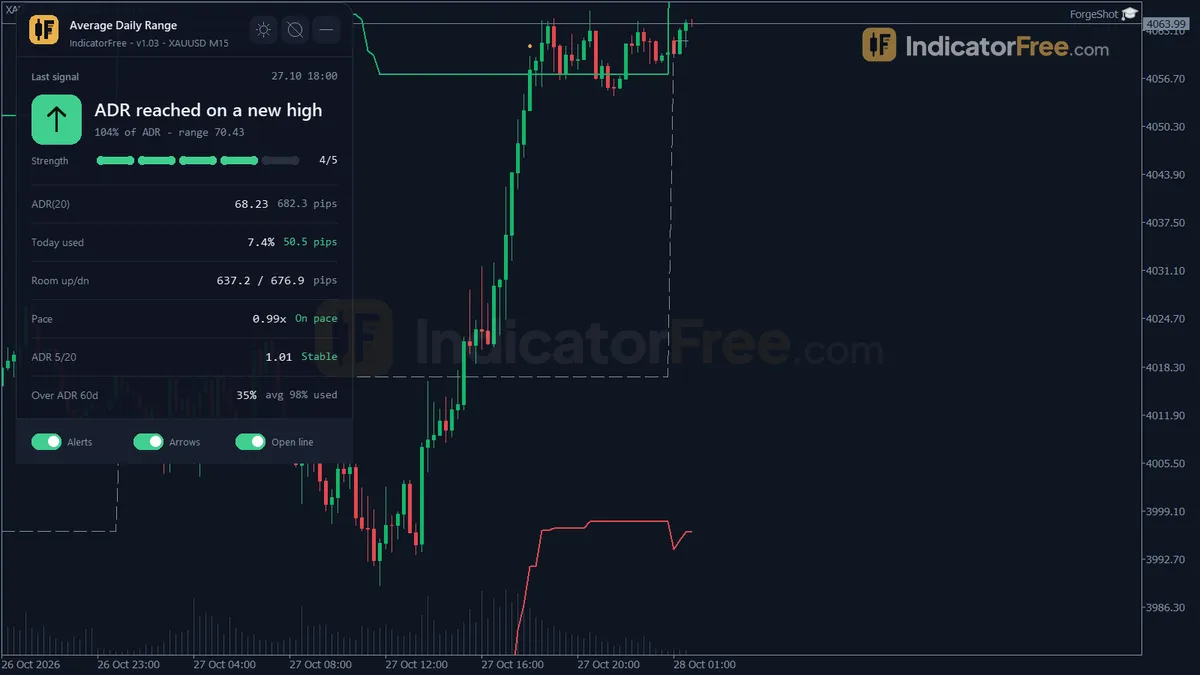
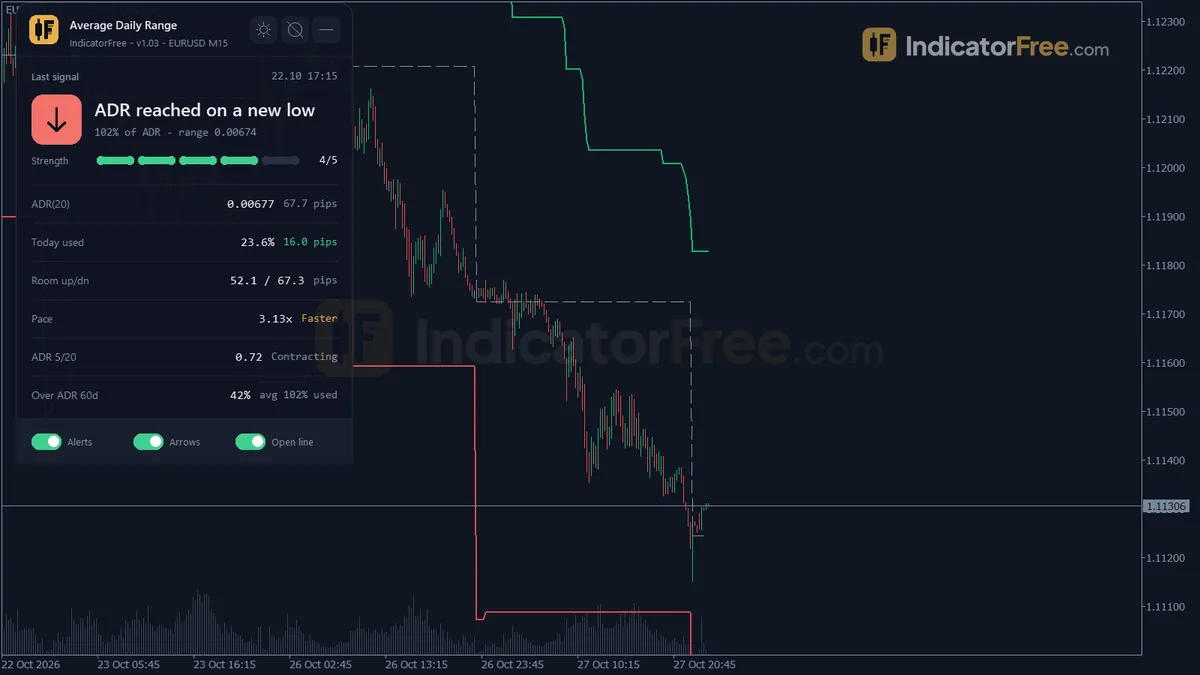
The Average Daily Range indicator for MT5 draws on your price chart. It adds two ADR bands, a Day Open line, Touch High and Touch Low arrows, and a gauge panel that shows how much of the average daily range today has already used. In the Lab's repaint test on EURUSD M15, 0 of 31 arrows changed or moved after their bar closed.
It helps intraday traders answer one question before they enter or set a target: does today still have room to move?
What it puts on your chart
The average daily range (ADR) is the average high-to-low distance of the last several closed daily candles. Here that is the last 20 by default, set by ADRPeriod. The indicator turns that one number into five things you can see:
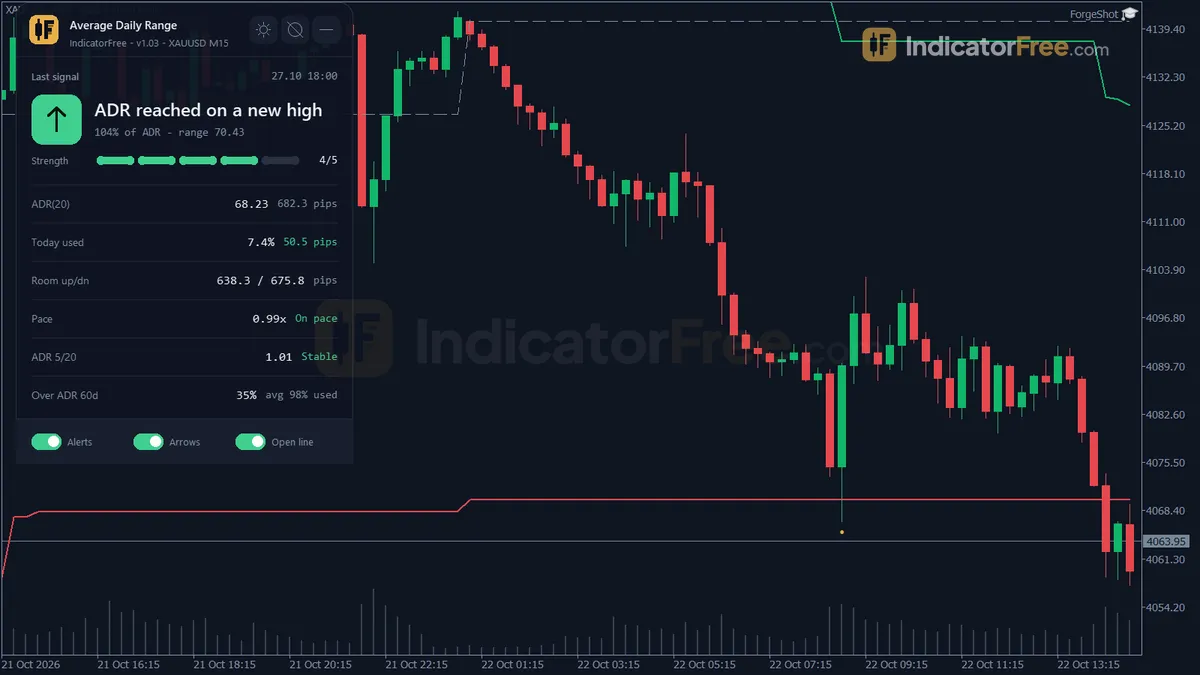
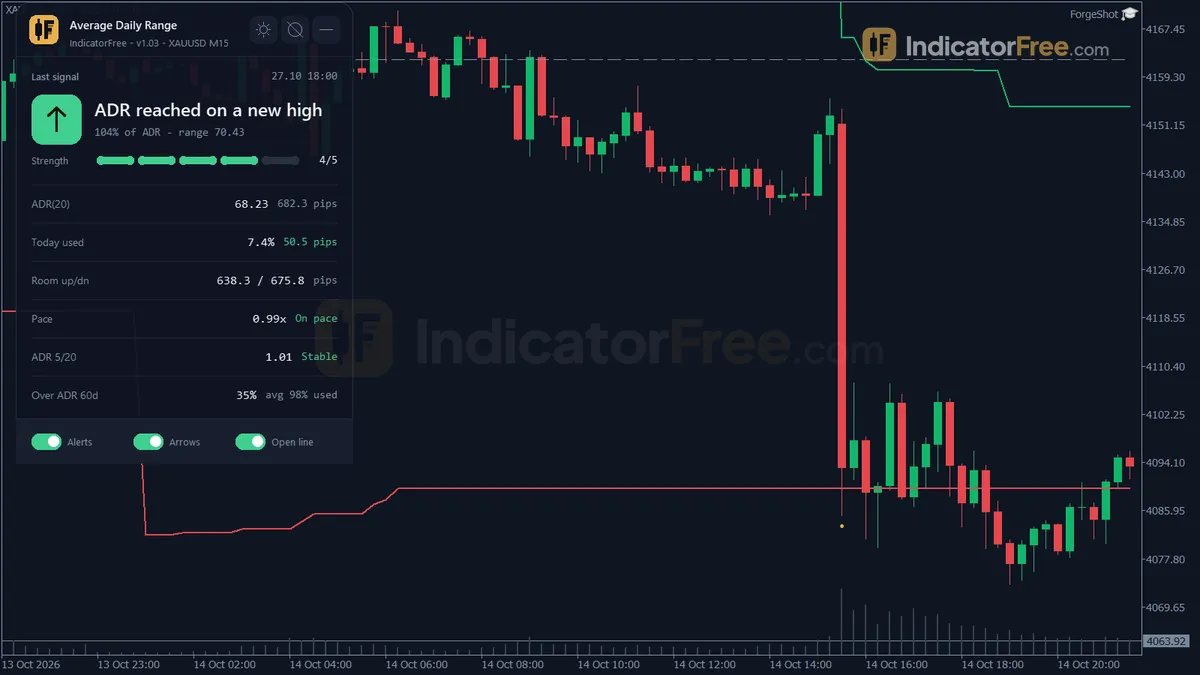
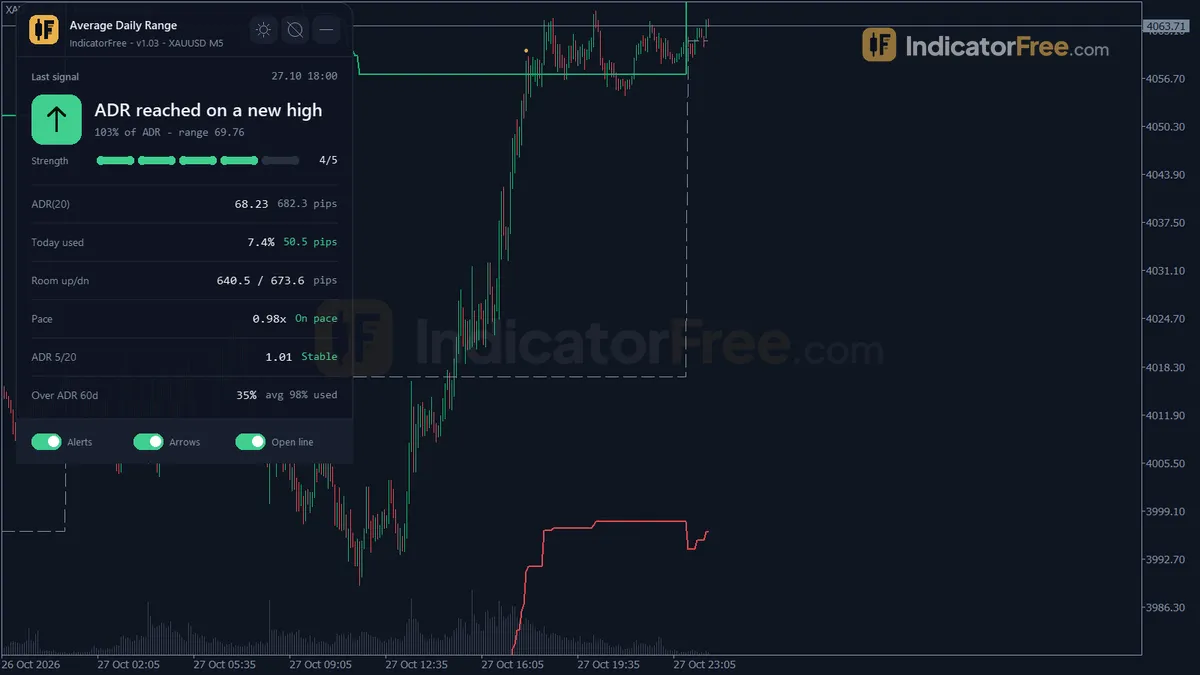
- ADR High (buffer 0) and ADR Low (buffer 1). These lines mark how far the day can still stretch up or down before its range equals the ADR.
- Day Open (buffer 2). A line at the open of the current daily candle.
- Touch High (buffer 3) and Touch Low (buffer 4). Arrows that mark when the day range reaches the ADR. The exact rule is explained under How it works.
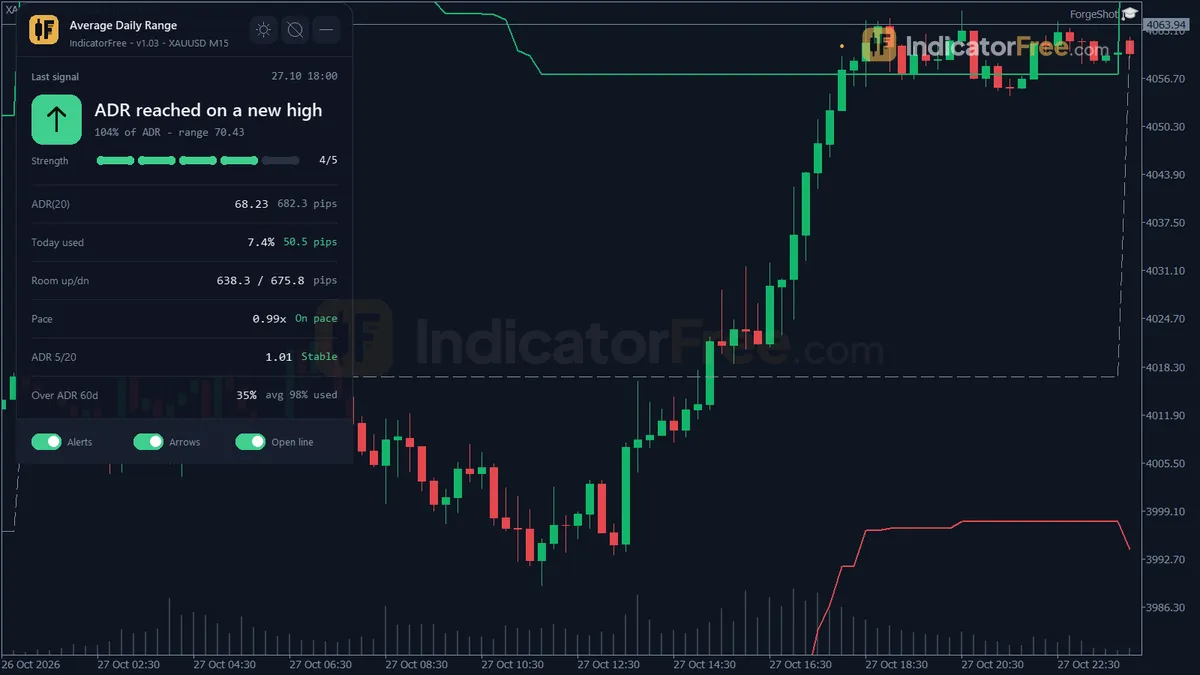
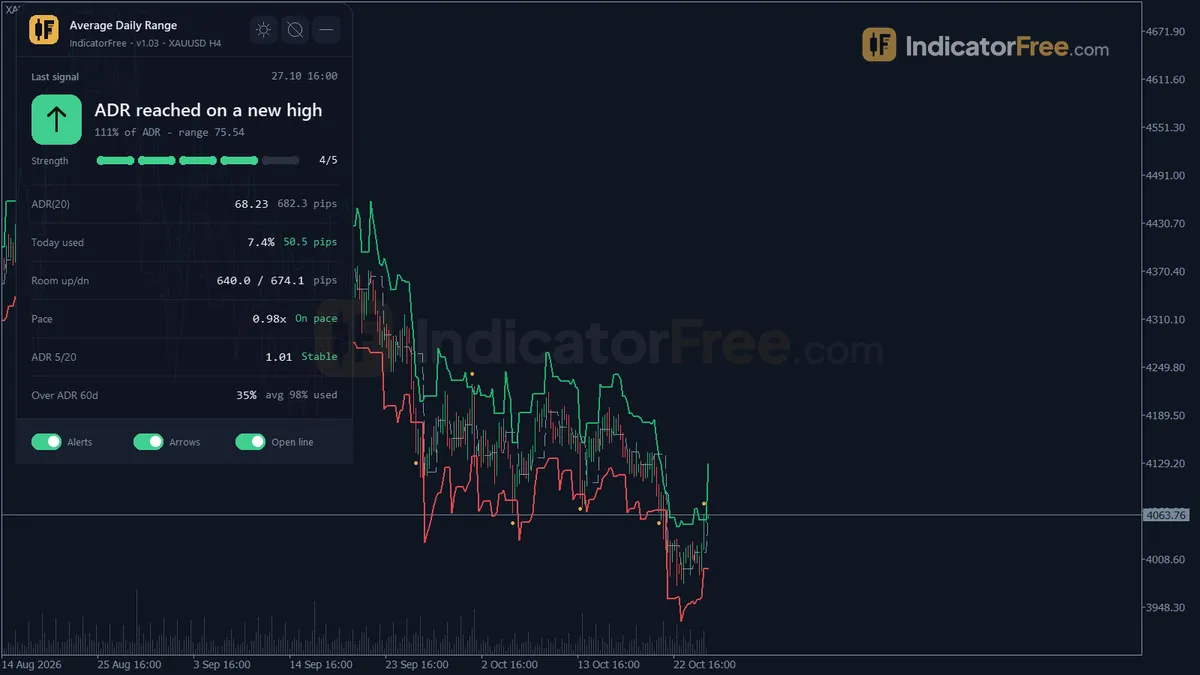
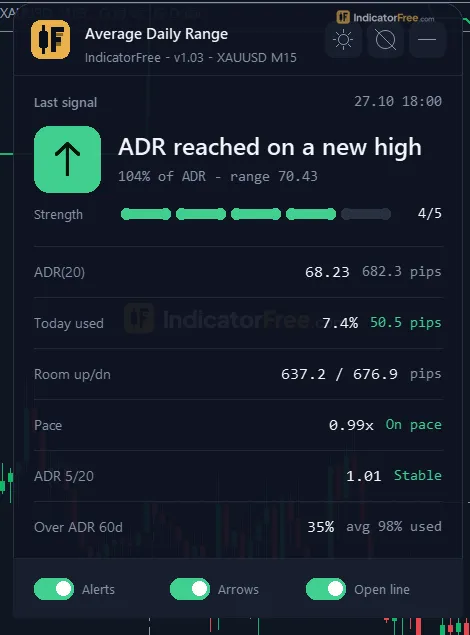
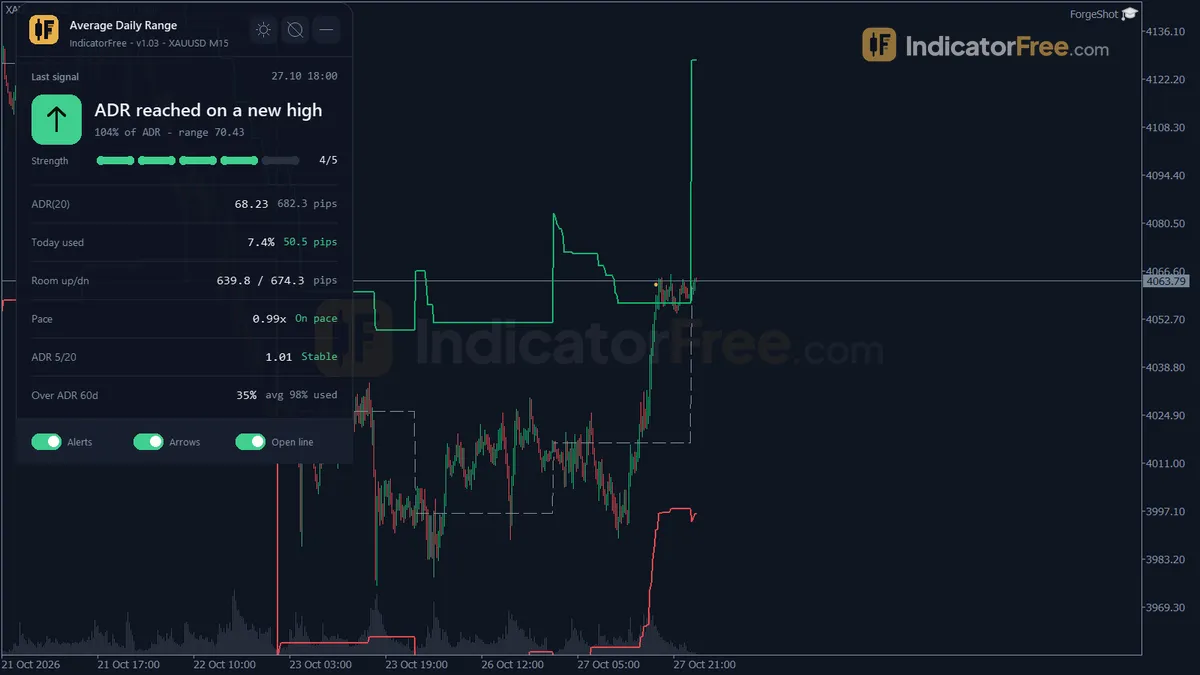
- ADR Gauge. A panel that shows the ADR value, the percent used today, the room left to each band, the pace compared with the time of day, the fast/slow ADR ratio, and how often recent days went past their ADR.
The tool runs in the main chart window, not a subwindow. It can alert you by popup, push notification or sound.
How the Lab tested it
The Lab tested version 1.03 on MT5 build 6230 on 2026-10-10. The repaint test replayed EURUSD M15 from 2026-07-10 to 2026-10-09 using real ticks from Raw Trading Ltd and logged every arrow as it printed. None of the 31 arrows moved or disappeared, and the maximum arrow delay was 0 bars.
Each arrow appears on the closed bar whose high (or low) first took the day range to the ADR, and it stays there. Arrows you see on history are the arrows you would have seen live.
What the signal numbers mean for you
The Lab also checked what price did after each of the same 31 arrows. In 61.3% of them, price reached a 1 ATR target before it moved 1 ATR the other way. The Lab's facts do not say whether that target was on the touched side (continuation) or the opposite side (a fade), so this number does not tell you which way to trade the arrow. 31 arrows is also a small sample, so treat the arrow as one input and not a system on its own.
Scale zoomed in to show the difference (bars do not start at zero).
The other two numbers matter just as much:
- Half the arrows resolved within a bar. Half of the arrows reached a 1 ATR target within 1 bar (Touch Low: 1.5). The other half took longer.
- Arrows rarely led to a dead market. Only 3.2% of arrows saw price reach neither 1 ATR target within 20 bars. For Touch High it was 6.7%, and for Touch Low it was 0.0%.
The two sides are too close, and the samples too small (15 and 16 arrows), to say that one side works better than the other.
Who it is for
It is built for day traders and intraday swing traders on forex, gold and similar markets (it sizes pips automatically; the Lab tested EURUSD only). If you often enter after the day has already made its move, or set targets the day has no range left to reach, the gauge shows you that before you click.
How it works
- 1Measures each closed daily bar's high-to-low range, then averages the last several days into the ADR.
ADR = average of (High - Low) over the last N closed daily barsInputs: ADRPeriod - 2Draws ceiling and floor: today's low plus ADR and high minus ADR, or day open plus/minus ADR.
Ceiling = Day Low + ADR, Floor = Day High - ADR (open mode: Day Open +/- ADR)Inputs: BandMode, ADRPeriod, MaxHistoryBars - 3Calculates percent of ADR used today, room left to each band, and pace against time elapsed in the day.
Used % = (Day High - Day Low) / ADR x 100, Pace = Used / share of day elapsedInputs: BandMode - 4Compares fast ADR to main ADR to label expanding or contracting, and counts past days that exceeded ADR.
Ratio = fast ADR / main ADR, expanding above 1.05, contracting below 0.95Inputs: ADRPeriodFast, ADRPeriod, StatsLookbackDays - 5Marks arrows when price reaches the ADR band and alerts once per day at warning and exceeded levels.
Alert when Used % reaches RoomWarnPercent, then again at RoomExceedPercentInputs: RoomWarnPercent, RoomExceedPercent
Specifications
- Platform
- MetaTrader 5
- Version
- 1.03
- Type
- Indicator
- Window
- Main chart
- Draws
- 3 lines, 2 arrows, 1 panel
- Alerts
- popup, push, sound
- Repaints
- No (0 of 31 signals changed)
- Inputs
- 16
- Tested on
- MT5 build 6230 · 2026-10-10
Repaint test
No repaint detected. In a 10 Jul 2026 – 9 Oct 2026 test on EURUSD M15 (Raw Trading Ltd real ticks), 31 signals were logged at bar close and re-read at the end of the test: 0 changed. Arrows print on the bar that closes the signal, with no delay.
IndicatorFree — tested 2026-10-10 · MT5 build 6230 · Raw Trading Ltd real ticks. Results come from historical data, not live trading, and do not guarantee future results.
Signal statistics
Over 10 Jul 2026 – 9 Oct 2026 on EURUSD M15, the indicator printed 31 arrows. After 61.3% of them, price moved 1×ATR(14) in the arrow's direction before moving 1×ATR against it (median 1 bars). 3.2% reached neither level within 20 bars.
This measures price movement after the arrow, not a trading result. It includes no spread, commission, stop loss or position sizing.
What it draws
- A line (ADR High) from buffer 0.
- A line (ADR Low) from buffer 1.
- A line (Day Open) from buffer 2.
- Arrows (Touch High) from buffer 3, drawn on the closed bar.
- Arrows (Touch Low) from buffer 4, drawn on the closed bar.
- An on-chart panel (ADR Gauge); values shown in the panel are not exposed as buffers.
Inputs
| Input | Default | What it does |
|---|---|---|
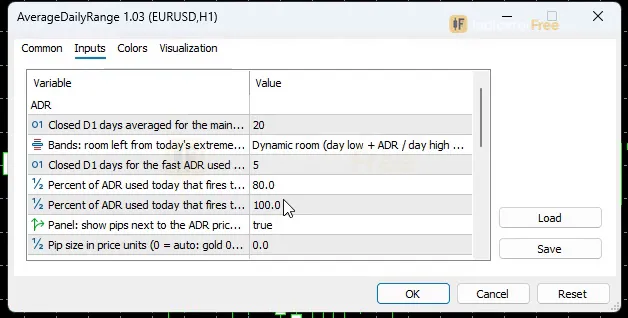
| ADRPeriod | 20 | Closed D1 days averaged for the main ADR (5-60) |
| BandMode | Dynamic room (day low + ADR / day high - ADR) | Bands: room left from today's extremes, or a fixed distance from the day open |
| ADRPeriodFast | 5 | Closed D1 days for the fast ADR used in the expanding/contracting ratio (3-30, below ADRPeriod) |
| RoomWarnPercent | 80 | Percent of ADR used today that fires the "room almost used" alert (50-100) |
| RoomExceedPercent | 100 | Percent of ADR used today that fires the "ADR exceeded" alert (80-200) |
| ShowPipsSecondary | true | Panel: show pips next to the ADR price value and use pips for today range and room |
| PipSizeOverride | 0 | Pip size in price units (0 = auto: gold 0.1, silver 0.01, forex by digits, others show price distance) |
| StatsLookbackDays | 60 | Closed D1 days used for the "days over ADR" and "average used" stats (20-250) |
| MaxHistoryBars | 1500 | Chart bars back from the newest bar that get bands and arrows (300-5000) |
| EnableAlertPopup | true | Popup alert in the terminal when the warning or exceeded level is crossed |
| EnablePush | false | Push notification to MT5 mobile (enable notifications in the terminal options) |
| EnableSound | false | Play a sound with the alert |
| ShowDashboard | true | Show the on-chart panel |
| PanelScale | 1 | Panel size multiplier (DPI is applied automatically) |
| Theme | Dark | Chart color theme |
| RestoreTheme | true | Restore the original chart colors when the indicator is removed |
How to read it
Install in three steps
Copy the downloaded .ex5 file into your MQL5/Indicators folder. In MT5, File > Open Data Folder opens the folder that holds MQL5. Then refresh the Navigator and drag Average Daily Range onto an intraday chart. The bands and panel appear in the main chart window.
Reading ADR High and ADR Low in Dynamic room mode
The default BandMode is Dynamic room. In this mode the bands are recalculated from today's extremes as the day goes on:
- ADR High = lowest low of the day so far + ADR
- ADR Low = highest high of the day so far − ADR
Price below ADR High means the day still has room to rise before its range equals the ADR. Price above ADR High means the day has already used its full average range on the upside. ADR Low works the same way in reverse.
The drawing below shows why the bands move on the live day. A new day low pulls ADR High down. A new day high pushes ADR Low up. Once the range equals the ADR, the bands sit on the day's own high and low.
A common misread: a band that moves during the day is not repainting. On the live day the bands are supposed to move, because they show the room left. The arrows are what the Lab checked for repaint.
If you want fixed levels, switch BandMode to the open-based option. The bands then sit at Day Open ± ADR and stay put all day, but they no longer show the room actually left.
Reading the Touch High and Touch Low arrows
Touch High prints on the first closed bar of the day whose new high takes the day range to 100% of ADR. Touch Low does the same for a new low. Each side can fire only once per day.
The arrow does not say "sell" or "buy". It says that today has now moved as far as an average day.
In this illustration the arrow lands on the bar whose high, 1.1041, makes the day range 81 pips, which is at least 100% of an 80-pip ADR. The candles after the arrow are only filler. They are not a forecast.
Reading the ADR Gauge panel
- Used % = (day high − day low) ÷ ADR × 100. At 100% the day has moved as far as an average day.
- Room is the distance from price to each band, shown in pips when
ShowPipsSecondaryis on. - Pace = used share ÷ share of the day elapsed. Worked example: 50% of ADR used when 25% of the day has passed gives 0.50 ÷ 0.25 = 2. The day is running about twice as fast as an even pace. A value below 1 means it is running slower.
- Fast/slow ratio = fast ADR (
ADRPeriodFast, default 5) ÷ main ADR. Above 1.05 is labelled expanding, and below 0.95 contracting. - Days over ADR is how often the last
StatsLookbackDaysdays (default 60) went past their ADR.
The inputs to change first
| Input | Default | Change it when |
|---|---|---|
ADRPeriod | 20 | You want the ADR to react faster (lower) or be steadier (higher). Range 5–60. |
BandMode | Dynamic room | You prefer fixed levels at Day Open ± ADR. |
ADRPeriodFast | 5 | You want a slower or quicker expanding/contracting label. Range 3–30, and it must stay below ADRPeriod. |
RoomWarnPercent / RoomExceedPercent | 80 / 100 | You want the warning earlier or later. Ranges 50–100 and 80–200. |
PipSizeOverride | 0 (auto) | The pip values look wrong for your symbol. |
StatsLookbackDays | 60 | You want the days-over-ADR stat to cover more or fewer days. Range 20–250. |
MaxHistoryBars | 1500 | You want bands and arrows further back, or a lighter chart. Range 300–5000. |
Alerts and where they appear
Alerts fire once per day when Used % reaches RoomWarnPercent, then again when it reaches RoomExceedPercent.
- The popup appears in the terminal (
EnableAlertPopup, on by default). - Push notifications go to MT5 mobile (
EnablePush, off by default). You also need to enable notifications in the terminal options. - A sound plays with the alert (
EnableSound, off by default).
Decision rules to try
These rules are not tested by the Lab, so compare them with your own results.
- Before a breakout or trend entry: if the panel shows Used % at or above your warning level, skip the entry. If you take it anyway, keep your target inside the room shown to the band in that direction.
- On a Touch arrow: consider a fade only when the ratio reads contracting and days over ADR is low, for example below about a third of the lookback days. That threshold is untested, so compare it with your own instrument's usual reading. Skip fades when the ratio reads expanding, because recent days have been running past their averages.
- Early in the day: if pace is well above 1 in the first hours, do not treat an early touch as the end of the move. Fast days may go past their ADR.
Installation
- 1Download AverageDailyRange.ex5 from the button above (Google Drive).
- 2In MetaTrader 5: File → Open Data Folder → MQL5 → Indicators. Copy AverageDailyRange.ex5 there.
- 3Restart MT5 or right-click Indicators in Navigator → Refresh.
- 4Drag Average Daily Range onto a chart. For push alerts, enable "Allow push notifications" under Tools → Options → Notifications.
- Tested on MT5 build 6230.
Key terms and guides
- Indicator buffer
- An indicator buffer is the list of numbers an indicator stores, one value per candle, for each line, histogram or arrow it draws. Expert Advisors and alerts read these buffers to get the indicator's values.
- Candlestick
- A candlestick is one bar on a price chart that shows four prices for a set period: the open, high, low and close. A thick body spans the open and close, and thin wicks reach the high and low.
- Trend
- A trend is the main direction price keeps moving in over a period. In an uptrend price makes higher highs and higher lows. In a downtrend it makes lower highs and lower lows.
- Symbol
- A symbol is the short code a trading platform uses to name one tradable market, such as EURUSD for the euro against the US dollar or XAUUSD for gold. Every quote, chart and order is tied to exactly one symbol.
- Price Swing
- A price swing is one move in a single direction, from a turning low to a turning high or the reverse. You measure it in pips from one swing point to the next.
- Pip
- A pip is the standard unit for measuring how far a currency price moves: 0.0001 on most forex pairs and 0.01 on pairs quoted in Japanese yen. Traders count stops, targets and spreads in pips.
More on this subject: Volatility & ranges guide, terms and tools
User reviews
No reviews yet. Members who download the tool can review it here.
Sign in and download the tool to review it.
Build a checklist with it
Average Daily Range does one job on the chart: risk / volatility. Put it on the same chart as the tools below and the IndicatorFree panels merge into one checklist card, ordered trend, zone, signal, risk.
- Trend / contextDowntrendAdds the trend side: which way the market leans before you act on Average Daily Range.
- Entry signalDojiAdds the entry signal: the moment to act once Average Daily Range has set the scene.
The Lab has not tested these combinations. Each tool is tested on its own; the card only lines up what each one says. Free members get 2 new tools a day. If one has to wait until tomorrow, install BlackBox to raise the limit to 5 a day (20 on a live account).
FAQ
Does Average Daily Range repaint?
No repaint detected. In a 10 Jul 2026 – 9 Oct 2026 test on EURUSD M15 (Raw Trading Ltd real ticks), 31 signals were logged at bar close and re-read at the end of the test: 0 changed. Arrows print on the bar that closes the signal, with no delay.
Can I use Average Daily Range in an EA?
Yes. Read buffer 3 (Touch High) with iCustom() on bar 1 — the last closed bar.
Why can’t my EA read the zones?
Zones and the panel are chart objects, not indicator buffers, so iCustom() does not return them.
How do I get alerts on my phone?
Enter your MetaQuotes ID under Tools → Options → Notifications, tick "Enable push notifications", and keep the push alert input on.
Does it work on other pairs?
Tested on EURUSD only; other symbols not tested.
Is ADR the same as ATR?
Both measure volatility, but ADR uses the plain high-to-low range described in the overview, while ATR uses true range, which also counts the gap from the previous close. ADR also asks a different question: how much of today's normal move is already used.
When does the trading day start for the ADR and the Day Open line?
The day follows your broker's daily (D1) candle, and the Day Open line is that candle's open. The indicator does not mark Asian, London or New York sessions.
Which chart timeframe should I attach it to?
The ADR is always calculated from closed D1 candles, so the value is the same on any timeframe. The Lab tested the arrows on M15. Intraday charts are where the bands and arrows are useful, because the tool tracks how today's range builds up.
Does it work on gold or indices?
It runs on any symbol and sizes pips automatically: 0.1 for gold, 0.01 for silver, by digit count for forex, and price distance for other symbols. The Lab measured the arrows only on EURUSD M15. If the values don't match how you count, set PipSizeOverride to your own pip size.
Why was my chart empty when I attached it on a weekend?
Daily history may not have synced yet, which also happens with a closed market or the first time you open a symbol. Since version 1.01, the indicator retries the D1 load every second and rebuilds the bands and Day Open line once the data arrives.
Changelog
- 1.03ADR bands now show the room actually left in the day (new default, BandMode = Dynamic room): ADR High = lowest low of the day so far + ADR, ADR Low = highest high of the day so far - ADR. · 2026-10-10
- 1.02Fixed pip values that were 10x too large on gold: the pip size now follows the symbol class instead of the digit count. · 2026-10-10
- 1.01Fixed an empty chart when the indicator is attached before the D1 history is synced (weekend, closed market, first open of a symbol): a 1-second timer now retries the D1 load and rebuilds the ADR bands, Day Open line,. · 2026-10-10
- 1.00Initial release: ADR High/Low bands drawn around every day's open from closed D1 bars (no repaint), live today-used percent and room to each band, Pace Ratio vs. · 2026-10-10
Final verdict
Should you download it?
Yes, if you trade intraday and want to know how much range is left before you enter. Its strongest point: the arrows did not repaint in the Lab's replay (0 of 31 changed). The arrows held up, and the panel saves you measuring ranges by hand.
Where it falls short
- It gives few signals. On EURUSD M15 the Lab logged 2.3 arrows a week: 1.1 Touch High and 1.2 Touch Low. The bands and panel are the daily tool. The arrow is an occasional event.
- The evidence is thin. It covers one symbol, one timeframe and three months. Results on gold, indices or other pairs were not measured.
- It only looks backward. Strong trend and news days often go past the ADR, and ADR is built from past days only.
- It is not an EA. It draws and alerts but never places trades.
Who should skip it
Skip it if you scalp and need many signals a day, if you trade only from daily or weekly charts, or if you want an arrow that tells you to buy or sell.
Settings to start with
Start with the defaults: ADRPeriod 20, Dynamic room bands, and warnings at 80% and 100%. The Lab tested version 1.03 on EURUSD M15.
Two starting points that the Lab has not tested, so compare each with the default:
- Set
RoomWarnPercentto 70 if you want an earlier heads-up before the day runs out of room. - Set
ADRPeriodto 10 if the market's volatility changed recently and the 20-day average feels stale.
A tool to pair it with
One idea the Lab has not tested: use Deviation Spectrum to check whether volatility is unusually high when a Touch arrow prints.