Donchian Channel Plus
Free MT5 Donchian Channel with breakout arrows, squeeze dots, an exit channel and alerts. Lab repaint test: 0 of 592 signals changed.
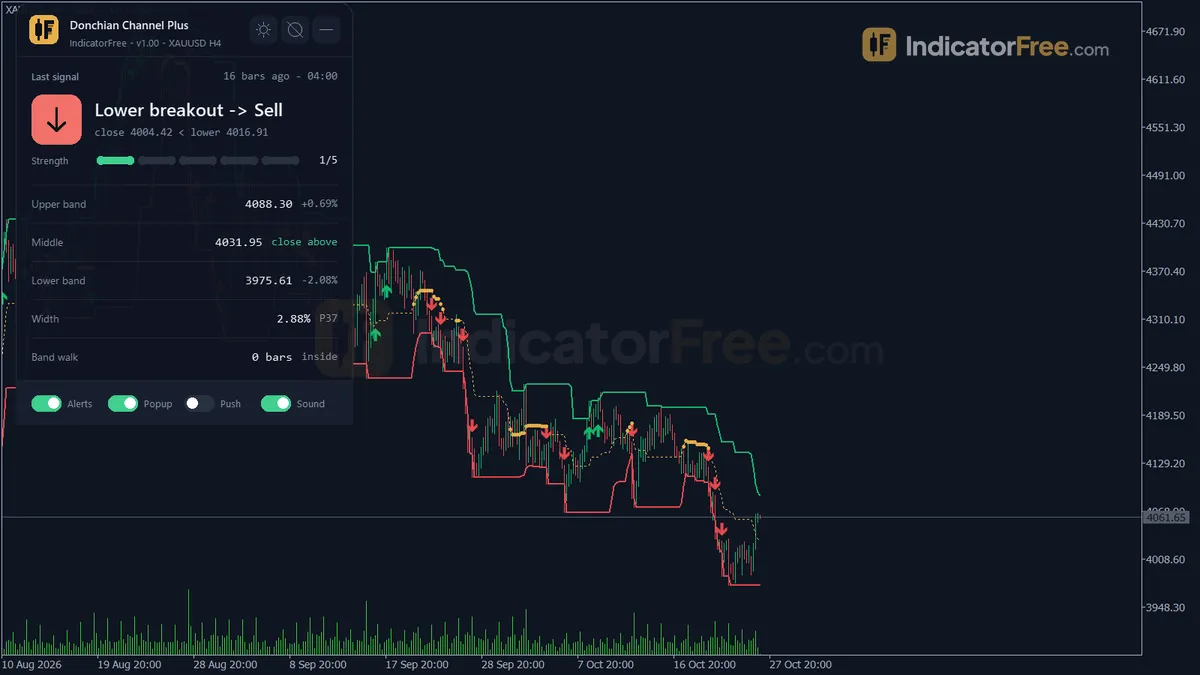
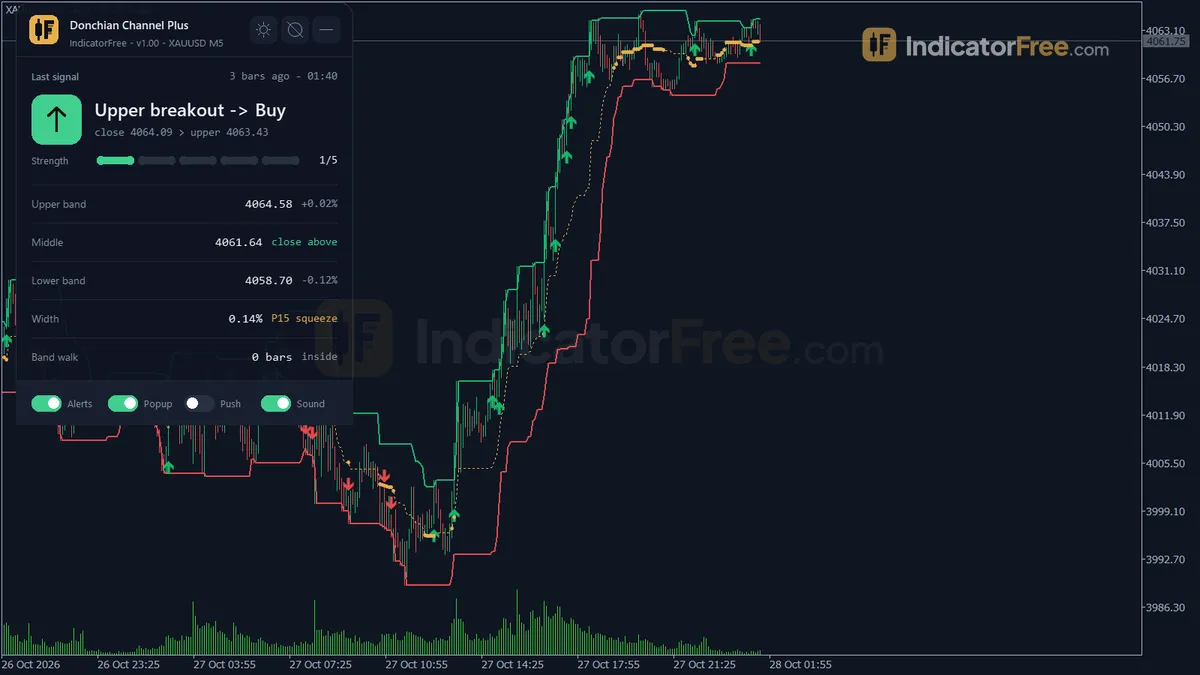
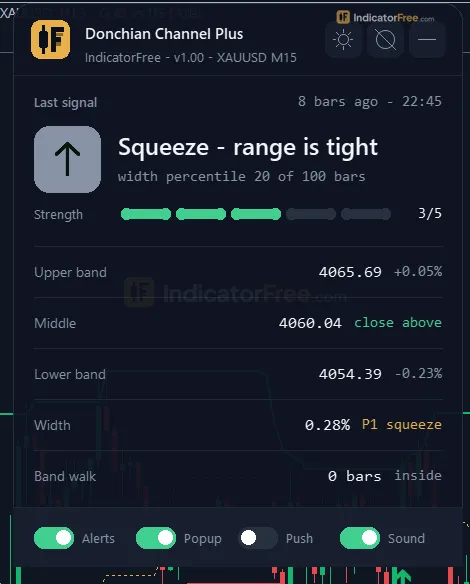
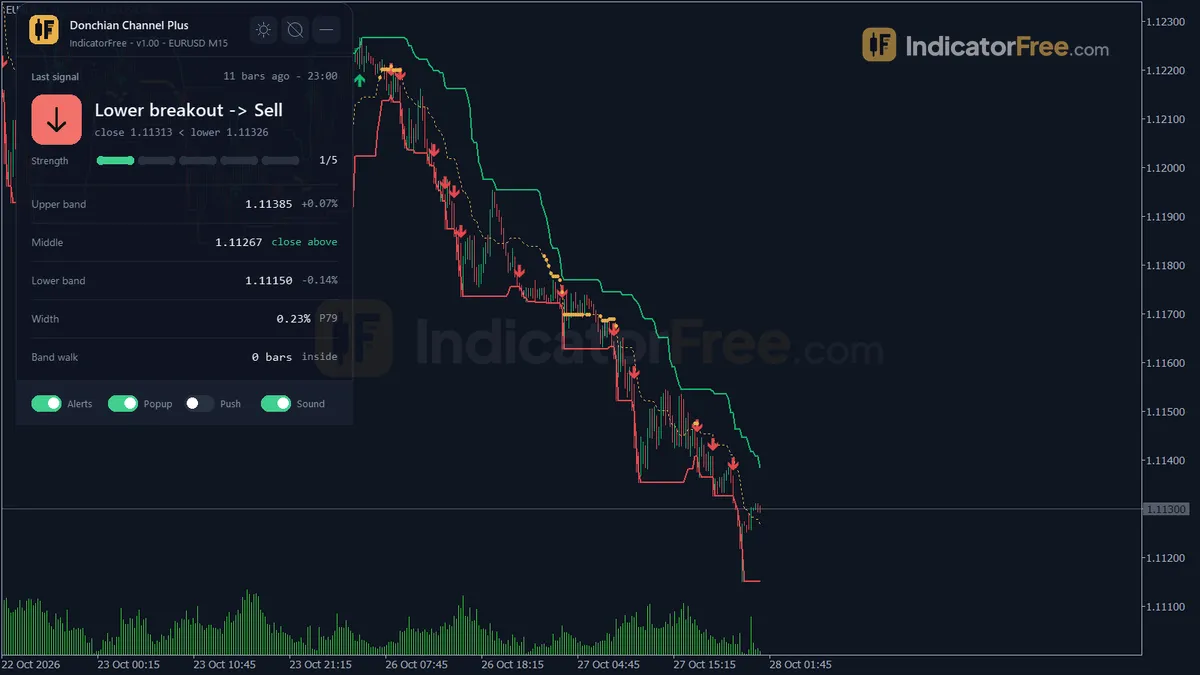
- Repainted
- 0 / 592
- Signals / week
- ≈ 45
- Tested on
- EURUSD M15
- Tested
- 2026-10-09
Overview
Donchian Channel Plus is a free MT5 indicator. It draws a Donchian Channel (Upper, Lower and Middle bands) on the main price chart. It adds Buy and Sell Breakout arrows, Squeeze Dots, an optional exit channel and a status panel. In the Lab's repaint test, 0 of 592 signals changed, and no arrow printed late (maximum delay 0 bars).
It is for breakout and trend traders who want closed-bar arrows and alerts that stay where they first appeared.
What it puts on your chart
A Donchian Channel marks the highest high and the lowest low of a set number of bars. That gives you the recent range and shows when price leaves it. In this version each band uses only the closed bars before the current bar. So a bar can close outside the band, and that close is the breakout.
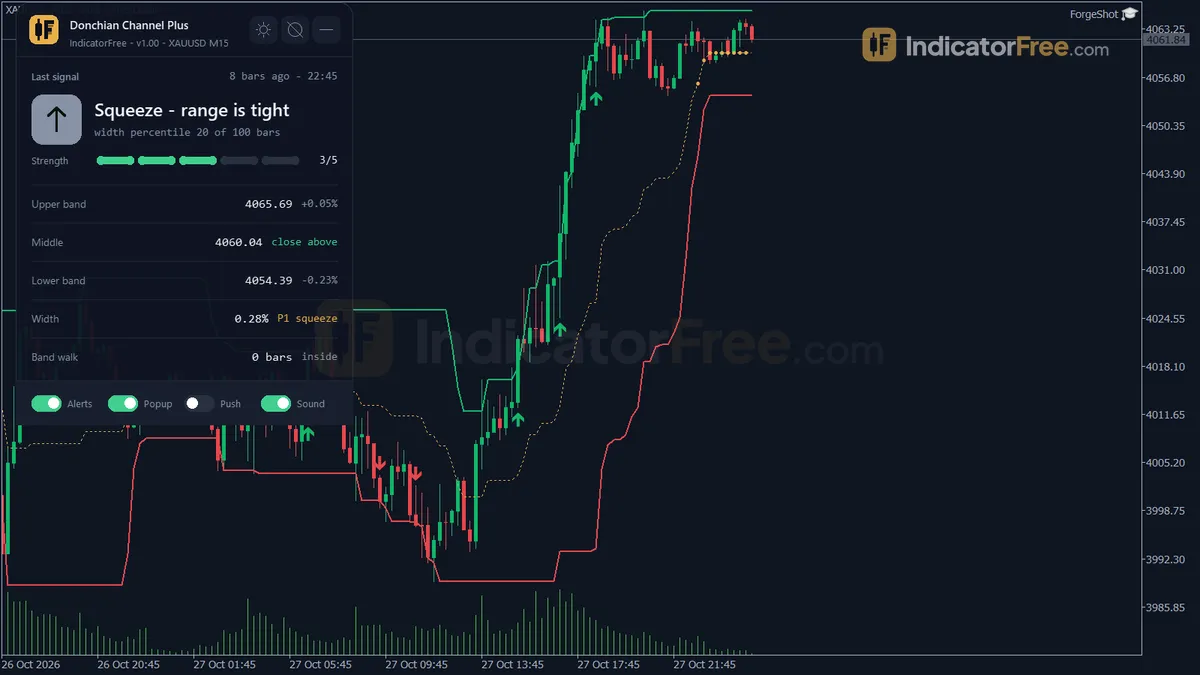
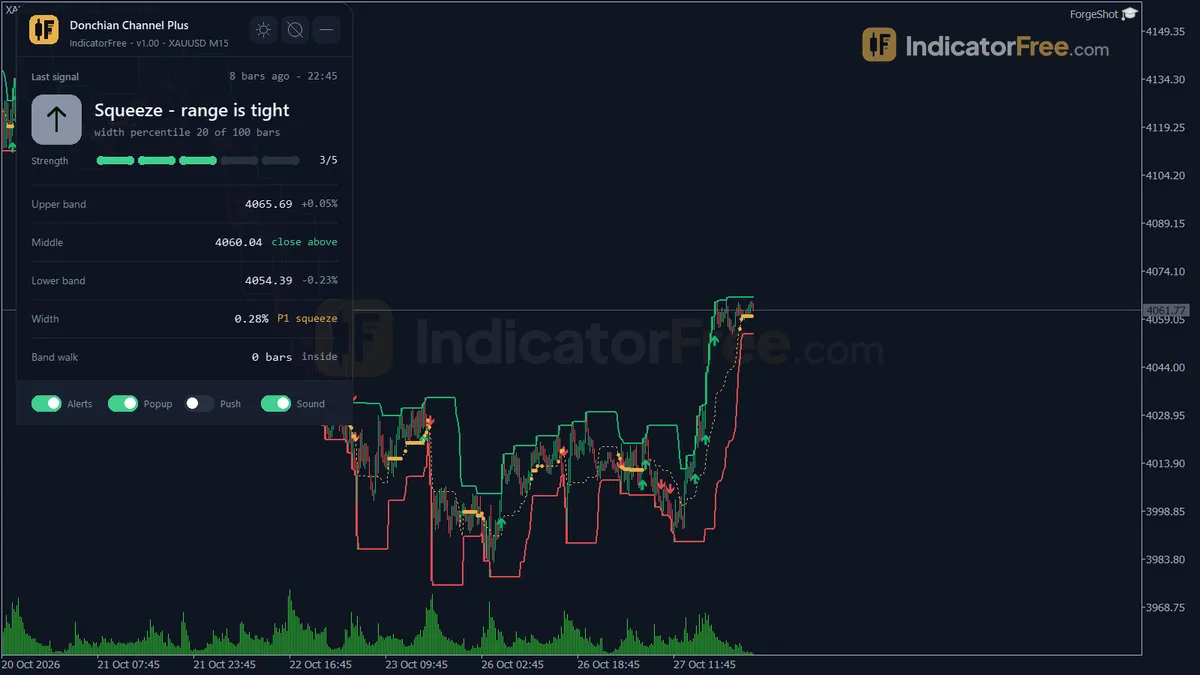
You get five lines (Upper Band, Lower Band, Middle Line, and an Exit Upper and Exit Lower pair you can switch on), three arrow types (Buy Breakout, Sell Breakout, Squeeze Dot) and the Channel Status panel. Everything draws on the price chart, not in a separate window below it.
How the Lab tested it
The Lab ran version 1.00 on MT5 build 6230 on 2026-10-09. The test used EURUSD M15 from 2026-07-09 to 2026-10-08 with Raw Trading Ltd real ticks. It logged 592 signals as they printed and checked whether any of them later moved or disappeared. None did, and none arrived late.
For every signal, the Lab also checked which came first: a move of 1 ATR (average true range, the pair's typical bar size) in the signal's direction, or 1 ATR against it.
What the numbers mean for you
- Buy Breakout: 51.0% of 210 arrows reached +1 ATR before −1 ATR. That is about a coin flip.
- Sell Breakout: 46.0% of 250 arrows did. That is slightly worse than a coin flip.
- Squeeze Dot: 41.7% of 132. This was the weakest result, and the dot does not point in any direction (see how to read it).
- All signals together: 46.8% of 592.
In plain words: on this pair and timeframe, an arrow on its own gave no edge. What the arrows give you is clean timing (the exact closed bar where price left the range), not a forecast. Your exit plan and a filter decide whether the trade pays.
The moves were quick. The median signal reached one side within 2 bars, which is about 30 minutes on M15. Only 0.5% of signals went 20 bars without reaching either side. So you usually know within the first hour whether a breakout is working.
How often it fires: 45 signals a week in total on EURUSD M15. The chart below splits that number by signal type.
Who it is built for
It suits intraday traders who trade breakouts from a range. It also suits trend followers who like Turtle-style exits and want a ready exit line. And it helps anyone who needs alerts they can trust not to repaint. If you backtest by scrolling back through the chart, closed-bar arrows mean the history you see matches what you would have seen live.
How it works
- 1Builds the upper and lower channel from the highest high and lowest low of previous bars, plus a middle line.
Upper = highest High, Lower = lowest Low of previous DonchianPeriod bars | Middle = (Upper + Lower) / 2Inputs: DonchianPeriod, ShowMiddleLine - 2Optionally draws a shorter exit channel the same way.
Exit channel over ExitPeriod barsInputs: ShowExitChannel, ExitPeriod - 3Measures channel width as percent of prior close and ranks it over the lookback, low rank means squeeze.
Width % = (Upper - Lower) / Close x 100 | squeeze if rank <= SqueezeThresholdPercentileInputs: SqueezeLookback, SqueezeThresholdPercentile, ShowSqueezeHighlight - 4Signals buy when a close crosses above the upper band and sell when it crosses below the lower band.
Buy: Close > Upper and previous Close <= previous Upper - 5Can drop signals against a higher-timeframe bias, the close versus the midpoint of that timeframe's channel.
Bias = Close vs (highest High + lowest Low) / 2 on higher timeframeInputs: UseHTFConfirmation, HTFPeriod
Specifications
- Platform
- MetaTrader 5
- Version
- 1.00
- Type
- Indicator
- Window
- Main chart
- Draws
- 5 lines, 3 arrows, 1 panel
- Alerts
- popup, push, sound
- Repaints
- No (0 of 592 signals changed)
- Inputs
- 19
- Tested on
- MT5 build 6230 · 2026-10-09
Repaint test
No repaint detected. In a 9 Jul 2026 – 8 Oct 2026 test on EURUSD M15 (Raw Trading Ltd real ticks), 592 signals were logged at bar close and re-read at the end of the test: 0 changed. Arrows print on the bar that closes the signal, with no delay.
IndicatorFree — tested 2026-10-09 · MT5 build 6230 · Raw Trading Ltd real ticks. Results come from historical data, not live trading, and do not guarantee future results.
Signal statistics
Over 9 Jul 2026 – 8 Oct 2026 on EURUSD M15, the indicator printed 592 arrows. After 46.8% of them, price moved 1×ATR(14) in the arrow's direction before moving 1×ATR against it (median 2 bars). 0.5% reached neither level within 20 bars.
This measures price movement after the arrow, not a trading result. It includes no spread, commission, stop loss or position sizing.
What it draws
- A line (Upper Band) from buffer 0.
- A line (Lower Band) from buffer 1.
- A line (Middle Line) from buffer 2.
- A line (Exit Upper) from buffer 3.
- A line (Exit Lower) from buffer 4.
- Arrows (Buy Breakout) from buffer 5, drawn on the closed bar.
- Arrows (Sell Breakout) from buffer 6, drawn on the closed bar.
- Arrows (Squeeze Dot) from buffer 7, drawn on the closed bar.
- An on-chart panel (Channel Status); values shown in the panel are not exposed as buffers.
Inputs
| Input | Default | What it does |
|---|---|---|
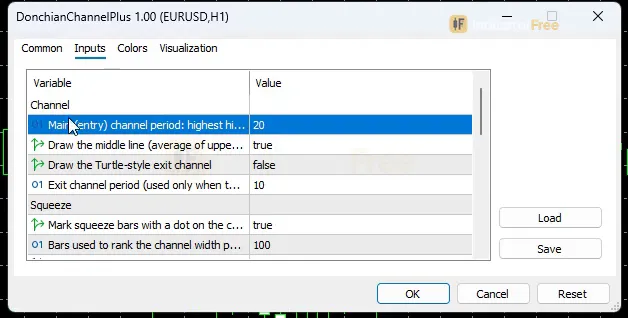
| DonchianPeriod | 20 | Main (entry) channel period: highest high / lowest low of the N closed bars before each bar |
| ShowMiddleLine | true | Draw the middle line (average of upper and lower band) |
| ShowExitChannel | false | Draw the Turtle-style exit channel |
| ExitPeriod | 10 | Exit channel period (used only when the exit channel is shown) |
| ShowSqueezeHighlight | true | Mark squeeze bars with a dot on the channel middle |
| SqueezeLookback | 100 | Bars used to rank the channel width percentile |
| SqueezeThresholdPercentile | 20 | Width percentile at or below this value counts as a squeeze |
| UseHTFConfirmation | false | Block breakouts against the higher-timeframe middle line bias |
| HTFPeriod | H4 | Higher timeframe used for the bias |
| AlertOnBreakout | true | Alert on a new buy/sell breakout or a new squeeze (closed bar) |
| EnablePopupAlert | true | Show a popup Alert() in the terminal |
| EnablePushNotification | false | Send a push notification to the MT5 mobile app |
| EnableSoundAlert | true | Play a sound |
| SoundFileBuy | alert2.wav | Sound file for buy breakouts and squeezes |
| SoundFileSell | alert2.wav | Sound file for sell breakouts |
| ShowDashboard | true | Show the on-chart panel |
| PanelScale | 1 | Panel size multiplier (DPI is applied automatically) |
| Theme | Dark | Chart color theme |
| RestoreTheme | true | Restore the original chart colors when the indicator is removed |
How to read it
Install in one line
Copy the downloaded file (101.4 KB) into your MQL5\Indicators folder (File → Open Data Folder), refresh the Navigator and drag Donchian Channel Plus onto a chart.
Reading the five lines
- Upper Band: the highest high of the last
DonchianPeriodclosed bars. A close above it is a bullish breakout. Each further close above it adds to the band walk count. - Lower Band: the lowest low of the same bars. A close below it is a bearish breakout and adds to the lower band walk.
- Middle Line: the average of the two bands. If the last close is above it, price sits in the upper half of the channel. If it is below, price sits in the lower half.
- Exit Lower (shown when
ShowExitChannelis on): a shorter channel built fromExitPeriodbars. A close at or below it is the reference exit for a long trade. - Exit Upper: a close at or above it is the reference exit for a short trade.
Reading the arrows and the Squeeze Dot
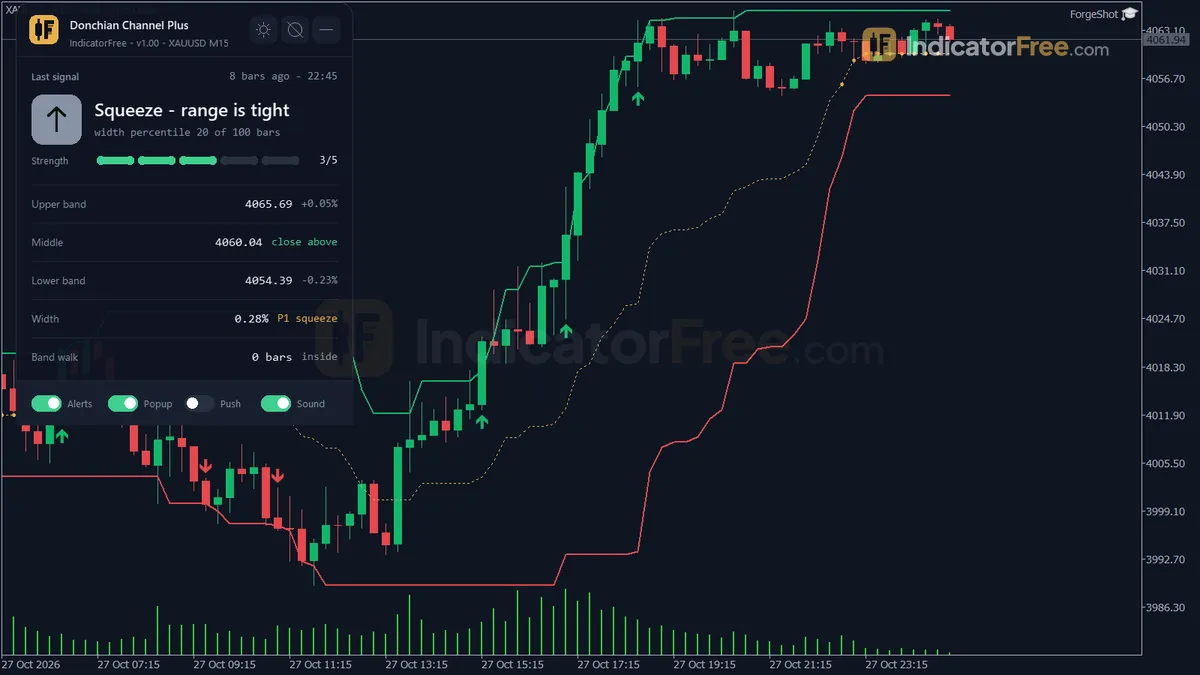
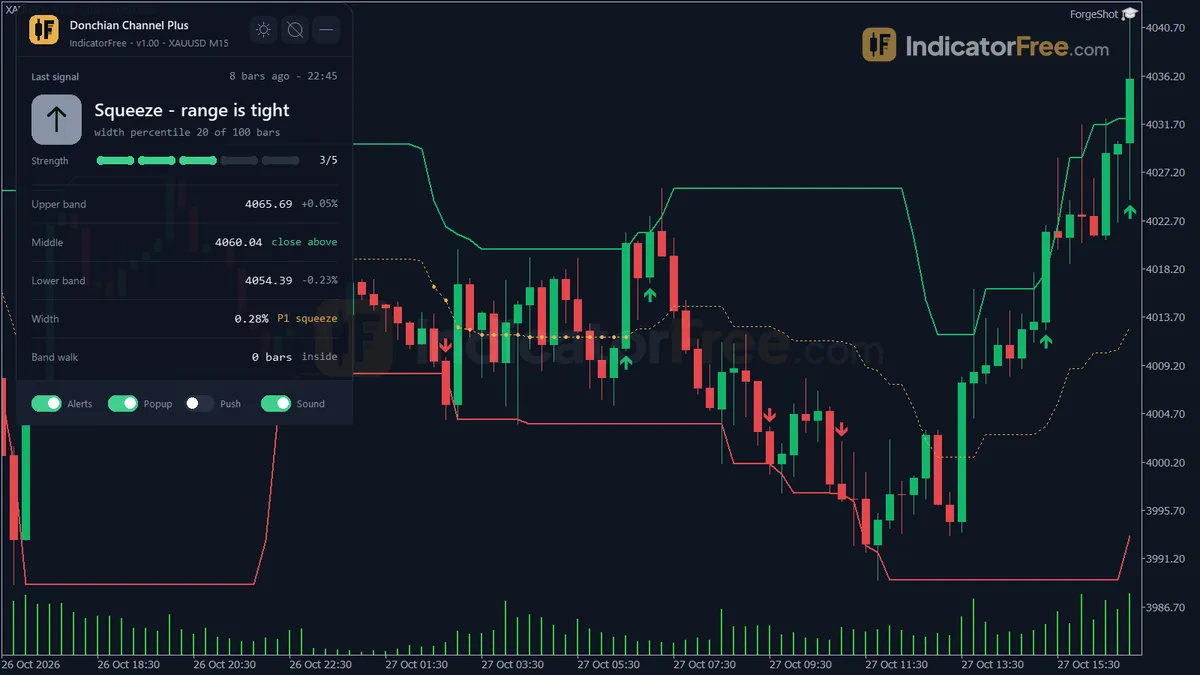
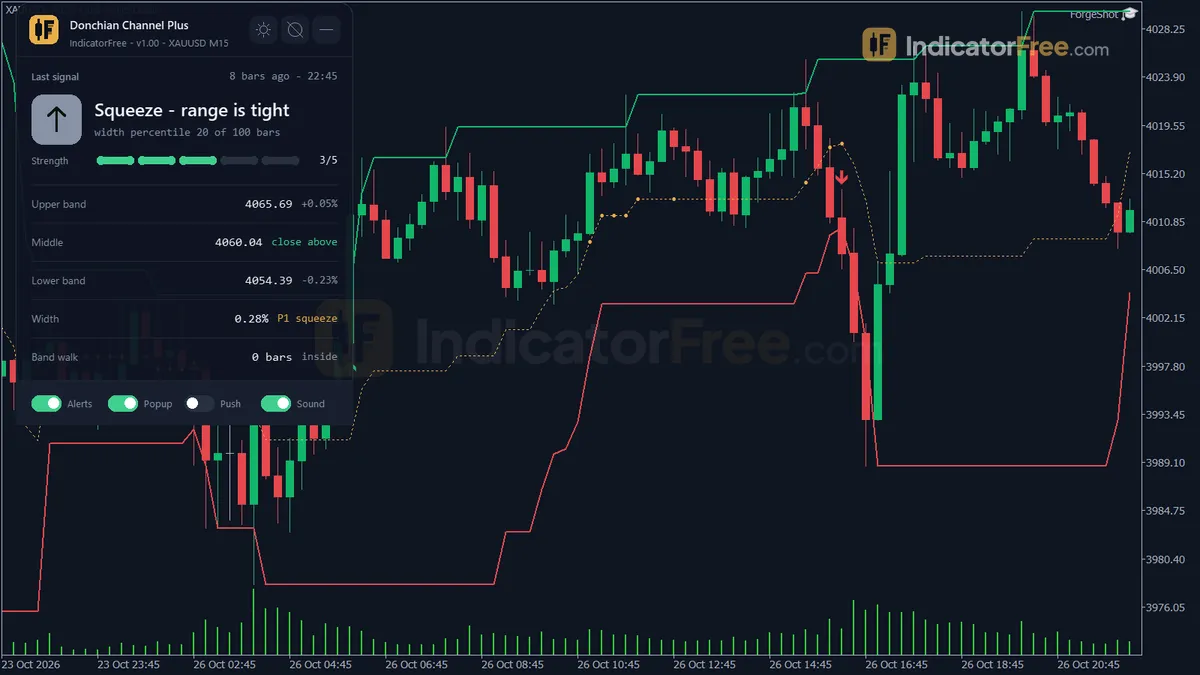
A Buy Breakout arrow prints when a bar closes above the Upper Band and the bar before it closed at or below its own Upper Band. A Sell Breakout is the mirror image at the Lower Band. Only the first close outside the band gets an arrow. Later closes outside add to the band walk count and get no new arrow.
The chart below shows the three cases you will meet most often.
A Squeeze Dot sits on the channel middle. It prints when the channel's width, measured in percent of price, is at or below the SqueezeThresholdPercentile percentile of the last SqueezeLookback bars. In other words, the channel is narrower than it usually is. The dot does not say which way price will break. It only says the range is unusually tight.
Three misreads to avoid
- A wick through the band is not a breakout. Only a close outside counts. If price spikes above the band and closes back inside, you get no arrow, and that is intended.
- No second arrow does not mean the move is over. While price keeps closing outside, the band walk count in the panel goes up instead. A high count means a strong run. It also means you are late if you have not entered yet.
- A Squeeze Dot is not a buy signal. The dot sits on the middle line and can look like an entry mark. It is a get-ready mark. Wait for the breakout arrow that follows.
The Channel Status panel
The panel shows the last signal, the Upper, Middle and Lower band values, the channel width in percent and its percentile, and the band walk count. It also shows either the higher-timeframe bias or the exit reference. Check it before acting on an arrow so you know where the bias and the exit line are.
Inputs to change first
DonchianPeriod(default 20): the main channel length. A larger value gives a wider channel, so you get fewer and later breakouts. A smaller value gives more arrows and more noise.UseHTFConfirmation(default false) withHTFPeriod(default H4): when on, the filter blocks a Buy Breakout if the higher-timeframe middle line bias is bearish, and a Sell Breakout if it is bullish.ShowExitChannel(default false) withExitPeriod(default 10): turns on the Exit Upper and Exit Lower lines, so every trade has a ready exit reference.SqueezeThresholdPercentile(default 20) andSqueezeLookback(default 100): a lower percentile means fewer, stricter Squeeze Dots. A longer lookback compares the current width with a longer history.
Alerts and where they appear
When AlertOnBreakout is on (default), you get an alert for each new Buy Breakout, Sell Breakout or Squeeze, and only once the bar has closed. EnablePopupAlert shows a popup in the MT5 terminal. EnablePushNotification (off by default) sends the alert to the MT5 mobile app. EnableSoundAlert plays SoundFileBuy for buy breakouts and squeezes, and SoundFileSell for sell breakouts. Both default to alert2.wav, so give them different files if you want to tell buys from sells by ear.
A decision rule for each signal
- Buy Breakout: take it only if the bar has closed, the higher-timeframe bias is not bearish, and you know your exit before you enter (Exit Lower, or your own stop). Skip it if a Sell Breakout printed in the same narrow channel a few bars earlier. Price is chopping, not breaking out.
- Sell Breakout: apply the same rule in reverse, with Exit Upper as the exit reference. Sells scored the weaker of the two directions in the Lab, so be stricter with them.
- Squeeze Dot: never trade the dot. Use it to set an alert and get ready, then judge the breakout arrow that follows with the rules above.
Installation
- 1Download DonchianChannelPlus.ex5 from the button above (Google Drive).
- 2In MetaTrader 5: File → Open Data Folder → MQL5 → Indicators. Copy DonchianChannelPlus.ex5 there.
- 3Restart MT5 or right-click Indicators in Navigator → Refresh.
- 4Drag Donchian Channel Plus onto a chart. For push alerts, enable "Allow push notifications" under Tools → Options → Notifications.
- Tested on MT5 build 6230.
Key terms and guides
- Wick
- A wick is the thin line above or below a candlestick's body. It marks the highest and lowest prices traded in that period that price could not hold until the candle closed.
- Backtest
- A backtest runs a trading strategy's rules over past price data to show how it would have traded: how many trades it took, how much it made or lost, and how deep the losing streaks went.
- Trend
- A trend is the main direction price keeps moving in over a period. In an uptrend price makes higher highs and higher lows. In a downtrend it makes lower highs and lower lows.
- Market Noise
- Market noise is the small, random back-and-forth price movement that has no lasting direction. It comes from routine buying and selling, not from a real change in what traders think an asset is worth.
More on this subject: Volatility & ranges guide, terms and tools
User reviews
No reviews yet. Members who download the tool can review it here.
Sign in and download the tool to review it.
Build a checklist with it
Donchian Channel Plus does one job on the chart: zone / level. Put it on the same chart as the tools below and the IndicatorFree panels merge into one checklist card, ordered trend, zone, signal, risk.
- Trend / contextDowntrendAdds the trend side: which way the market leans before you act on Donchian Channel Plus.
- Entry signalDojiAdds the entry signal: the moment to act once Donchian Channel Plus has set the scene.
The Lab has not tested these combinations. Each tool is tested on its own; the card only lines up what each one says. Free members get 2 new tools a day. If one has to wait until tomorrow, install BlackBox to raise the limit to 5 a day (20 on a live account).
FAQ
Does Donchian Channel Plus repaint?
No repaint detected. In a 9 Jul 2026 – 8 Oct 2026 test on EURUSD M15 (Raw Trading Ltd real ticks), 592 signals were logged at bar close and re-read at the end of the test: 0 changed. Arrows print on the bar that closes the signal, with no delay.
Can I use Donchian Channel Plus in an EA?
Yes. Read buffer 5 (Buy Breakout) with iCustom() on bar 1 — the last closed bar.
Why can’t my EA read the zones?
Zones and the panel are chart objects, not indicator buffers, so iCustom() does not return them.
How do I get alerts on my phone?
Enter your MetaQuotes ID under Tools → Options → Notifications, tick "Enable push notifications", and keep the push alert input on.
Does it work on other pairs?
Tested on EURUSD only; other symbols not tested.
Is there an MT4 version of Donchian Channel Plus?
No. This version is built for MT5 and was tested on MT5 build 6230. It will not load in MT4.
Can I use it on gold, indices or other timeframes than M15?
It runs on any symbol and timeframe, but the Lab measured it only on EURUSD M15. On anything else, scroll back through the arrows on your own chart and judge them before trading. Since the signals do not repaint, that history is reliable.
Does it give me a stop loss or a profit target?
No. The Exit Upper and Exit Lower lines are reference exits for closing a trade, not stops or targets. Set your own protective stop, for example beyond the opposite exit line or an ATR-based distance.
Will it change my chart colors?
It applies the `Theme` you choose (Dark by default). With `RestoreTheme` on (the default), your original chart colors come back when you remove the indicator.
The panel is too small or too big on my screen. Can I resize it?
Yes. Change `PanelScale` (default 1). Screen DPI is applied automatically. To hide the panel completely, set `ShowDashboard` to false.
Changelog
- 1.00Initial release: non-repainting Donchian Channel (Upper/Lower/Middle bands built only from closed bars), optional Turtle-style exit channel, channel-width percentile squeeze reading, band-walk strength counter, optional. · 2026-10-09
Final verdict
Where it earns its place
The repaint result is the main reason to use it. Every arrow is fixed at the bar close, so your alerts, your live chart and your scroll-back review all show the same signals. The bands are built from closed bars only, which makes "close outside the band" a clear yes or no. The band walk counter and the optional exit channel give you a complete Turtle-style setup (entry, strength, exit) in one indicator, with a panel that shows the current state at a glance.
Where it falls short
The arrows are not an edge on their own. In the Lab test, buys came out near a coin flip and sells and dots below it. Treat an arrow as the moment to make a decision, not as the decision itself. The tests cover one pair (EURUSD) on one timeframe (M15) over one three-month period. Other pairs and timeframes have not been tested. The indicator does not draw a stop loss or a take-profit. The exit channel is a reference for closing a trade, not a protective stop. In a flat, narrow market, buy and sell breakouts can alternate and cut you up.
Use it, or skip it
The comparison below sums up who gets value from it and who does not.
- –You trade breakouts and want the exact closed bar where the range broke
- –You need alerts that will not repaint
- –You will add a filter (the HTF bias) and a fixed exit
- –You want a Turtle-style exit line ready on the chart
- –You want an arrow that wins on its own
- –You trade inside ranges and fade the edges
- –You need a stop loss or profit target drawn for you
- –You will act on a Squeeze Dot as if it were an entry
Settings to start with
Keep DonchianPeriod at 20. Then try UseHTFConfirmation = true with HTFPeriod = H4, and ShowExitChannel = true with ExitPeriod = 10. That way every arrow agrees with the bigger picture and comes with an exit line. This combination is an untested starting point: the Lab has not published results with the filter on. Compare it with the defaults on your own chart before you rely on it.
Two other free tools cover things this one does not. Deviation Spectrum labels the volatility regime, so you can check whether a breakout comes out of a quiet regime or into an already extreme one. Average Daily Range shows how much of the day's usual range is already used up before you take a breakout. Both are ideas to try: the Lab has not tested either pair.