Every tick based on real ticks
Also called Real ticks, Real ticks mode, Real tick backtest, Real tick modelling
Every tick based on real ticks is the MT5 Strategy Tester mode that replays the actual bid and ask ticks your broker recorded, with the real changing spread, instead of ticks the tester invents from 1-minute bars.
A backtest is only as honest as the prices fed into it. If your EA takes small profits or uses tight stops, the tick mode alone can decide whether the report shows a gain or a loss.
What the real-ticks mode replays
A tick is one price update: a new bid, a new ask, or both. In this mode the tester downloads the tick history stored by your broker and feeds it to the EA in the original order.
The other modes work from 1-minute bars. They know only each bar's open, high, low and close, so the tester has to invent a path between those four prices. It also applies one spread value to the whole bar, the spread stored with that 1-minute bar, so a brief widening around news disappears.
The Modelling list offers four modes: Every tick based on real ticks, Every tick, 1 minute OHLC and Open prices only. The table compares them.
| Mode | Prices inside the bar | Spread | Use it for |
|---|---|---|---|
| Every tick based on real ticks | Recorded by the broker | Recorded, changes tick by tick | Final check, scalpers, tight stops |
| Every tick | Invented from 1-minute bars | One value per bar | Faster runs and optimisation when spread spikes inside the bar do not matter |
| 1 minute OHLC | Four prices per minute | One value per bar | Rough optimisation |
| Open prices only | First price of each bar | One value per bar | EAs that act only on a new bar |
Real ticks keep two things that invented ticks lose. One is the true order of price moves inside the minute. The other is the spread (the gap between bid and ask) at each moment, including the moments it widens.
The drawing below shows the same minute both ways. A sell trade closes at the ask, so a brief jump in the ask can hit a stop-loss that the invented path never touches.
How the tick mode changes a backtest result, in numbers
The numbers below are an illustrative example. An EA trades 0.10 lot on a USD-quoted pair, where one pip is worth $1.00. On invented ticks it makes 1,000 trades and averages 1 pip of profit each. On real ticks, wider spreads at entry and exit cost it an extra 0.6 pip per trade.
Same EA, same dates, and the profit falls from $1,000 to $400. The thinner the average trade, the bigger this gap becomes.
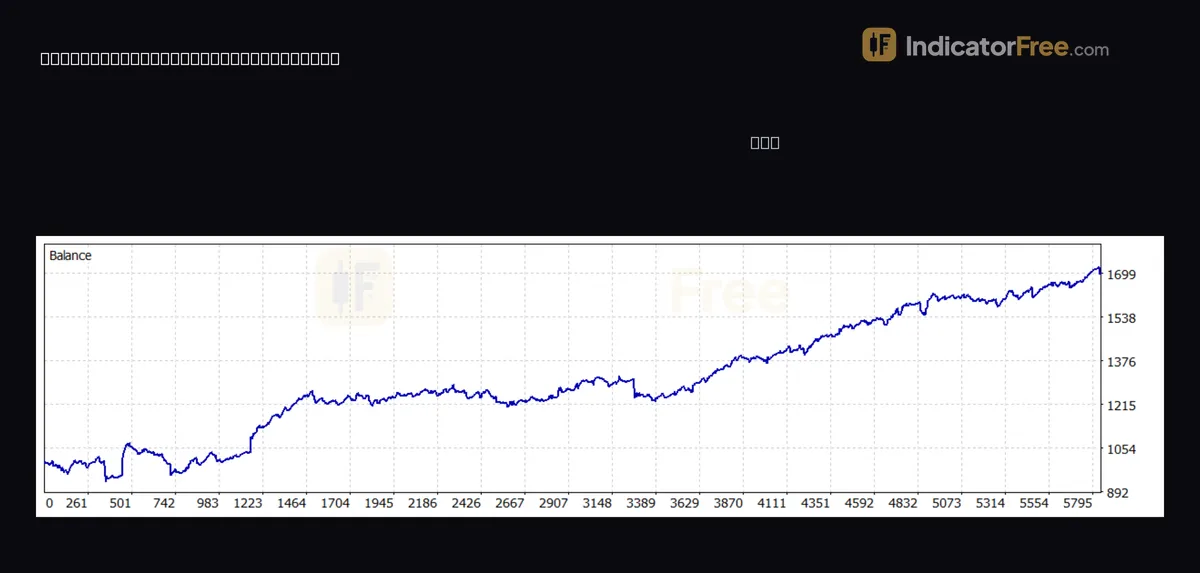
Now look at the real report at the top of this page. It is an EA on XAUUSD, 1-minute chart, 2026.06.27 to 2026.09.27. History quality is 100%, but that figure does not show which tick mode ran, and our data for this report does not record it. The next section shows how to check your own report. The report shows 2,910 trades, profit factor 1.18 and expected payoff 0.24.
Expected payoff is the average net result per trade. Multiply trades by expected payoff: 2,910 × 0.24 ≈ 698 in account currency. A plain rule follows: if the expected payoff is smaller than the extra spread you would pay on one trade during busy or news minutes (spread × lot size × contract value, in account currency), the edge does not hold on real ticks. A result this thin means little unless the ticks and spreads behind it were the recorded ones. It is a past example, not a prediction.
Where you set it in the MT5 Strategy Tester
Open the Strategy Tester and choose the EA, symbol, timeframe and dates. Then pick "Every tick based on real ticks" in the Modelling list. The first run downloads the ticks from your broker's server.
After the run, read the History Quality line in the report. When recorded ticks were used it says so in words, next to the percentage. A bare percentage with no "real ticks" label does not prove which mode ran. Where the broker has no tick history for part of the range, that stretch runs on generated ticks. The report then shows a real-tick percentage below 100%, and the tester journal shows the date real ticks start. How far back that history goes depends on the broker and the symbol, so start the test on or after that date when you want a clean real-tick result.
Checks before you trust a real-tick backtest
- Match the account. Test on the broker and account type you will trade live. Tick history from another account type carries a different spread.
- Apply the decision rule. If the average profit per trade is only a few spreads wide, or the EA moves stops inside the bar, trust real ticks only. If it acts only when a new bar opens, develop on open prices and confirm once on real ticks.
- Run both tick modes on the same dates. A large drop from "Every tick" to real ticks tells you the edge depends on fill details, not on the idea.
- Check the commission. Ticks carry the spread only. Confirm the report's commission line matches what your live account charges per lot. If it shows zero or a different amount, the result is too optimistic by that cost on every trade.
- Judge the sample. Three months, as in the report above, covers one stretch of market conditions. Test other periods too.
- Forward test on a demo account. Recorded ticks still fill instantly in the tester; a demo shows the fills and spreads your EA really gets.
FAQ
Why is a real-tick backtest so slow?
The tester processes every recorded price update, and a busy symbol produces a great many inside one minute.
Does a real-tick backtest include slippage?
Not by default. Orders fill at the recorded price as if execution were instant. The tester has a delay setting that simulates a slower fill, and live fills can still differ from it.
Why does the same EA give different real-tick results on two brokers?
Each broker records its own ticks from its own price feed, with its own spread. The tick history differs, so every fill that depends on it differs too. Trust only the run on the broker you will trade with. If the two results are far apart, the edge depends on the spread, so expect the live result to move whenever your broker's spread changes.