









Strategy Tester
Also called Backtester, Backtesting engine, Strategy backtest, EA tester
A Strategy Tester is the part of a trading platform that replays past price data, runs your trading rules or Expert Advisor on it, and reports the trades, profit and drawdown those rules would have produced.
A tester never fills a real order. It assumes a spread, a commission and a clean fill, and each assumption can be kinder than your live account. Treat the report as a best case that you then try to break.
What a Strategy Tester does with your rules
You give it three things: a set of rules, a market with a timeframe, and a date range. The rules are usually an Expert Advisor (EA), a program that opens and closes trades automatically, or a strategy script.
The tester then walks through the past prices one step at a time. At each step it asks your rules "buy, sell, or nothing?" and records the simulated trade. Your rules only see the bars that had already formed at that moment.
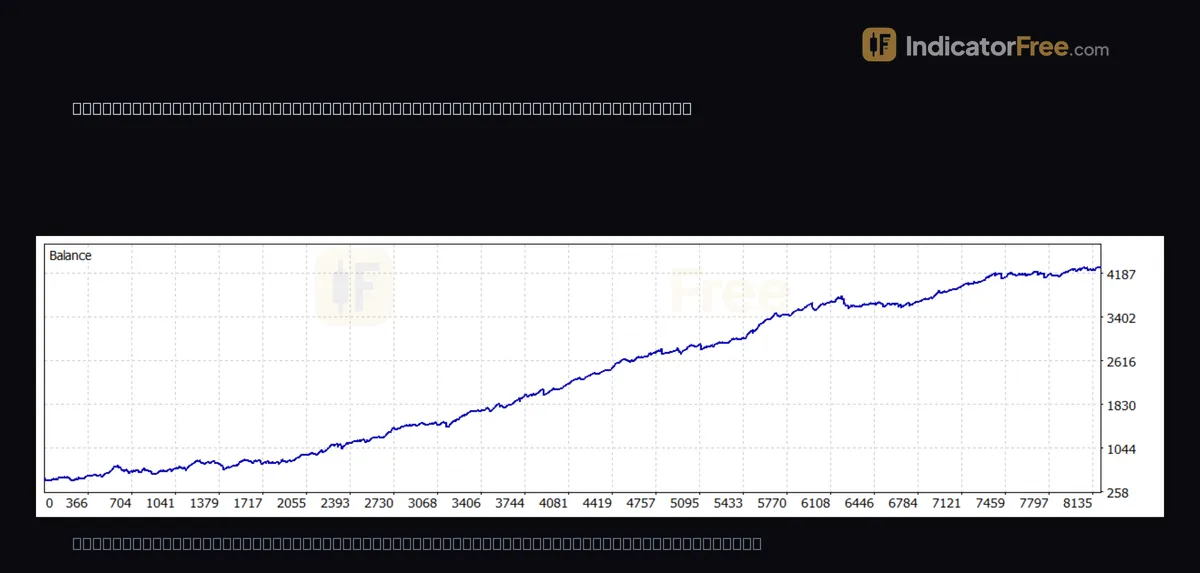
At the end you get a report and an equity curve, a line showing the account value after every trade.
Settings that change your result: costs, deposit and price modelling
In MetaTrader 5 (MT5), the Strategy Tester opens from the View menu. Before you press Start, you choose:
- symbol, timeframe and date range;
- starting deposit and leverage;
- spread and commission come from your broker's symbol data. To test different costs, copy the symbol as a custom symbol and change its spread and commission;
- Delays, which adds an execution delay between your order and its fill. With no delay, the tester assumes every order fills instantly;
- price modelling, meaning how the tester rebuilds price movement inside each bar. MT5 offers four main choices, compared in the table below.
| Mode | What it replays | Speed | Safe for |
|---|---|---|---|
| Open prices only | Runs your rules once per bar, at its open price | Fastest | Rules that act only on finished bars |
| 1-minute OHLC | Rebuilds each bar from the open, high, low and close of its 1-minute bars | Fast | Quick first checks of rules with wide stops and targets |
| Every tick | Generates ticks between those 1-minute points | Slow | Most rules, when real tick data is not available |
| Every tick based on real ticks | Replays the ticks your broker recorded | Slowest | Final checks, short timeframes and tight stops; closest to live trading |
The drawing below shows why price modelling matters. One bar's range contains both your stop and your target. A coarse rebuild draws a simple path through the bar and reaches the target first. A fine rebuild follows the smaller moves inside the bar, which dipped to the stop first. Same bar, opposite result.
Finer modelling runs slower but places stops and targets closer to where they would really have been hit. It matters most on short timeframes, where a few points decide a trade.
How one cost setting can halve the result
The figures in this section are an illustrative example. You test a strategy on a USD-quoted pair at 0.10 lots. That is 10,000 units, so one pip is worth $1. The report shows 200 trades and a net profit of $400.
The average trade made $400 ÷ 200 = $2. Now suppose your live spread is 1 pip wider than the spread the tester used. Every trade costs $1 more, and the calculation below shows what the tester report keeps.
One pip removed half the profit. You can copy this check for any report: divide net profit by the number of trades, then compare it with the money value of one pip at your lot size. If the average trade is worth less than about two extra pips, treat the result as fragile. Two pips is a rule of thumb, not a measured limit: a wider spread plus slippage (a fill at a worse price than you asked for) on entry and exit can use up that much.
Reading the report from a real three-month test
The report at the top of this page is an EA backtest on gold (XAUUSD) on the 1-minute chart, from 26 June 2026 to 26 September 2026. It is a past example, not a prediction.
| Report line | Value in this test | What it tells you |
|---|---|---|
| Trades | 4085 | Sample size behind every other number |
| Profit trades | 2583 (63.23%) | Share of trades that closed in profit; it says nothing about their size |
| Profit factor | 1.23 | Gross profit divided by gross loss; above 1 means winners outweighed losers |
| Expected payoff | 0.93 | Average net result per trade, in account currency |
| Maximum equity drawdown | 253.68 (6.70%) | Largest fall from a peak, counting open trades |
| Maximum balance drawdown | 228.96 (6.05%) | The same fall, counting closed trades only |
| History quality | 100% | How complete the price data was; if it is low or the chart has gaps, get better data and rerun |
Three common misreads show up here. First, the profit factor of 1.23 draws the eye, but the expected payoff matters more. The 0.93 per trade is already net of the spread and commission the tester assumed, so any extra live cost per trade comes straight off 0.93. 0.93 per trade is your break-even extra cost. Over 4085 trades that is about 3,800 of net profit for the three months (4085 × 0.93 ≈ 3,800).
Second, the equity drawdown is larger than the balance drawdown. Equity includes losing trades that were still open, so it is the figure closer to what you would have watched on screen. Size your risk from that one.
Third, 63.23% of trades closed in profit, yet the profit factor is only 1.23. That gap means the average losing trade was bigger than the average winning trade. With 2583 winners and 1502 losers, the average win was about 0.72 of the average loss (1.23 × 1502 ÷ 2583 ≈ 0.72), so the average loss was about 1.4 times the average win. A high share of winners does not tell you how much the strategy keeps.
Why optimised settings look better than they are
Optimisation means letting the tester rerun the same rules many times with different settings, such as a different stop distance or moving-average length. You set a start, a step and an end for each setting, and the tester can run thousands of combinations, then sort them by profit.
The top row is the trap. With that many tries, some setting will fit the ups and downs of that exact date range by chance, so part of its profit is luck that will not repeat.
A simple decision rule: look at the best setting's neighbours, one step either side. If they also make money, the result sits on a broad profitable area and is more likely to hold. If they lose money, the peak is noise; pick a setting from the middle of a profitable area or drop the idea. Then run your choice on unseen data, as in the check below.
Checks before you trust a tester result
- Stress the costs: rerun the same test with a deliberately wider spread. In MT5, copy XAUUSD as a custom symbol, raise its spread, and rerun. If it stops being profitable, the strategy had no margin for live conditions.
- Sample and period: the 4085 trades in the example are a large sample, but they cover only three months and one stretch of market conditions. Judge the date range as well as the trade count.
- Unseen data: tune settings on one period, then run them unchanged on a later period. The Forward option in the tester does this split for you. If the result collapses, the settings were fitted to the past: the same luck the neighbour check in the optimisation section looks for.
- Drawdown in money: convert the percentage to your account size and ask if you would have kept trading through it.
- Demo first: run the same settings on a demo account before real money, and compare fills with the report.
FAQ
Why is my Strategy Tester empty or not showing results?
A common cause is that you loaded an indicator. An indicator draws lines but places no orders, so the report has no trades to list. Also check that the date range has price data and that your rules could trigger at least one trade in it.
Can I use a Strategy Tester for free?
Yes. In MT5 the Strategy Tester is part of the free terminal, so running it costs nothing extra. How much price history you can test on depends on what your broker's server provides, so check History quality in the report before relying on a result.
Why does my backtest give different results on another broker's account?
Each broker's server supplies its own price history, spreads, commission and symbol settings. With real-tick modelling, you also replay that broker's own recorded ticks. So the same EA on the same dates can open different trades. Before you decide which result to trust, compare History quality and the symbol's spread in both reports.