Asian Session Range
Free MT5 indicator that boxes the Asian session and marks sweeps and confirmed breakouts of its edges. Lab: 0 of 134 signals repainted.
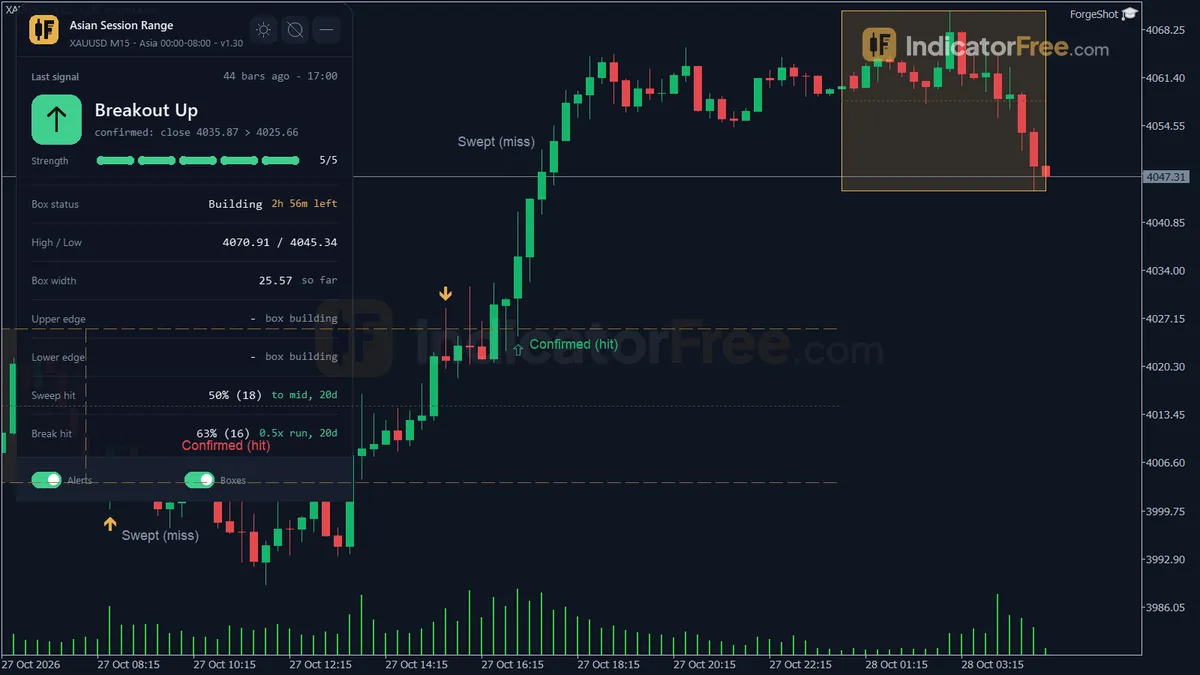
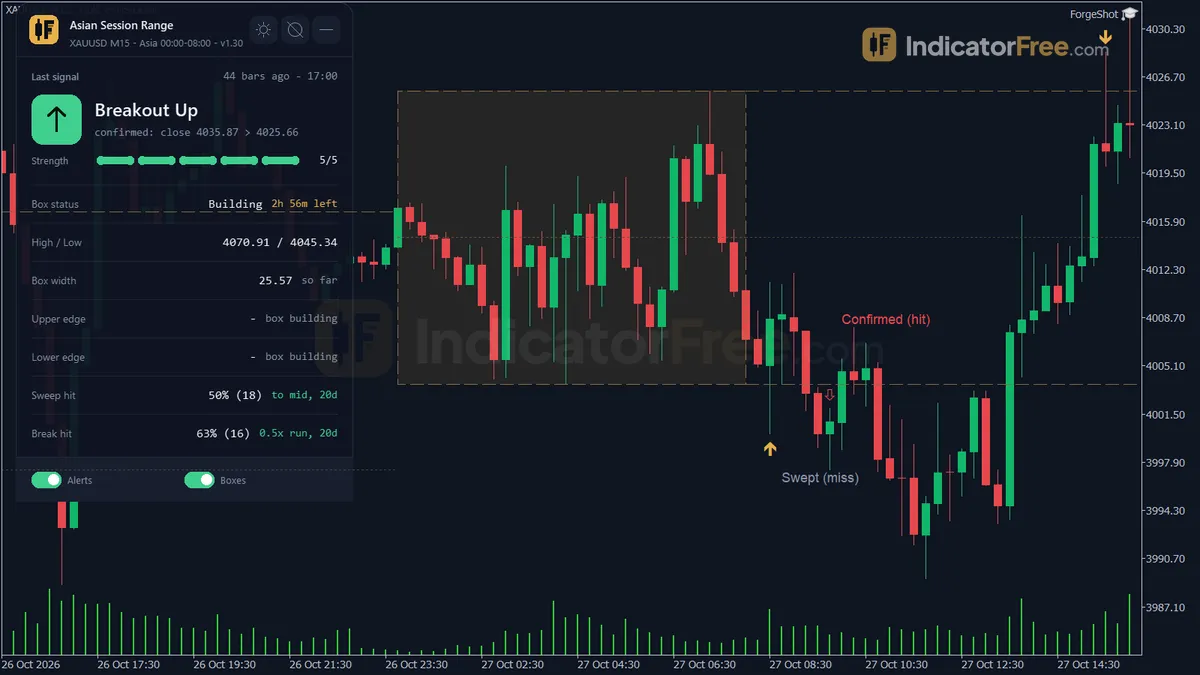
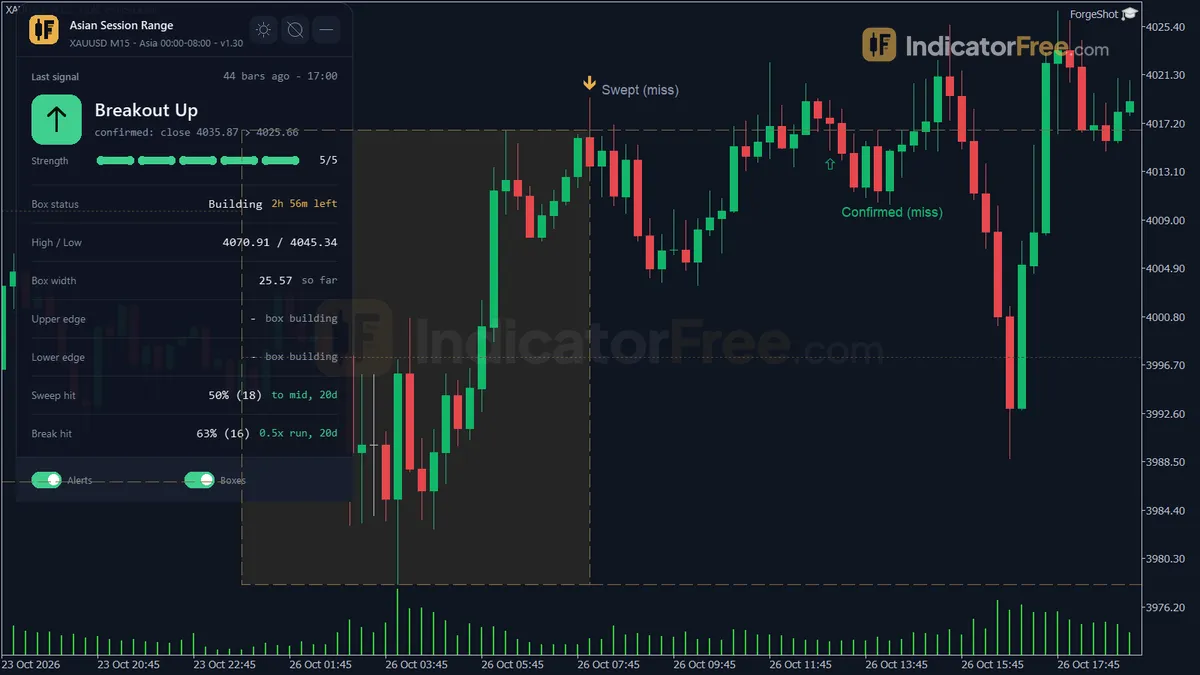
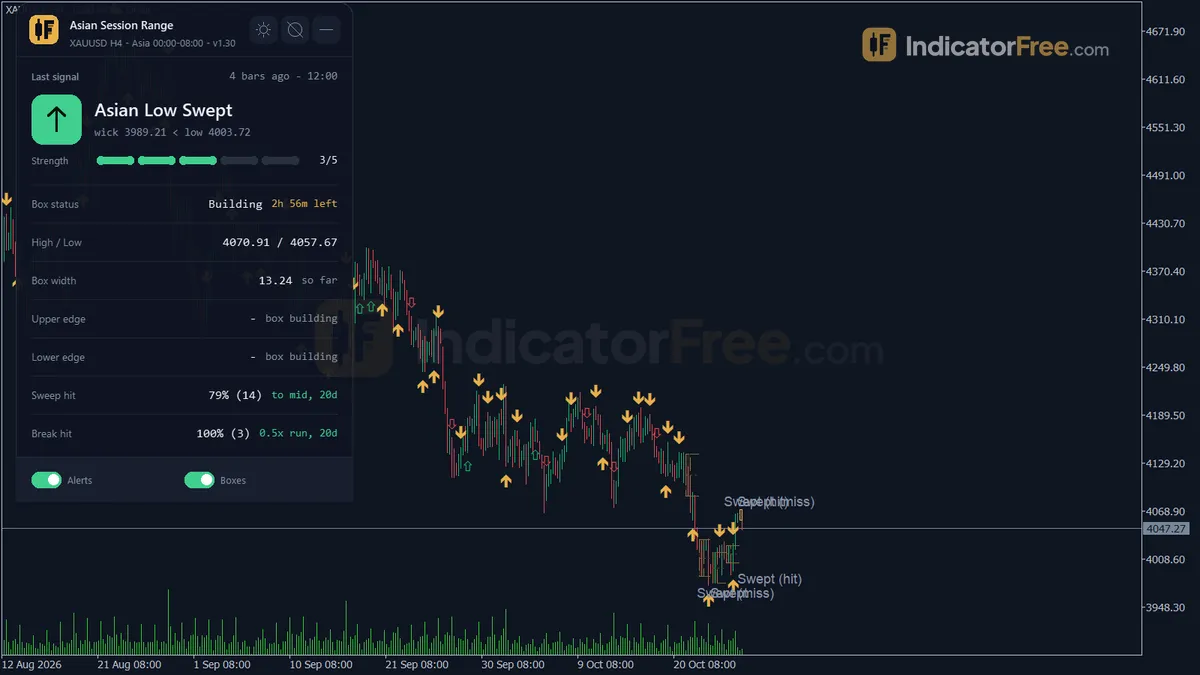
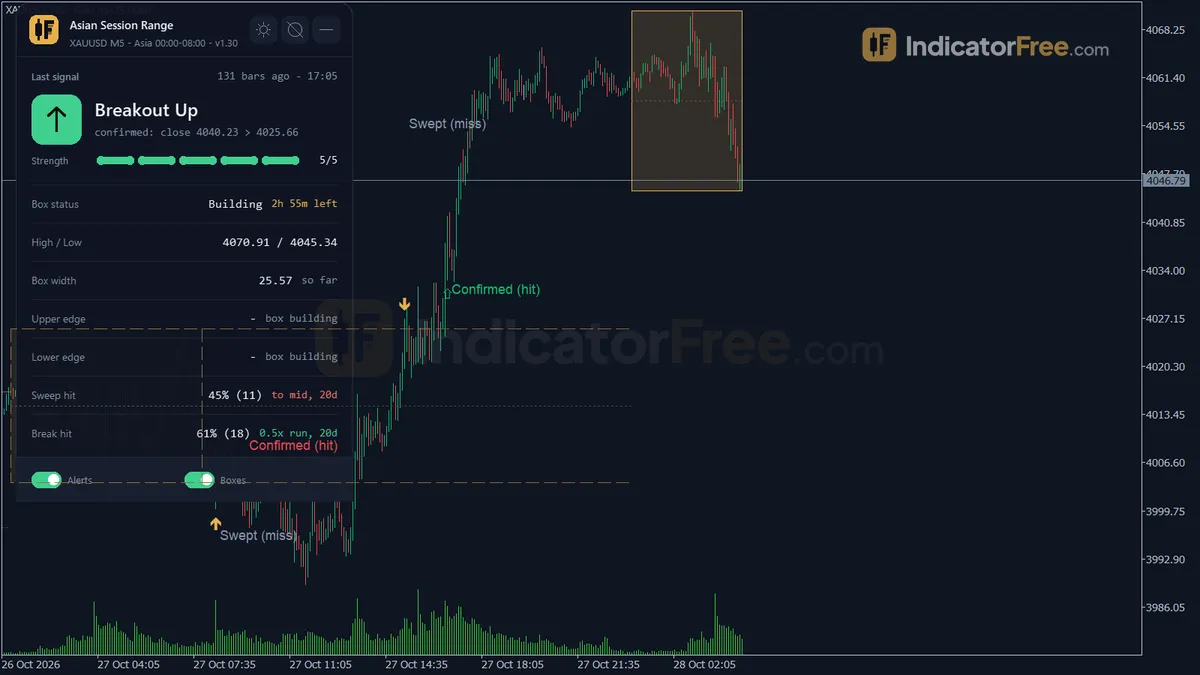
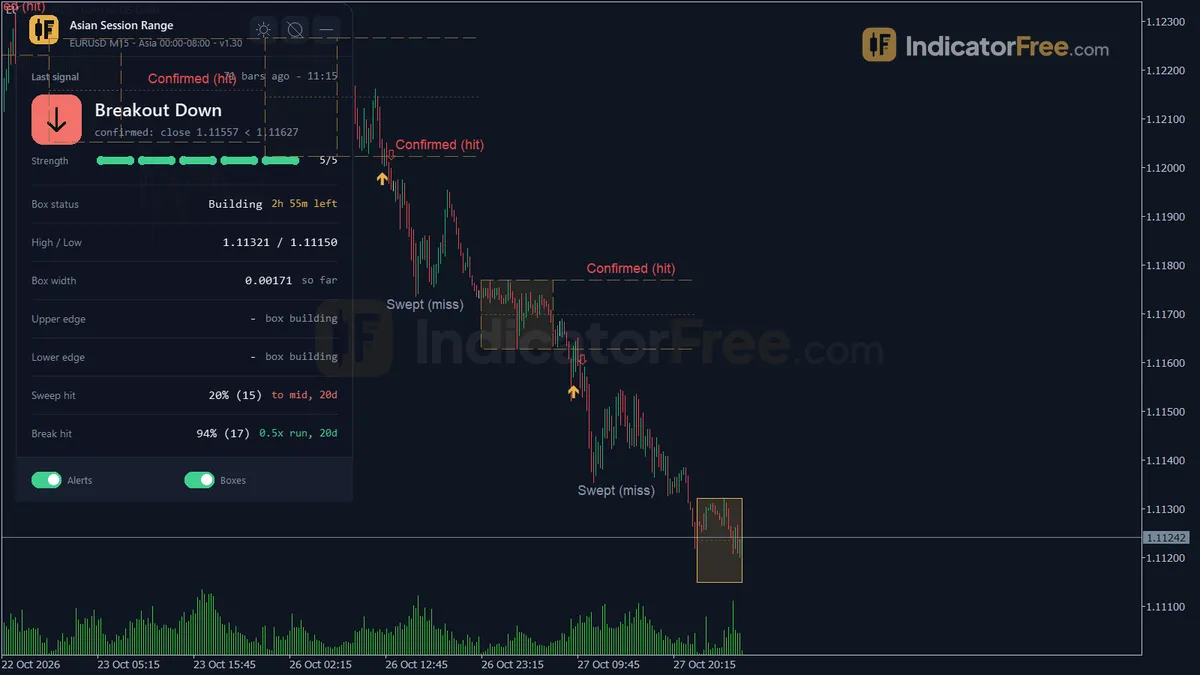
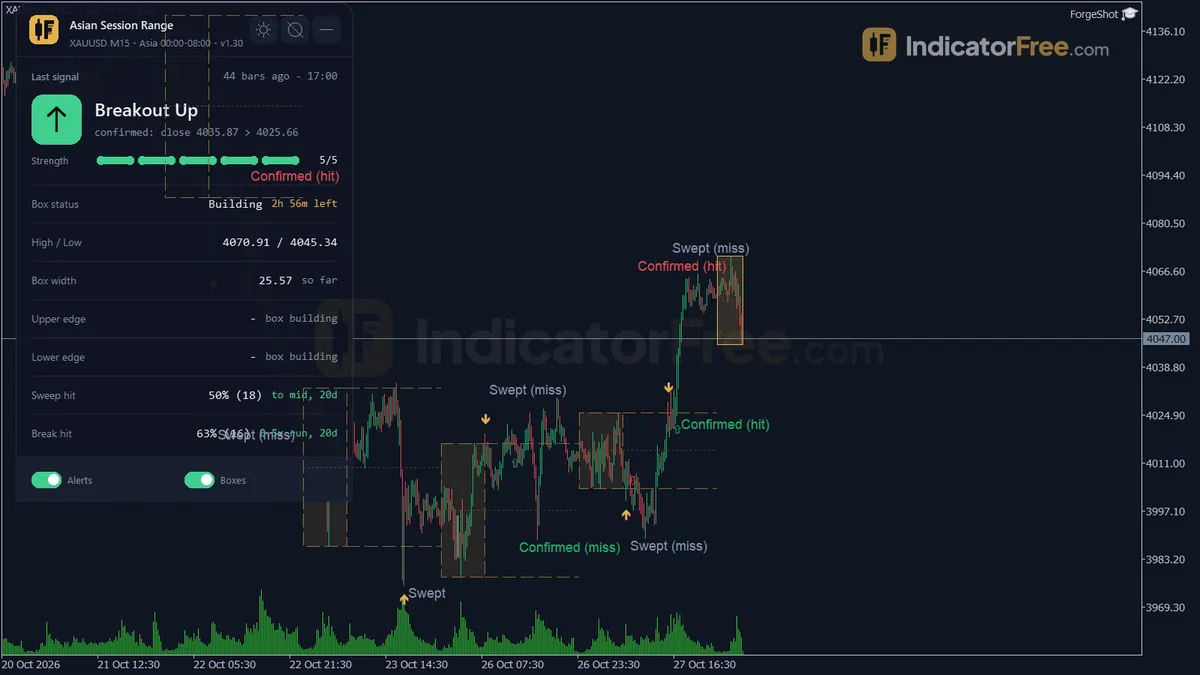
- Repainted
- 0 / 134
- Signals / week
- ≈ 10.2
- Tested on
- EURUSD M15
- Tested
- 2026-10-09
Overview
Asian Session Range is a free MT5 indicator that draws a box around each day's Asian session high and low on your price chart. It marks two kinds of event at the box edges: a sweep, where price pokes through an edge and closes back inside, and a confirmed breakout, where price stays outside. In the Lab's repaint test, 0 of 134 signals changed. It suits traders who plan the London morning around the night's range.
What it draws on your chart
The Asian session range is the high and low that price makes during the quiet hours before Europe opens. A push through one of those edges that quickly fails is often called a liquidity sweep. The indicator doesn't teach either idea. It measures them for you on closed bars.
On the main chart window (no subwindow) you get:
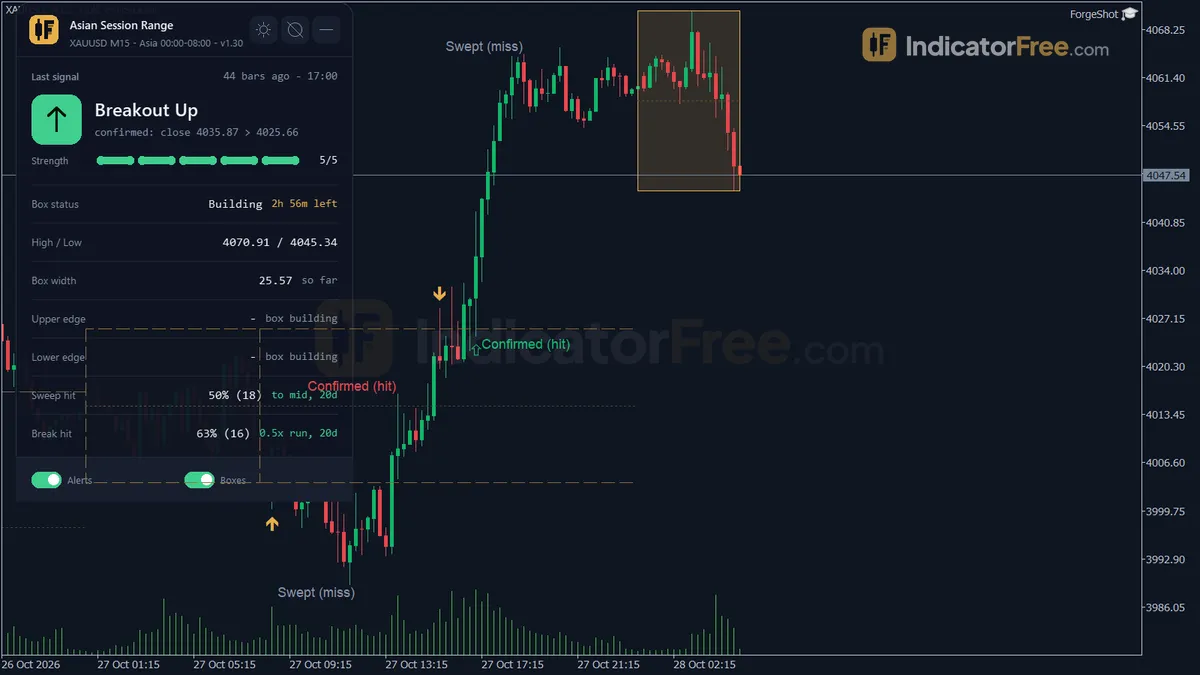
- Asian Range Box: a rectangle around the session high and low. It freezes when the session window ends.
- High/Low extensions: dashed lines at the box high and low and a dotted mid line. They run from the window end until the next Asian session starts, for 24 hours at most.
- Four arrows: Asian High Sweep, Asian Low Sweep, Breakout Up and Breakout Down.
- Tags: "Swept" or "Confirmed" next to each arrow. Later, "(hit)" or "(miss)" is added once closed bars decide the follow-through.
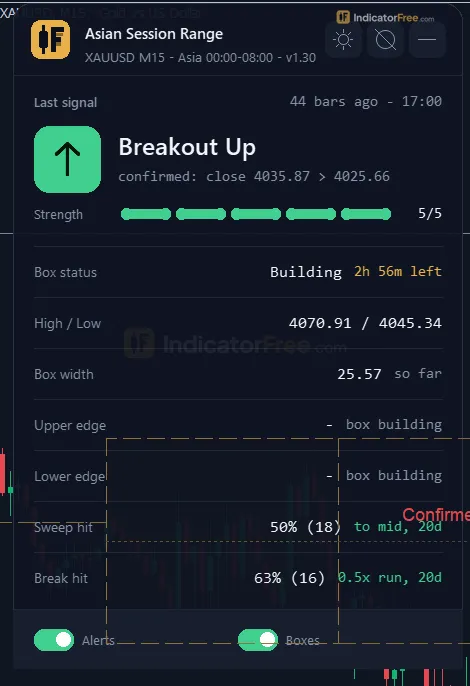
- Status panel: the box state, edge states and recent follow-through rates (explained in the next tab).
What the Lab measured and how
The Lab tested version 1.30 on MT5 build 6230 (tested 2026-10-09). The data was EURUSD M15 from 2026-07-09 to 2026-10-08, using Raw Trading Ltd real ticks. Every arrow was logged as it appeared and then checked again later. None of the 134 signals moved or disappeared, and the longest arrow delay was 0 bars. The box is built from closed bars only, so what you see live is what history shows.
For follow-through, the Lab checked whether price moved 1 ATR (Average True Range, the average bar size) in the arrow's direction before it moved 1 ATR against it. Across all signals the result was 43.3%, which is below a coin flip. Every signal reached one side or the other within 20 bars, so no trade was left undecided. The median time to the 1 ATR touch was 2 bars, which is 30 minutes on M15. On that test the tool fired about 10.2 times a week.
The chart below splits the result by arrow type:
What this means for you: Breakout Down is the only arrow that beat a coin flip, and only on 44 signals. Asian Low Sweep was the weakest. Each group holds just 26 to 44 signals from one pair, one timeframe and one quarter, so treat these as directions to check, not fixed odds.
Who it helps
It helps intraday traders who want the Asian high and low drawn the same way every day. It also helps if you need a rule-based answer to "was that a fake-out or a real break?" instead of judging it by eye.
How it works
- 1Tracks the high and low of every bar inside the chosen Asian session time window, one box per day.
Session High = max High, Session Low = min Low inside the windowInputs: AsianStartHour, AsianStartMinute, AsianEndHour, AsianEndMinute, MaxDaysShown - 2At session end, freezes the box and compares its width with recent sessions to label it narrow, normal or wide.
Ratio = box width / average width of prior sessions | Narrow < NarrowThreshold, Wide > WideThresholdInputs: StatsLookbackDays, NarrowThreshold, WideThreshold - 3After the session, a bar trading beyond a box edge by a buffer starts a possible sweep.
Breach if High > Session High + buffer | buffer = max(BreakoutBufferATRMult x ATR, BreachMinBoxFrac x width)Inputs: ATRPeriod, BreakoutBufferATRMult, BreachMinBoxFrac, TrackStartHour, TrackStartMinute - 4A close back inside the box is a sweep, staying outside through the confirm window is a confirmed breakout.
Sweep: Close back inside edge | Breakout: still outside after ConfirmWindowBars barsInputs: ConfirmWindowBars - 5Sets a target and invalidation per event, tracks hit or miss, and scales strength by how far price pushed past.
Strength = ceil(excess / (0.25 x ATR)), limited to 1 to 5 | sweep target = box midpoint
Specifications
- Platform
- MetaTrader 5
- Version
- 1.30
- Type
- Indicator
- Window
- Main chart
- Draws
- 4 arrows, 3 zones, 1 panel
- Alerts
- popup, push, sound
- Repaints
- No (0 of 134 signals changed)
- Inputs
- 24
- Tested on
- MT5 build 6230 · 2026-10-09
Repaint test
No repaint detected. In a 9 Jul 2026 – 8 Oct 2026 test on EURUSD M15 (Raw Trading Ltd real ticks), 134 signals were logged at bar close and re-read at the end of the test: 0 changed. Arrows print on the bar that closes the signal, with no delay.
IndicatorFree — tested 2026-10-09 · MT5 build 6230 · Raw Trading Ltd real ticks. Results come from historical data, not live trading, and do not guarantee future results.
Signal statistics
Over 9 Jul 2026 – 8 Oct 2026 on EURUSD M15, the indicator printed 134 arrows. After 43.3% of them, price moved 1×ATR(14) in the arrow's direction before moving 1×ATR against it (median 2 bars). 0% reached neither level within 20 bars.
This measures price movement after the arrow, not a trading result. It includes no spread, commission, stop loss or position sizing.
What it draws
- Arrows (Asian High Sweep) from buffer 0, drawn on the closed bar.
- Arrows (Asian Low Sweep) from buffer 1, drawn on the closed bar.
- Arrows (Breakout Up) from buffer 2, drawn on the closed bar.
- Arrows (Breakout Down) from buffer 3, drawn on the closed bar.
- Rectangles (Asian Range Box) drawn as chart objects, not buffers — they are not readable by iCustom() in an EA.
- Rectangles (Asian High/Low Extension) drawn as chart objects, not buffers — they are not readable by iCustom() in an EA.
- Rectangles (Sweep/Breakout Tags) drawn as chart objects, not buffers — they are not readable by iCustom() in an EA.
- An on-chart panel (Status); values shown in the panel are not exposed as buffers.
Inputs
| Input | Default | What it does |
|---|---|---|
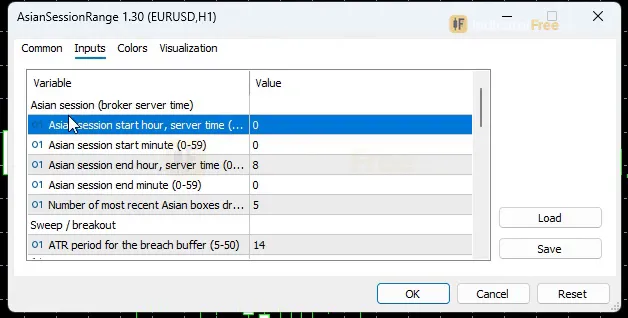
| AsianStartHour | 0 | Asian session start hour, server time (0-23) |
| AsianStartMinute | 0 | Asian session start minute (0-59) |
| AsianEndHour | 8 | Asian session end hour, server time (0-23); end at or before start = window crosses midnight |
| AsianEndMinute | 0 | Asian session end minute (0-59) |
| MaxDaysShown | 5 | Number of most recent Asian boxes drawn on the chart (1-30) |
| ATRPeriod | 14 | ATR period for the breach buffer (5-50) |
| BreakoutBufferATRMult | 0.1 | A breach needs price beyond the box edge by this many ATR (0.0-1.0) |
| BreachMinBoxFrac | 0.05 | Breach buffer floor as a fraction of the box width (0 = off, 0.0-0.25) |
| ConfirmWindowBars | 3 | Bars (breach bar included) to close back inside = Sweep, or stay outside = Confirmed (1-20) |
| TrackStartHour | -1 | Track breaches from this server hour (-1 = from the box end; set the London open for London-only events) |
| TrackStartMinute | 0 | Track start minute (0-59), used when TrackStartHour >= 0 |
| NarrowThreshold | 0.7 | Width / average width below this = Narrow (0.3-0.9) |
| WideThreshold | 1.4 | Width / average width above this = Wide (1.1-3.0) |
| StatsLookbackDays | 20 | Previous boxes used for the average width and the sweep / breakout share (5-60) |
| EnableAlertSweep | true | Alert when an edge is swept (breach, then close back inside) |
| EnableAlertBreakout | true | Alert when a breakout is confirmed |
| EnableAlertPopup | true | Show a popup alert |
| EnableAlertPush | false | Send a push notification to the MT5 mobile app |
| EnableAlertSound | false | Play a sound |
| SoundFile | alert.wav | Sound file played when EnableAlertSound is on |
| ShowDashboard | true | Show the status panel |
| PanelScale | 1 | Panel size multiplier (DPI is applied automatically) |
| Theme | Dark | Chart color theme |
| RestoreTheme | true | Restore the original chart colors when the indicator is removed |
How to read it
Install it in one step: put the 121 KB file in your MT5 MQL5/Indicators folder, refresh the Navigator and drag the indicator onto a chart.
How a breach becomes a Sweep or a Confirmed breakout
The indicator only looks for events after the box is frozen. By default it starts at the box end; with TrackStartHour you can start later. A breach needs a closed bar to go beyond the edge by a buffer. The buffer is the larger of BreakoutBufferATRMult x ATR and BreachMinBoxFrac x box width. The next few closes then decide what the breach was:
- 1Box freezesHigh and low fixed from closed bars at AsianEndHour:AsianEndMinute
- 2Tracking startsAt the box end, or at TrackStartHour if you set it
- 3Closed bar breaches an edgeBeyond the edge by the larger of BreakoutBufferATRMult x ATR and BreachMinBoxFrac x box width
- 4SweepThe breach bar or one of the next ConfirmWindowBars-1 bars closes back inside. Only the first sweep per edge per day counts
- 5Confirmed breakoutEvery close from the breach bar through the ConfirmWindowBars-th bar stays outside the edge
- 6Tag resolves(hit) or (miss) is added once later closed bars decide the follow-through
The chart below shows what a session with both events looks like:
The misread to avoid: a breakout arrow is already late
A Confirmed breakout needs ConfirmWindowBars closes outside the box. With the default of 3, the move is up to 3 bars old by the time the arrow can exist. That isn't repaint. It's the price of confirmation. Before you enter, look at how far price has already run from the edge.
The second misread is about one edge with two tags. A Breakout can follow an earlier Sweep of the same edge. If you faded a High Sweep and a Breakout Up then prints, the sweep idea has failed. Treat it as your exit, not as a new signal to ignore.
Reading the Status panel
The panel shows:
- the last sweep or confirmed breakout
- the box state and the time left in the session
- the box high and low
- the box width compared with its recent average, shown as Narrow, Normal or Wide
- the state of the upper and lower edges
- the follow-through hit rate of recent events
The panel scores events differently from the Lab:
- A sweep counts as a hit if price reaches the box mid before it goes 0.5 ATR beyond the sweep extreme.
- A breakout counts as a hit if price runs 0.5 x box width beyond the edge before a close back across the box mid.
These are not the Lab's 1 ATR numbers, so don't compare the two directly. The panel tells you how this box behaved on your symbol recently. The Lab tells you how it behaved on EURUSD M15 in one test.
The inputs to change first
AsianStartHour/AsianEndHour(default 0 and 8): these use your broker's server time, not your local time. Check this first. If the box doesn't cover the hours you mean, nothing else on the chart is reliable. An end time at or before the start time makes the window cross midnight.TrackStartHour(default -1, meaning from the box end): set it to the London open in server time if you only want London-session events.TrackStartMinutesets the minute.ConfirmWindowBars(default 3, range 1-20): a lower value gives faster arrows and more fake-outs labelled as breakouts. A higher value gives fewer and later breakouts and more sweeps.BreakoutBufferATRMult(default 0.1) andBreachMinBoxFrac(default 0.05, 0 = off): raise these to ignore 1-pip pokes through the edge. The box-width floor stops a tiny ATR from counting noise as a breach.NarrowThreshold/WideThreshold/StatsLookbackDays(0.7 / 1.4 / 20): these control the Narrow/Wide label and how many past boxes feed the panel's averages.MaxDaysShown(default 5, range 1-30): sets how many past boxes, with their lines and tags, stay on the chart.
Alerts
EnableAlertSweep and EnableAlertBreakout choose which events alert you. Both are on by default. Delivery options:
- a popup in MT5 (
EnableAlertPopup, on by default) - a push notification to the MT5 mobile app (
EnableAlertPush, off by default) - a sound (
EnableAlertSound, off by default, playingSoundFile)
Decision rules
These are reasoning-based rules. The Lab has not tested them.
- Sweep: treat it as a fade back toward the dotted mid line, the same target the panel scores sweeps against. Drop the idea if a Confirmed tag appears on the same edge.
- Asian Low Sweep: don't take it on its own. It was the weakest arrow in the Lab test, so require another reason, such as a higher-timeframe level, before acting.
- Confirmed breakout: take it only if price hasn't already run far beyond the edge. Skip it when the panel shows the box as Wide, because the day's range may already be spent.
Installation
- 1Download AsianSessionRange.ex5 from the button above (Google Drive).
- 2In MetaTrader 5: File → Open Data Folder → MQL5 → Indicators. Copy AsianSessionRange.ex5 there.
- 3Restart MT5 or right-click Indicators in Navigator → Refresh.
- 4Drag Asian Session Range onto a chart. For push alerts, enable "Allow push notifications" under Tools → Options → Notifications.
- Tested on MT5 build 6230.
Key terms and guides
- False breakout
- A false breakout is when price closes beyond a support, resistance or range edge, can't stay there, and closes back inside the range or back on the original side of the level, often followed by a move the other way.
- Range breakout
- A range breakout happens when price closes beyond the high or low of a sideways range, so a quiet market starts moving in one direction. Traders buy above the top or sell below the bottom.
- New York open
- The New York open is the start of the New York forex session. It is usually counted from 8:00 am New York time (13:00 UK time for most of the year), when US banks and funds start trading and volume rises.
- Trading session
- A trading session is the block of hours when one major financial centre (Asia, London or New York) is open and most of its traders are active.
- Session overlap
- A session overlap is the window when two major forex trading sessions are open at once, for example London and New York, roughly the New York morning. More banks and traders are active then, so volume and price movement usually rise.
- Session high
- A session high is the highest price reached during one trading session, such as the Asian, London or New York hours. Traders mark it as a level to watch for breakouts, stop runs and reversals.
- Guide: What Is Revenge Trading? Why It Happens and a Routine to Stop It
- Guide: Trading Journal: What to Record, a Free Template and a Review Routine
- Guide: What Is a Business Plan Template? A Beginner's Guide for Traders
More on this subject: Breakouts & sessions guide, terms and tools
User reviews
No reviews yet. Members who download the tool can review it here.
Sign in and download the tool to review it.
Build a checklist with it
Asian Session Range does one job on the chart: zone / level. Put it on the same chart as the tools below and the IndicatorFree panels merge into one checklist card, ordered trend, zone, signal, risk.
- Trend / contextEMA Trend WallAdds the trend side: which way the market leans before you act on Asian Session Range.
- Entry signalBox BreakoutAdds the entry signal: the moment to act once Asian Session Range has set the scene.
The Lab has not tested these combinations. Each tool is tested on its own; the card only lines up what each one says. Free members get 2 new tools a day. If one has to wait until tomorrow, install BlackBox to raise the limit to 5 a day (20 on a live account).
FAQ
Does Asian Session Range repaint?
No repaint detected. In a 9 Jul 2026 – 8 Oct 2026 test on EURUSD M15 (Raw Trading Ltd real ticks), 134 signals were logged at bar close and re-read at the end of the test: 0 changed. Arrows print on the bar that closes the signal, with no delay.
Can I use Asian Session Range in an EA?
Yes. Read buffer 0 (Asian High Sweep) with iCustom() on bar 1 — the last closed bar.
Why can’t my EA read the zones?
Zones and the panel are chart objects, not indicator buffers, so iCustom() does not return them.
How do I get alerts on my phone?
Enter your MetaQuotes ID under Tools → Options → Notifications, tick "Enable push notifications", and keep the push alert input on.
Does it work on other pairs?
Tested on EURUSD only; other symbols not tested.
How do I change the indicator's colours?
Use the `Theme` input (default Dark) to switch the chart colour theme. Leave `RestoreTheme` on and your original chart colours come back when you remove the indicator.
Why don't I see any arrows today?
Arrows only appear after the box is frozen and from `TrackStartHour` onward, and each edge gets at most one sweep per day. Also, a breakout needs `ConfirmWindowBars` closes outside the box before it shows. Check that your session hours match your broker's server time before you assume something is wrong.
Which timeframe should I use it on?
M15 is the only timeframe the Lab tested. The box is built from closed bars inside the session window, so pick a timeframe where several bars fit inside that window. Then scale `ConfirmWindowBars` so it covers a similar amount of time.
Can I get alerts on my phone?
Yes. Turn on `EnableAlertPush` and the indicator sends sweep and breakout alerts to the MT5 mobile app linked to your terminal.
Changelog
- 1.30New BreachMinBoxFrac input (default 0.05, 0 = off): the breach buffer is now the larger of BreakoutBufferATRMult x ATR and BreachMinBoxFrac x box width. · 2026-10-09
- 1.20New TrackStartHour / TrackStartMinute inputs: breaches are only tracked from this server time (default -1 = from the box end, same as before). · 2026-10-09
- 1.10Follow-through stats: every Sweep and Confirmed Breakout is now tracked on later closed bars until the box stops being tracked. · 2026-10-09
- 1.00Initial release: Asian session box built from closed bars in a configurable server-time window, freezing automatically at session end with no repaint. · 2026-10-09
Final verdict
Verdict: a clean, non-repainting range map, not a signal system
The tool's real strength is reliability. The box freezes on closed bars, arrows don't move, and the Sweep/Confirmed logic replaces guesswork with a fixed rule. The Status panel adds context most session boxes lack: how wide today's box is compared with recent ones, and how recent events followed through on your own symbol.
As an entry trigger it is weak on its own. Overall follow-through was below half, and only Breakout Down cleared it in the Lab test. Use the arrows to tell you where to look and what kind of move is happening. Make the entry decision with your own structure or trend read.
Limits and who should skip it
- Only one pair and timeframe were tested: EURUSD M15 over one quarter. Results on gold, indices or other timeframes are unknown.
- The session window is fixed in server time. If your broker's clock shifts for daylight saving, check that the box still covers the hours you mean.
- Only the first sweep of each edge per day gets an arrow. Later probes of the same edge are not marked as sweeps.
- It has no trend or higher-timeframe filter. It judges the box edges and nothing else.
- Skip it if you need instant entries at the edge, if you don't know your broker's server time, or if you want a tool that tells you what to trade on its own.
Settings to start with
On EURUSD M15, start with the defaults. They are the exact set the Lab tested. Set the session hours to your broker's server clock, and set TrackStartHour to the London open if you only trade London.
On M5, try ConfirmWindowBars 9. Nine 5-minute bars cover the same 45 minutes as the default 3 bars on M15. This is not tested by the Lab, so compare it with the default on your own chart.
If noisy pairs give you breaches of a pip or two, try BreachMinBoxFrac 0.1 (range 0.0-0.25). This is also not tested by the Lab.
An idea to pair with it
Asian Session Range tells you that a breakout was confirmed, but not how strong it was. Breakout Confirmation scores breakouts on strength, volume and follow-through, so you could use it as a second opinion on a Breakout arrow. This is an idea to try. The Lab has not tested the pair.