Inside Bar Fakeout
Free Inside Bar Fakeout indicator MT5: boxes mother bars and arrows failed breakouts. Lab: 0 of 303 signals repainted on EURUSD M15.
- Repainted
- 0 / 303
- Signals / week
- ≈ 23.8
- Tested on
- EURUSD M15
- Tested
- 2026-10-05
Overview
The Inside Bar Fakeout indicator for MT5 boxes each inside bar setup whose mother bar is at least 0.3 ATR (default) on your main chart. It waits for a closed bar to break out of the box, then draws an arrow if the breakout fails: a light arrow for a FALSE breakout and a strong arrow for a full REVERSAL. In the Lab's repaint test, 0 of 303 signals changed after they appeared. It suits price-action traders who trade against failed breakouts and want each trap measured instead of judged by eye.
What it draws on your chart
An inside bar is a bar whose whole range sits inside the bar before it, which is called the mother bar. The glossary covers the pattern in full. This tool adds the following to the price chart (it does not open a subwindow):
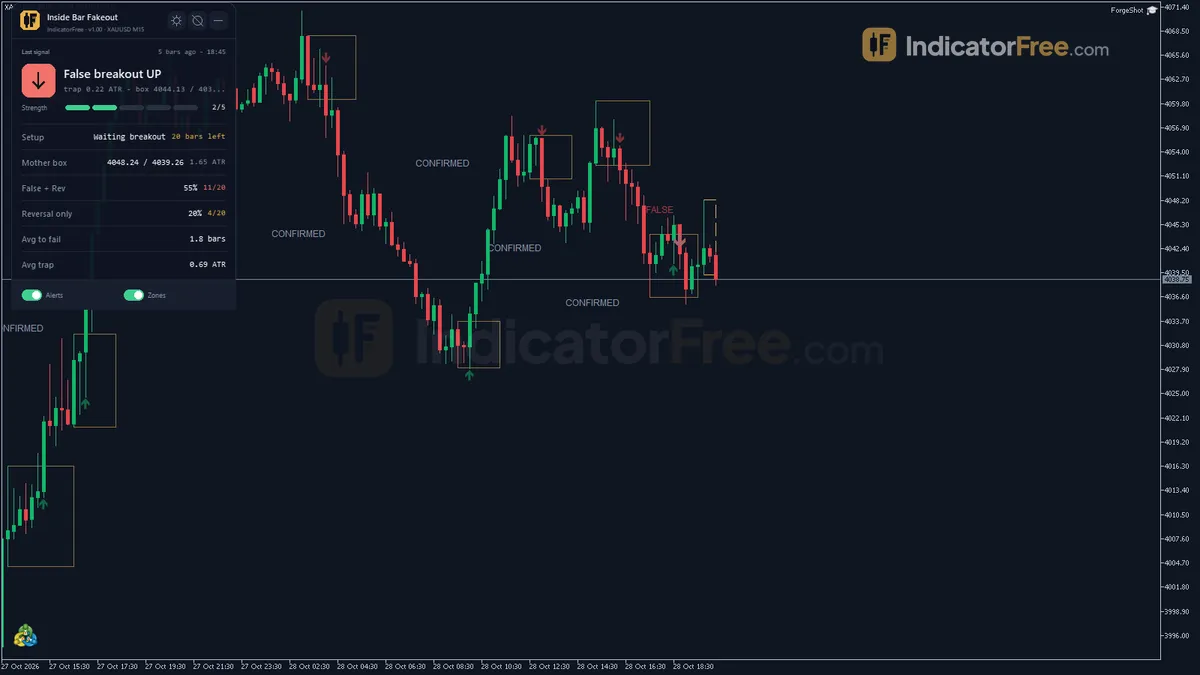
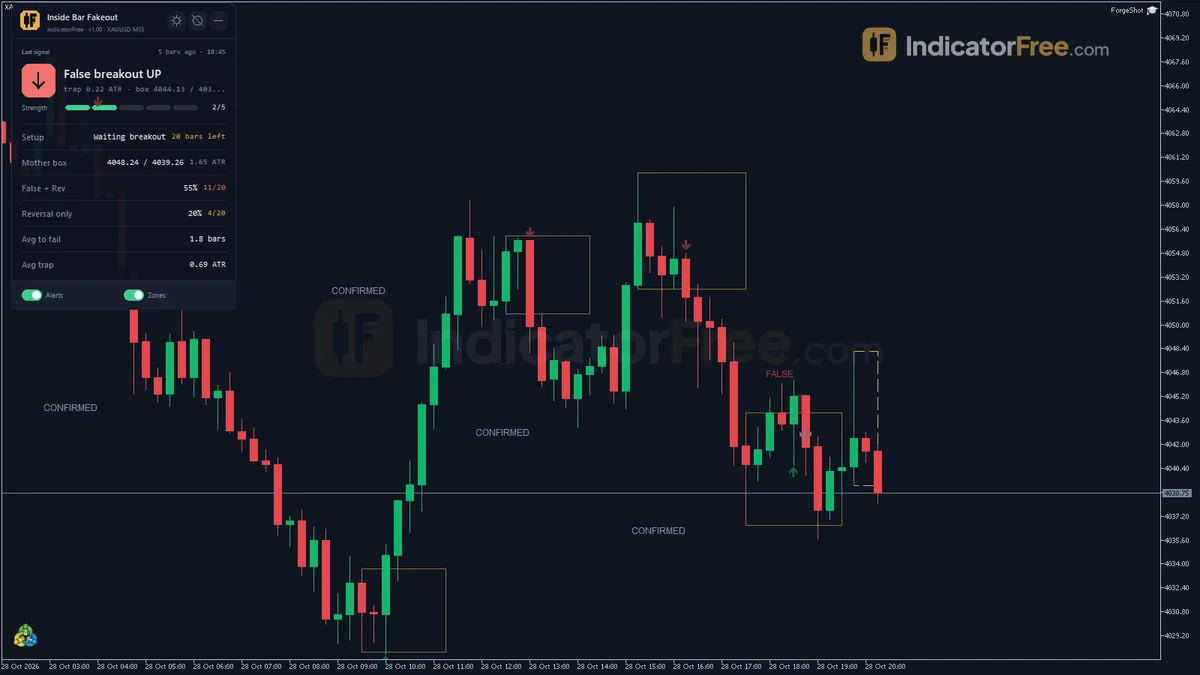
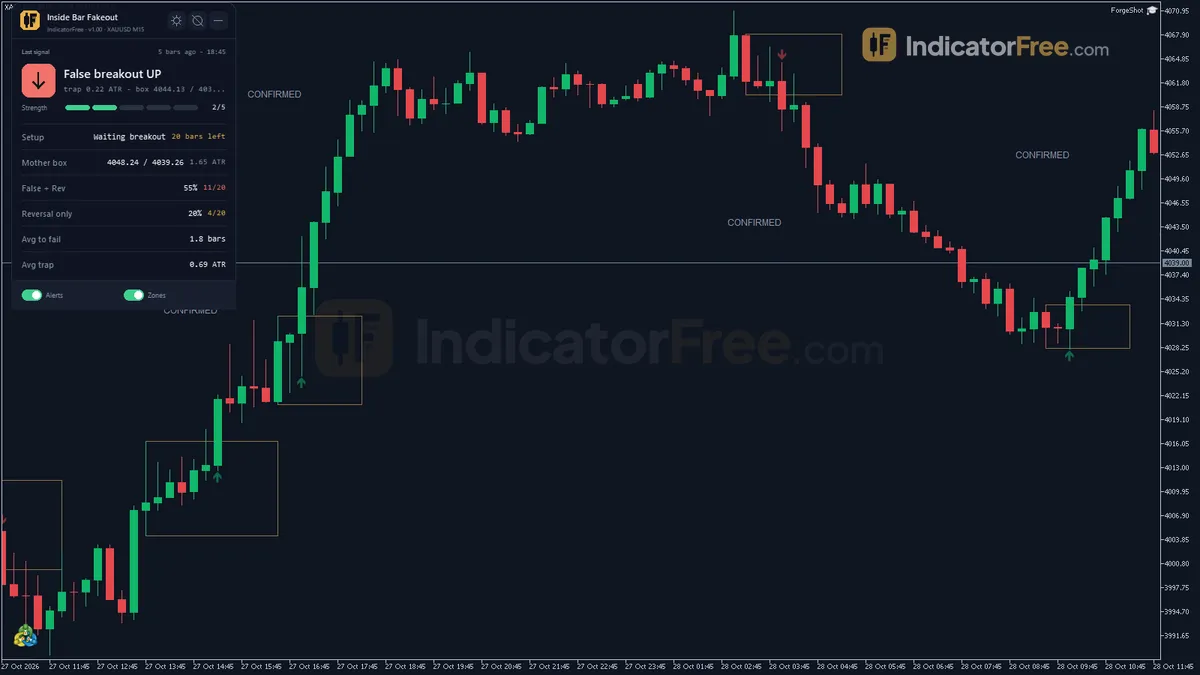
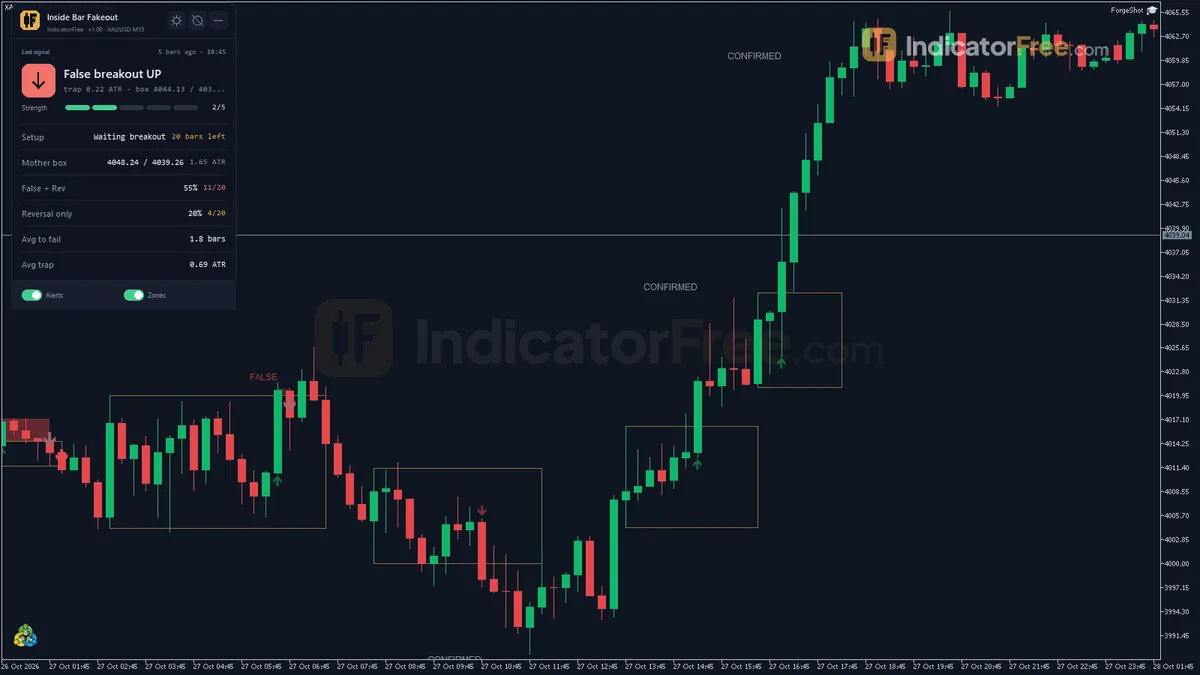
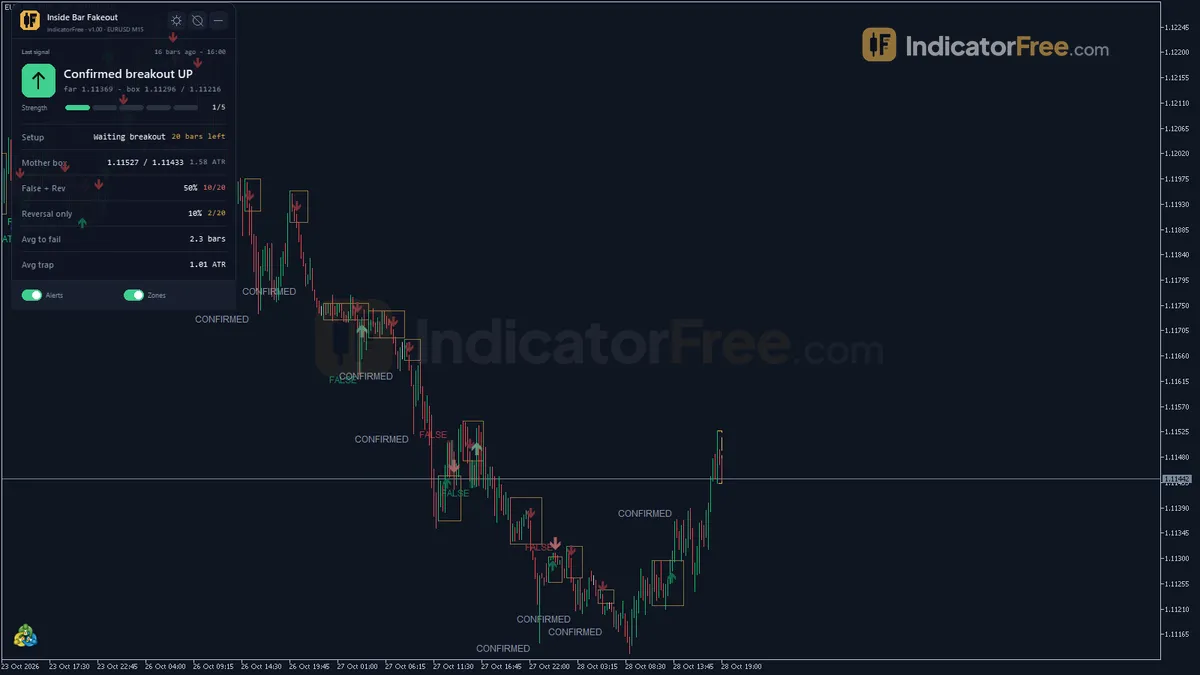
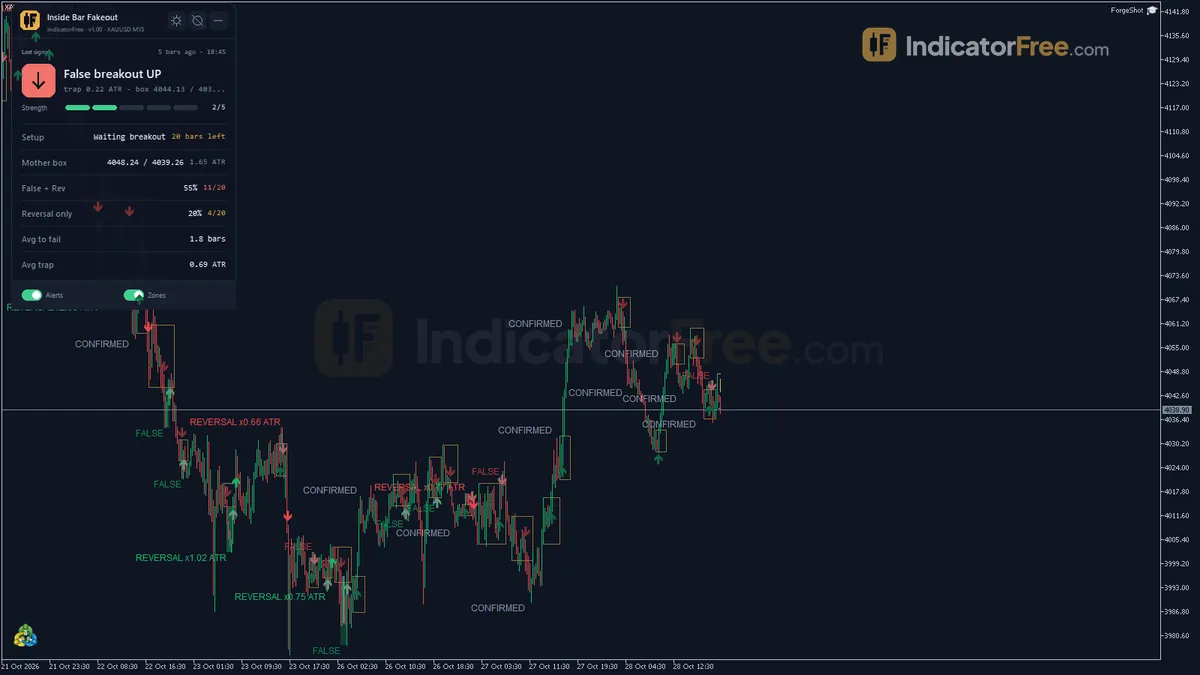
- Mother Box: a rectangle around the mother bar. It is dashed while the setup waits for a breakout and turns solid once a breakout happens.
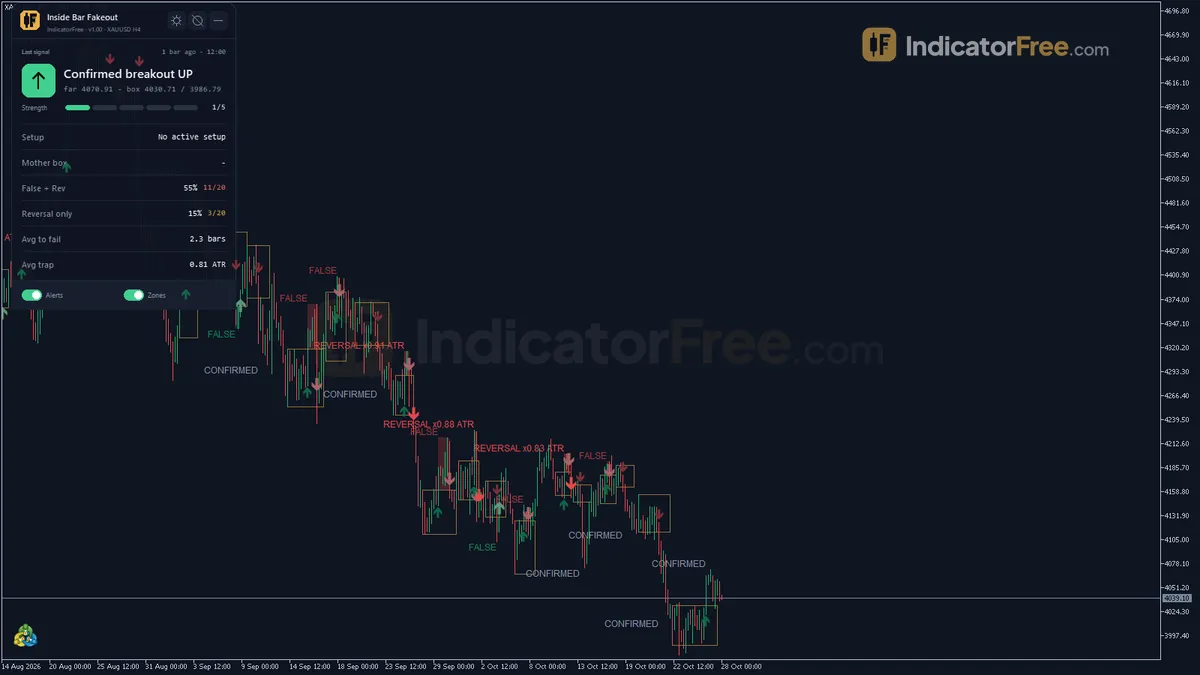
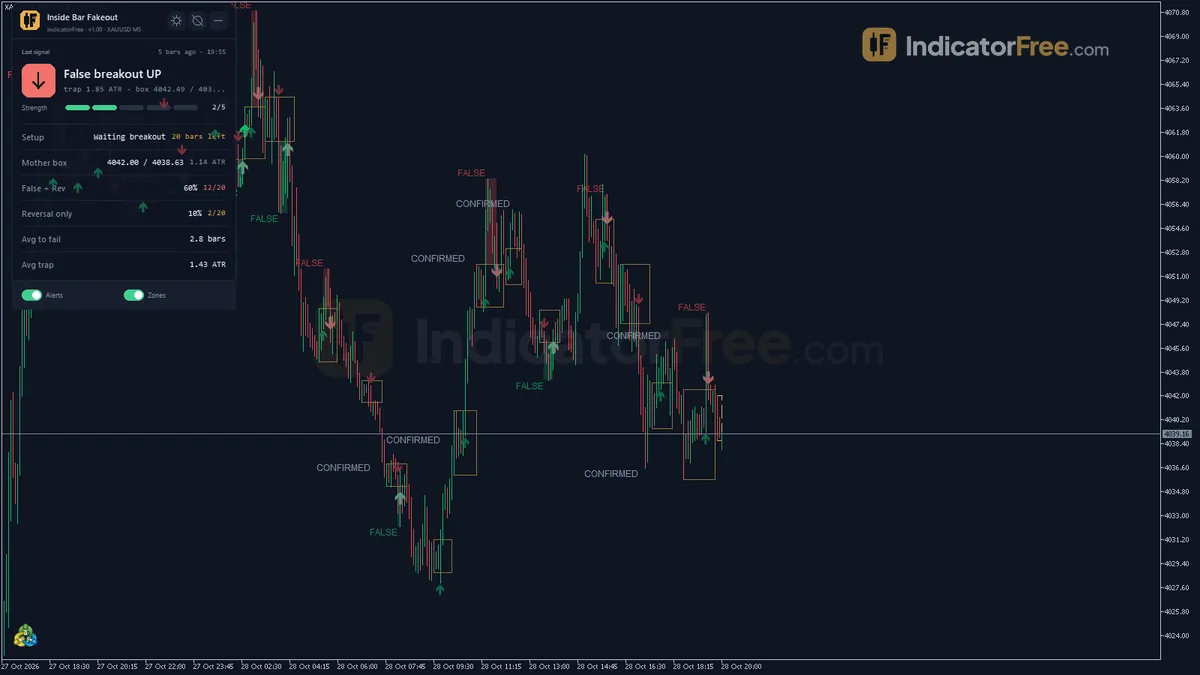
- Breakout Marks: an arrow on the breakout bar plus a text label that reads BREAKOUT, FALSE, REVERSAL x ATR or CONFIRMED, so you can see how each setup ended.
- Trap Zone: a filled box from the broken mother level to the farthest price the breakout reached. It is drawn only when a breakout is classified FALSE or REVERSAL. Its height shows how far the trapped traders were pulled in.
- Bullish Fakeout / Bearish Fakeout arrows: the actual signals, explained step by step in the How it works tab.
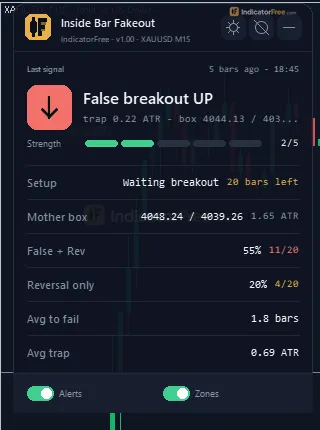
- Setup Stats panel: the last signal, the current setup status, the mother box high and low, and statistics on recent setups.
How the Lab tested it
The Lab ran version 1.00 on MT5 build 6230 (tested 2026-10-05) on EURUSD M15 from 2026-07-06 to 2026-10-02, using Raw Trading Ltd real ticks. For the repaint test, every arrow was logged the moment it fired and then compared with the finished chart. Besides the repaint result in the opening, the maximum arrow delay was 0 bars. Each arrow appears on the closed bar that completes its condition, not later, and it does not move afterwards.
What the Lab numbers mean for you
45.9% of all signals moved 1 ATR in the arrow's direction before moving 1 ATR against it. That is slightly worse than a coin flip, so the arrow is not an entry on its own. Treat it as a trigger that you filter. The bearish arrows did better than the bullish ones in this sample:
Scale zoomed in to show the difference (bars do not start at zero).
- Median of 2 bars to the 1 ATR hit: signals resolve fast. On M15 you usually know within about half an hour whether the trade is working.
- 2.3% reached neither side within 20 bars: almost every signal produces a full 1 ATR move one way or the other. Where you put your stop decides the outcome more than patience does.
- 23.8 signals per week: on M15 this is a busy tool. You will need to filter it rather than take every arrow.
The Lab's statistics count light FALSE arrows and strong REVERSAL arrows together. The facts do not include a separate result for each tier.
How it works
- 1Finds an inside bar within the previous mother bar, which must be at least a fraction of ATR.
Mother range >= MinMotherRangeATR x ATRInputs: ATRPeriod, MinMotherRangeATR - 2The setup waits for a close beyond the mother high or low by a small ATR buffer, else expires.
Break: Close > Mother high + BreakoutBufferATRMult x ATRInputs: BreakoutBufferATRMult, SetupExpiryBars - 3A close back inside the mother range within the window is a false breakout. Otherwise the breakout is confirmed.Inputs: ConfirmWindow
- 4After a false breakout, a close beyond the opposite mother edge within a few bars gives a reversal signal.Inputs: ReversalExtraBars, UseTrendFilter, EMAPeriod
- 5Tracks trap depth in ATR and a hit-rate over the most recent setups.
Depth = abs(extreme - mother edge) / ATRInputs: StatsLookbackSetups
Specifications
- Platform
- MetaTrader 5
- Version
- 1.00
- Type
- Indicator
- Window
- Main chart
- Draws
- 2 arrows, 3 zones, 1 panel
- Alerts
- popup, push, sound
- Repaints
- No (0 of 303 signals changed)
- Inputs
- 21
- Tested on
- MT5 build 6230 · 2026-10-05
Repaint test
No repaint detected. In a 6 Jul 2026 – 2 Oct 2026 test on EURUSD M15 (Raw Trading Ltd real ticks), 303 signals were logged at bar close and re-read at the end of the test: 0 changed. Arrows print on the bar that closes the signal, with no delay.
IndicatorFree — tested 2026-10-05 · MT5 build 6230 · Raw Trading Ltd real ticks. Results come from historical data, not live trading, and do not guarantee future results.
Signal statistics
Over 6 Jul 2026 – 2 Oct 2026 on EURUSD M15, the indicator printed 303 arrows. After 45.9% of them, price moved 1×ATR(14) in the arrow's direction before moving 1×ATR against it (median 2 bars). 2.3% reached neither level within 20 bars.
This measures price movement after the arrow, not a trading result. It includes no spread, commission, stop loss or position sizing.
What it draws
- Arrows (Bullish Fakeout) from buffer 0, drawn on the closed bar.
- Arrows (Bearish Fakeout) from buffer 2, drawn on the closed bar.
- Rectangles (Mother Box) drawn as chart objects, not buffers — they are not readable by iCustom() in an EA.
- Rectangles (Trap Zone) drawn as chart objects, not buffers — they are not readable by iCustom() in an EA.
- Rectangles (Breakout Marks) drawn as chart objects, not buffers — they are not readable by iCustom() in an EA.
- An on-chart panel (Setup Stats); values shown in the panel are not exposed as buffers.
Inputs
| Input | Default | What it does |
|---|---|---|
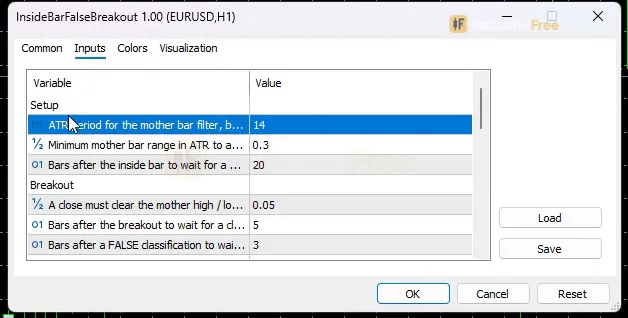
| ATRPeriod | 14 | ATR period for the mother bar filter, breakout buffer and trap depth (7-50) |
| MinMotherRangeATR | 0.3 | Minimum mother bar range in ATR to accept a setup (0.0-2.0) |
| SetupExpiryBars | 20 | Bars after the inside bar to wait for a breakout before the setup is dropped (5-100) |
| BreakoutBufferATRMult | 0.05 | A close must clear the mother high / low by more than this x ATR (0.0-0.5) |
| ConfirmWindow | 5 | Bars after the breakout to wait for a close back inside before it counts as confirmed (2-20) |
| ReversalExtraBars | 3 | Bars after a FALSE classification to wait for a close beyond the opposite side (1-10) |
| UseTrendFilter | false | Only accept REVERSAL signals in the direction of the EMA trend at the mother bar |
| EMAPeriod | 50 | EMA period of the trend filter (10-200) |
| StatsLookbackSetups | 20 | Last classified setups used for the panel statistics (5-50) |
| MaxHistoryBars | 1500 | Closed bars scanned back on load; older setups are removed (300-5000) |
| AlertOnBreakout | false | Alert when a mother bar breakout is detected (pending) |
| AlertOnFalseBreakout | true | Alert when a breakout is classified as FALSE |
| AlertOnReversal | true | Alert when a FALSE breakout is upgraded to REVERSAL |
| AlertOnConfirmed | false | Alert when a breakout is CONFIRMED |
| EnableAlertPopup | true | Use popup alerts in the terminal |
| EnableAlertPush | false | Use push notifications to the phone |
| EnableAlertSound | true | Play a sound |
| ShowDashboard | true | Show the status panel |
| PanelScale | 1 | Panel size multiplier (DPI is applied automatically) |
| Theme | Dark | Chart color theme |
| RestoreTheme | true | Restore the original chart colors when the indicator is removed |
How to read it
Install in one line
Copy the downloaded .ex5 file (160.4 KB) into the folder you reach via File > Open Data Folder > MQL5 > Indicators, refresh the Navigator and drag Inside Bar Fakeout onto a chart.
How one setup becomes a signal
- Setup: the indicator finds an inside bar inside the previous mother bar. The mother bar must be big enough:
Mother range >= MinMotherRangeATR x ATR(ATR length set byATRPeriod). The Mother Box appears dashed. - Breakout: a bar must close beyond the mother high or low by a small buffer, for example
Close > Mother high + BreakoutBufferATRMult x ATR. If no breakout happens withinSetupExpiryBarsbars after the inside bar, the setup is dropped. Once a breakout happens, the box turns solid and a BREAKOUT mark appears. This is not a signal yet. - FALSE or CONFIRMED: if a closed bar comes back inside the broken mother level within
ConfirmWindowbars, the breakout is FALSE and a light fakeout arrow appears, pointing against the breakout. If price stays out for the whole window, the breakout is marked CONFIRMED and no fakeout arrow is drawn. - REVERSAL upgrade: after a FALSE, if a closed bar closes beyond the opposite edge of the mother box within
ReversalExtraBarsbars, the signal is upgraded to REVERSAL and drawn in the strong color. - Trap depth: the Trap Zone and the panel record
Depth = abs(extreme - mother edge) / ATR, which is how far the failed breakout ran before it turned.
The chart below follows a bearish example from start to finish:
Reading the two arrows
- Bearish Fakeout: price broke above the mother high and failed. The arrow points down, against the breakout.
- Bullish Fakeout: price broke below the mother low and failed. The arrow points up.
- Light color = FALSE: the breakout came back inside the box. Strong color = REVERSAL: price then also closed through the far side of the box.
Common misread: taking the BREAKOUT mark as the signal. The breakout mark shows the move that traders may get trapped in. The fakeout arrow points the other way and only appears after the breakout fails. A CONFIRMED label means the breakout held, and a fakeout trade there would be the losing side.
The Setup Stats panel
The panel shows the last signal, the current setup status, the mother box high and low, and four statistics over the last StatsLookbackSetups classified setups: the false + reversal rate, the reversal-only rate, the average bars to failure and the average trap depth in ATR. Check it to see whether breakouts on this chart have recently been failing or holding.
Inputs to change first
| Input | Default | What changing it does |
|---|---|---|
ConfirmWindow | 5 | Shorter: only quick snap-backs count as FALSE, so you get fewer arrows. Longer: slow failures count too, so you get more arrows (range 2-20). |
ReversalExtraBars | 3 | How long a FALSE breakout has to turn into a REVERSAL (1-10). Raising it gives more strong arrows, but later ones. |
MinMotherRangeATR | 0.3 | Raise it to ignore small, noisy mother bars (0.0-2.0). |
BreakoutBufferATRMult | 0.05 | A bigger buffer ignores breakouts that only just poke out of the box (0.0-0.5). |
UseTrendFilter / EMAPeriod | false / 50 | When on, REVERSAL signals are only accepted in the direction of the EMA trend at the mother bar. It does not filter FALSE arrows. |
SetupExpiryBars | 20 | How long a box waits for a breakout before it is dropped (5-100). |
MaxHistoryBars | 1500 | How many closed bars are scanned on load. Older setups are removed (300-5000). |
Display inputs: ShowDashboard, PanelScale (DPI is applied automatically), Theme (default Dark) and RestoreTheme, which puts your original chart colors back when you remove the indicator.
Alerts
You can get alerts for four events: AlertOnBreakout (off), AlertOnFalseBreakout (on), AlertOnReversal (on) and AlertOnConfirmed (off). They are delivered as a terminal popup (EnableAlertPopup, on), a sound (EnableAlertSound, on) or a push notification to your phone (EnableAlertPush, off). With the defaults, you hear about failed breakouts and reversals only.
A decision rule
Take a fakeout arrow only if all three of these hold:
- The x ATR trap depth on the label is at least a minimum you choose.
- The panel's false + reversal rate is above 50% over the last
StatsLookbackSetupssetups. - Your stop goes beyond the far edge of the Trap Zone.
The minimum depth and the 50% cut-off are your own choices. The Lab has not tested this rule, its cut-offs or the two tiers; treat it as a starting filter to check on your own chart.
Skip the arrow when the panel's false + reversal rate is below 50%, because breakouts on this chart are holding.
Installation
- 1Download InsideBarFalseBreakout.ex5 from the button above (Google Drive).
- 2In MetaTrader 5: File → Open Data Folder → MQL5 → Indicators. Copy InsideBarFalseBreakout.ex5 there.
- 3Restart MT5 or right-click Indicators in Navigator → Refresh.
- 4Drag Inside Bar Fakeout onto a chart. For push alerts, enable "Allow push notifications" under Tools → Options → Notifications.
- Tested on MT5 build 6230.
Key terms and guides
- Trade setup
- A trade setup is the full set of conditions that must be in place before you enter a trade: the market context, a price area, an entry trigger, a stop-loss level and a target, all decided in advance.
- ATR period
- The ATR period is the number of candles the Average True Range averages. A short period reacts fast to new volatility; a long period gives a smoother, slower reading.
- Average True Range
- Average True Range (ATR) is a volatility indicator that shows how far price typically moves per candle, gaps included, averaged over a set number of candles. It measures the size of moves, not their direction.
- Indicator buffer
- An indicator buffer is the list of numbers an indicator stores, one value per candle, for each line, histogram or arrow it draws. Expert Advisors and alerts read these buffers to get the indicator's values.
- False breakout
- A false breakout is when price closes beyond support, resistance or a range edge, fails to hold there, and closes back on the original side, often followed by a move the other way.
- Every tick based on real ticks
- Every tick based on real ticks is the MT5 Strategy Tester mode that replays the actual bid and ask ticks your broker recorded, with the real changing spread, instead of ticks the tester invents from 1-minute bars.
- Guide: What Is a Fair Value Gap in Forex? How to Spot and Trade One
- Guide: How to Read Candlestick Charts: Bodies, Wicks and Shapes Explained
More on this subject: Price action & SMC guide, terms and tools
User reviews
No reviews yet. Members who download the tool can review it here.
Sign in and download the tool to review it.
Build a checklist with it
Inside Bar Fakeout does one job on the chart: entry signal. Put it on the same chart as the tools below and the IndicatorFree panels merge into one checklist card, ordered trend, zone, signal, risk.
- Trend / contextEMA Lead GaugeInside Bar Fakeout tells you when; this tells you which way the market leans, so you can skip signals against it.
- Zone / levelDemand Zone FinderShows the zones and levels, so you can see whether a signal from Inside Bar Fakeout fires at a level worth trading.
The Lab has not tested these combinations. Each tool is tested on its own; the card only lines up what each one says. Free members get 2 new tools a day. If one has to wait until tomorrow, install BlackBox to raise the limit to 5 a day (20 on a live account).
FAQ
Does Inside Bar Fakeout repaint?
No repaint detected. In a 6 Jul 2026 – 2 Oct 2026 test on EURUSD M15 (Raw Trading Ltd real ticks), 303 signals were logged at bar close and re-read at the end of the test: 0 changed. Arrows print on the bar that closes the signal, with no delay.
Can I use Inside Bar Fakeout in an EA?
Yes. Read buffer 0 (Bullish Fakeout) with iCustom() on bar 1 — the last closed bar.
Why can’t my EA read the zones?
Zones and the panel are chart objects, not indicator buffers, so iCustom() does not return them.
How do I get alerts on my phone?
Enter your MetaQuotes ID under Tools → Options → Notifications, tick "Enable push notifications", and keep the push alert input on.
Does it work on other pairs?
Tested on EURUSD only; other symbols not tested.
Which timeframe should I use the Inside Bar Fakeout indicator on?
The Lab's numbers come from M15 only. The tool runs on any timeframe, including H4 and M5 as the screenshots show, but signal results there were not measured. Test any other timeframe on your own chart first.
How do I get the alerts on my phone?
Enter your MetaQuotes ID in the MT5 notification settings, then set `EnableAlertPush` to true.
Does it work on pairs other than EURUSD?
It uses ATR for its filters and buffers, so it adapts to any symbol's volatility. On a new pair, check the panel's false + reversal rate to see whether fakeouts are common there before you trade the arrows.
Will it change my chart colors?
Yes, it applies the selected `Theme` (Dark by default). With `RestoreTheme` left on true, your original colors come back when you remove the indicator.
Changelog
- 1.00Initial release: mother bar / inside bar setup detection with an ATR-based minimum range filter, breakout detection, two-tier False/Reversal classification with ATR-normalized trap depth, optional EMA trend filter for. · 2026-10-09
Final verdict
Where it earns its place
The repaint result is the strongest point. The arrows are fixed on the closed bar that triggers them, so what you see in history is what you would have seen live, and you can trust your own back-scrolling. The two-tier FALSE/REVERSAL logic and the Trap Zone depth in ATR give you information a plain inside bar scanner does not: how badly a breakout failed, not just that it failed. The panel turns that into a running record for the chart you are on.
Where it falls short
- On its own, its edge is weak. Fewer than half the signals reached 1 ATR in their direction first, and the bullish side was the weaker of the two. You need a filter and your own stop logic.
- It fires a lot on M15. Taking every arrow means taking many coin-flip trades.
- The Lab measured EURUSD M15 only. Other pairs and timeframes may behave differently, and this page has no numbers for them.
- It does not set stops, targets or position size, and the trend filter only affects REVERSAL signals.
- –You already trade inside bar breakouts and want failures flagged
- –The panel shows breakouts on this chart are failing often
- –You size stops beyond the Trap Zone
- –You want arrows that stay put after the bar closes
- –You want a standalone buy/sell signal with no filtering
- –The panel shows breakouts on this chart keep printing CONFIRMED
- –You cannot handle many alerts a week on low timeframes
- –You need tested results for a pair or timeframe other than EURUSD M15
Settings to start with
Start on the defaults, which are the settings the Lab tested. Then try these one at a time. None of them were tested by the Lab, so compare each against the default before you rely on it:
UseTrendFilter= true withEMAPeriod50, to keep only REVERSAL arrows that agree with the trend.MinMotherRangeATR0.5 on M5 or M15, to drop small mother bars and cut the signal count.ConfirmWindow3, if you only want quick snap-backs. The trap is fresher, but you get fewer arrows.
An idea to pair it with
An idea the Lab has not tested: pair it with Liquidity Sweep to see whether the fakeout ran through a marked BSL/SSL level.